
1. Toradh thallview
The LB-link BL-MP01 is a compact and versatile 150 Mbps Wireless N Pocket Travel Router designed for easy internet access and sharing on the go. It supports multiple operating modes and features for convenient wireless connectivity.

Figear 1: Aghaidh view of the LB-link BL-MP01 Wireless N Router, showing the WPS/RESET button and indicator lights for WiFi, LAN, and Power.
Prìomh fheartan:
- Supports random selection of switching between Router, Client, and AP modes.
- WPS (Wi-Fi Protected Setup) support for one-key encryption, eliminating the need for manual password entry.
- Plug and Play functionality for easy wireless access and internet sharing.
- Built-in device for scanning wireless hotspots, remembering SSID names, and automatically bridging/relaying for convenient use.
- Equipped with RJ45 and USB ports for versatile connectivity.
2. Stiùirich rèiteachaidh
2.1 Cumhachd Tòiseachaidh Air adhart
- Connect the LB-link BL-MP01 to a power source using the provided USB cable.
- Fuirich gus an tionndaidh an solas comharra Cumhachd gu daingeann, a’ sealltainn gu bheil an inneal air a chumhachdachadh.
2.2 A’ ceangal ris an router
- Ceangal gun uèir: On your computer or mobile device, search for available Wi-Fi networks. Select the network name (SSID) broadcast by the BL-MP01 (e.g., "LB-link_XXXX"). Enter the default password if prompted (refer to the label on the device or packaging for default credentials).
- Ceangal Wired: Connect an Ethernet cable from the RJ45 port of the BL-MP01 to your computer's Ethernet port.
2.3 Basic Configuration (Router Mode)
- Fosgail a web brabhsair agus cuir a-steach an seòladh IP bunaiteach (me,
192.168.16.1) anns a’ bhàr seòlaidh. - Log in using the default username and password (e.g.,
admin/admin). - Follow the on-screen setup wizard to configure your internet connection type (e.g., PPPoE, Dynamic IP, Static IP).
- Set a new Wi-Fi network name (SSID) and a strong password for your wireless network.
3. Modhan obrachaidh
The BL-MP01 supports multiple operating modes to suit various networking needs:
- Modh Router: Connects to a modem (DSL/Cable) and creates a private wireless network for multiple devices.
- Modh Cliant: Allows a wired device (e.g., a desktop computer) to connect to an existing wireless network.
- Modh AP (Puing Ruigsinneachd): Transforms a wired network connection into a wireless hotspot, allowing wireless devices to connect.
To switch between modes, access the router's web management interface and navigate to the operating mode settings. Select the desired mode and save the changes. The device may restart to apply the new settings.
4. Gnìomhachd WPS
The Wi-Fi Protected Setup (WPS) feature allows for quick and secure connection to your wireless network without manually entering the password.
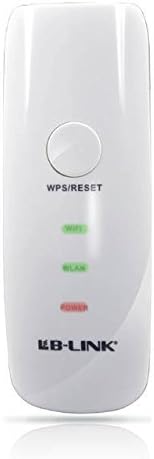
Figear 2: Dùin suas view of the LB-link BL-MP01 Wireless N Router, highlighting the WPS/RESET button at the top.
A’ cleachdadh WPS:
- Brùth an WPS / RESET button on the BL-MP01 for approximately 1-3 seconds. The Wi-Fi indicator light will start blinking.
- Within two minutes, activate the WPS function on your client device (e.g., laptop, smartphone). Refer to your client device's manual for specific instructions on activating WPS.
- The devices will automatically establish a secure connection. The Wi-Fi indicator light on the router will become solid when connected.
5. Wireless Hotspot Scanning and Bridging
The BL-MP01 features a built-in function to scan for available wireless hotspots, remember their SSID names, and automatically bridge or relay the connection. This is particularly useful for extending Wi-Fi coverage or connecting to public hotspots.
Steps for Hotspot Connection:
- Faigh cothrom air an router web eadar-aghaidh riaghlaidh.
- Seòl gu na