
Ro-ràdh
The Behringer NEKKST K8 is an ultra-linear 150-Watt reference-class studio monitor designed for accurate sound reproduction. It features an 8-inch woofer and a 1-inch silk dome tweeter, utilizing advanced waveguide technology for optimal acoustic dispersion and a wide 'sweet zone'. This monitor operates in a true bi-amping mode with two separate ampluchd-lughdachadh fuaim airson soilleireachd fuaim nas fheàrr.

Ìomhaigh: Aghaidh view of the Behringer NEKKST K8 Studio Monitor, showcasing the 8-inch woofer and 1-inch tweeter.
Stiùireadh sàbhailteachd cudromach
Please read and follow all safety instructions before operating the Behringer NEKKST K8 studio monitor. Retain these instructions for future reference.
- Cunnart bho clisgeadh dealain: Do not open the device. Refer all servicing to qualified service personnel.
- Na cuir a-mach an inneal seo gu uisge no taiseachd.
- Na cleachd an inneal seo faisg air uisge.
- Glan a-mhàin le clò tioram.
- Na cuir bacadh air fosglaidhean fionnarachaidh sam bith. Stàlaich a rèir stiùiridhean an neach-dèanamh.
- Na cuir a-steach faisg air stòran teas sam bith leithid rèididheatoran, clàran teas, stòbhaichean, no uidheam eile (a 'gabhail a-steach ampliifiers) a bheir teas.
- Dìon an sreang cumhachd bho bhith air a choiseachd air no air a phronnadh, gu sònraichte aig plugaichean, gabhadan goireasachd, agus an àite far am fàg iad bhon inneal.
- Na cleachd ach ceanglachan / goireasan a chaidh a shònrachadh leis an neach-dèanamh.
- Na cuir a-steach an inneal seo aig àm stoirmean dealanach no nuair nach eilear ga chleachdadh airson ùine mhòr.

Image: Safety and regulatory labels found on the Behringer NEKKST K8, indicating electrical warnings and compliance information.
Suidhich
A' dì-phapadh
Carefully unpack your NEKKST K8 monitor. Inspect the unit for any signs of damage that may have occurred during transit. Retain the original packaging for future transport or storage.
Ceanglaichean
The NEKKST K8 offers both balanced XLR and unbalanced RCA input options. Connect your audio source (e.g., audio interface, mixer) to the appropriate input on the rear panel of the monitor.
- Input XLR: For balanced audio signals, providing optimal noise rejection.
- Input RCA: For unbalanced audio signals, commonly used with consumer audio equipment.
Ensure the monitor is powered off before making any connections.
Placement and Room Compensation
Proper placement of your studio monitors is crucial for accurate sound reproduction. The NEKKST K8 features 'ROOM COMPENSATION' switches on the rear panel to help optimize its performance for your specific acoustic environment.
- Free Field: Use this setting when the monitor is placed away from walls and corners.
- Balla: Select this setting if the monitor is placed close to a wall.
- Oisean: Choose this setting if the monitor is placed in a corner, which typically results in increased bass response.
Experiment with these settings to achieve the most balanced sound in your listening space.
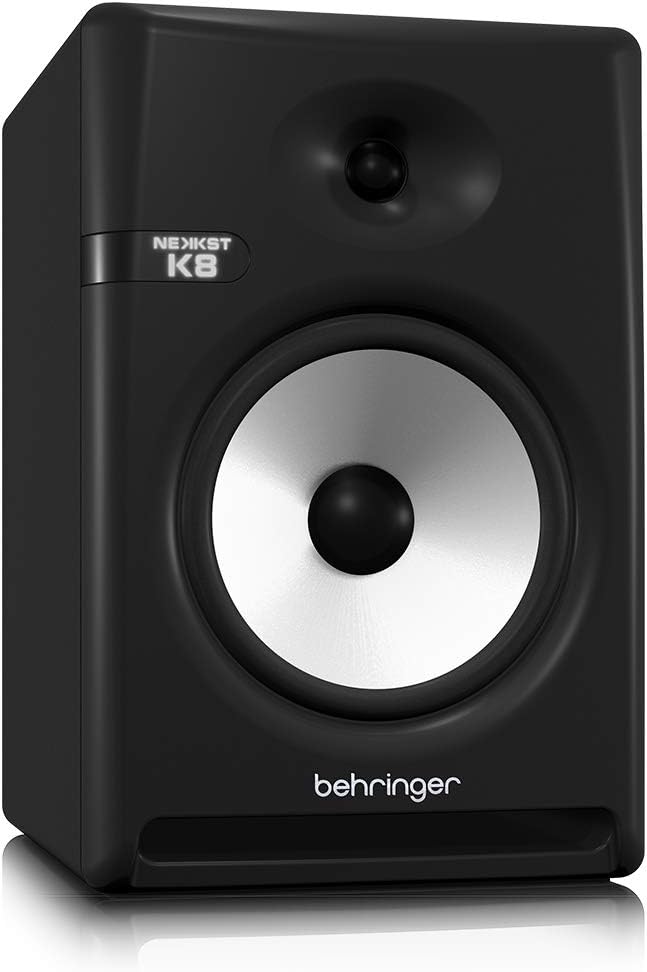
Image: Rear panel of the Behringer NEKKST K8, displaying XLR and RCA inputs, along with various control switches for room compensation and frequency adjustments.

Ìomhaigh: Mion-fhiosrachadh view of the NEKKST K8's rear control panel, highlighting the input trim, frequency adjustments, and room compensation switches.
Ceangal cumhachd
Connect the provided power cord to the AC IN socket on the rear panel and then to a suitable power outlet. Ensure the power switch is in the OFF position before connecting to power.
Obrachaidh
Cumhachd air / dheth
After all connections are made, switch the power button on the rear panel to the ON position. It is recommended to power on your monitors last and power them off first to prevent any pops or clicks through your speakers.
Input Trim Adjustment
The 'INPUT TRIM' knob on the rear panel allows you to adjust the input sensitivity of the monitor. Start with the knob at a lower setting and gradually increase it to achieve a comfortable listening level without distortion. This control helps match the output level of your audio source to the monitor's input.
Frequency Adjustments
The NEKKST K8 provides 'HIGH FREQUENCY' and 'LOW FREQUENCY' switches for fine-tuning the monitor's response to your listening environment and personal preference. These switches allow you to cut or boost specific frequency ranges.
- Tricead àrd: Adjusts the treble response. Options typically include flat, -2 dB, +2 dB.
- LOW FREQUENCY: Adjusts the bass response. Options typically include flat, -2 dB, -4 dB, -6 dB. This can be useful for compensating for room acoustics or when using a subwoofer.
Refer to the markings on the rear panel for specific dB adjustments.
Cumail suas
Glanadh
To clean the exterior of your NEKKST K8 monitor, use a soft, dry cloth. Do not use liquid cleaners, abrasive cleaners, or solvents, as these can damage the finish or internal components. Ensure the monitor is unplugged before cleaning.
Stòradh
If storing the monitor for an extended period, it is recommended to use the original packaging to protect it from dust and physical damage. Store in a cool, dry place away from direct sunlight and extreme temperatures.
Fuasgladh thrioblaidean
| Trioblaid | Adhbhar a dh’fhaodadh a bhith ann | Fuasgladh |
|---|---|---|
| Gun fhuaim |
|
|
| Fuaim air a mhilleadh |
|
|
| Hum no fuaim |
|
|
If the problem persists after trying these solutions, please contact Behringer customer support.
Sònrachaidhean
| Ainm Modail | K8 |
| Seòrsa neach-labhairt | Cumail sùil |
| Trast-thomhas woofer | 8 òirlich |
| Trast-thomhas an Tweeter | 1 òirlich |
| Neach-labhairt cumhachd toraidh as àirde | 150 watt |
| Dètage | 150 watt |
| Freagairt Tricead | 20000 Hz (Upper limit; full range typically wider) |
| Teicneòlas ceangail | RCA, XLR |
| Modh Toraidh Fuaim | Stereo |
| Stòr cumhachd | Electric Corded |
| Meudan toraidh | 13.4"D x 13.4"W x 18.8"H |
| Cuideam nì | 19.18 Punnd |
| Stuth | Plastic, Metal, Fabric |
| Dèanadair | Tribe Ciùil nan SA |
| UPC | 748252139344 |
Fiosrachadh Barantais
The Behringer NEKKST K8 Studio Monitor comes with a Limited Warranty. For detailed information regarding warranty terms, conditions, and registration, please refer to the official Behringer weblàrach-lìn no a’ chairt barantais a tha air a ghabhail a-steach leis an toradh agad.
Taic
For further assistance, technical support, or to download the latest drivers and software, please visit the official Behringer weblàrach-lìn no cuir fios chun roinn seirbheis teachdaiche aca.
Faodaidh tu cuideachd tadhal air an Bùth Behringer air Amazon airson fiosrachadh mu thoraidhean agus goireasan.