
Ro-ràdh
This manual provides essential information for the proper setup, operation, and maintenance of your Intermec CV31 Vehicle-Mount Computer. The CV31 is a robust, fixed-mount computer designed for demanding environments, including freezer forklift applications, featuring a heated display and 9-36V power input.
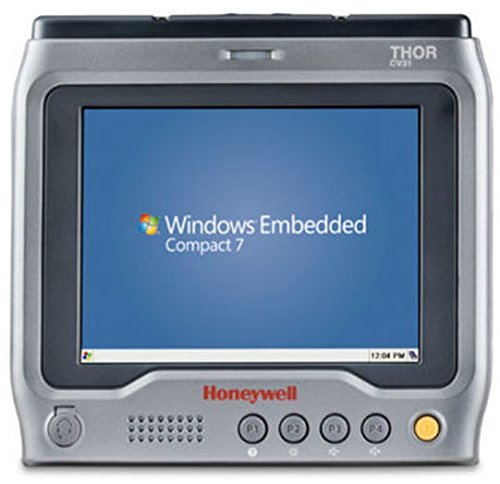
Dealbh 1: Aghaidh view of the Intermec CV31 Vehicle-Mount Computer. The screen displays "Windows Embedded Compact 7". Below the screen, the "Honeywell" logo is visible, along with a speaker grille, four programmable function buttons (P1-P4), and a power button.
Suidhich
- A' dì-phapadh: Carefully remove the CV31 computer and all accessories from the packaging. Verify that all components are present according to the packing list.
- Stàladh: Securely mount the CV31 to the desired vehicle or fixed location using appropriate mounting hardware (sold separately). Ensure the mounting location provides clear visibility and accessibility for the operator, while also protecting the device from excessive vibration or impact.
- Ceangal cumhachd: Connect the power cable to the CV31's power input port. The device operates on a 9-36V DC power supply. Ensure the power source meets these specifications and is properly fused. For freezer environments, ensure the heated power connection is secure.
- Ceanglaichean iomaill: Connect any necessary peripherals such as barcode scanners, keyboards, or external antennas to the appropriate ports. Refer to the peripheral's manual for specific connection instructions.
- Cumhachd tùsail air adhart: Press the power button to turn on the device. The system will boot up, displaying the Windows Embedded Compact 7 operating system.
Stiùireadh Obrachaidh
Obrachadh Bunaiteach
- Cumhachd air / dheth: Press the power button (typically located on the front panel) to turn the unit on. To turn off, press and hold the power button until the shutdown options appear, then select "Shut Down."
- Seòladh touchscreen: The CV31 features a resistive touchscreen. Use a finger or stylus to interact with the operating system and applications.
- Programmable Function Keys (P1-P4): The four programmable keys on the front panel can be configured for quick access to frequently used functions or applications. Refer to the system settings for customization options.
- Heated Display: The integrated heated display ensures optimal visibility and performance in cold environments, such as freezers. This feature activates automatically as needed.
Bathar-bog agus Iarrtasan
The CV31 runs on Windows Embedded Compact 7. Users can install and run compatible applications for data collection, inventory management, and other industrial tasks. Consult your IT department or system administrator for specific software deployment and usage guidelines.
Cumail suas
- Glanadh: Regularly clean the display and exterior casing le bog, damp cloth. Use a mild, non-abrasive cleaning solution if necessary. Avoid spraying liquids directly onto the device.
- Sgrùdadh càball: Periodically inspect all cables (power, peripheral) for signs of wear, damage, or loose connections. Replace damaged cables immediately to prevent operational issues.
- Ùrachaidhean bathar-bog: Keep the operating system and installed applications updated to ensure optimal performance and security. Consult your system administrator for update procedures.
- Beachdachaidhean Àrainneachdail: While designed for harsh environments, avoid exposing the CV31 to extreme temperatures outside its specified operating range or to direct water immersion.
Fuasgladh thrioblaidean
| Trioblaid | Adhbhar a dh’fhaodadh a bhith ann | Fuasgladh |
|---|---|---|
| Chan eil cumhachd aig an inneal. | No power, loose power cable, faulty power supply. |
|
| Chan eil an scrion-suathaidh a’ freagairt. | Calibration issue, software glitch, physical damage. |
|
| Applications are slow or freezing. | Too many applications running, low memory, outdated software. |
|
For issues not covered here, please consult your system administrator or Intermec technical support.
Sònrachaidhean
| Modail Àireamh | CV31A1HPACCP0000 |
| Brand | Eadar-mheadhonach |
| Seòrsa | Vehicle-Mount Computer, Fixed |
| Àrainneachd tagraidh | Freezer Forklift |
| Cuir a-steach cumhachd | 9-36V DC |
| Feartan | Heated Display, ICP License |
| Siostam-obrachaidh | Windows Embedded Compact 7 (as shown in image) |
| Meudan toraidh | 6.95 x 2.2 x 7.45 òirleach |
| Cuideam | 1 Punnd |
| Ri fhaighinn an toiseach | Dùbhlachd 17, 2015 |