
1. Ro-ràdh
The Intel NUC DE3815TYKHE is a compact, fanless mini PC designed for various applications, including thin clients, digital signage, and embedded solutions. This kit provides a flexible platform with support for a 2.5-inch storage drive, offering a customizable computing experience in a small form factor.
2. Pasgan-susbaint
Dèan cinnteach gu bheil a h-uile rud anns a’ phacaid agad:
- Intel NUC DE3815TYKHE Unit
- Adaptor Cumhachd AC
- VESA Mounting Bracket (with screws)
- Stiùireadh Tòiseachaidh Luath (ma tha e air a ghabhail a-steach)
3. Thar-chor corporraview
3.1 Pannal aghaidh
The front panel provides essential connectivity and controls.

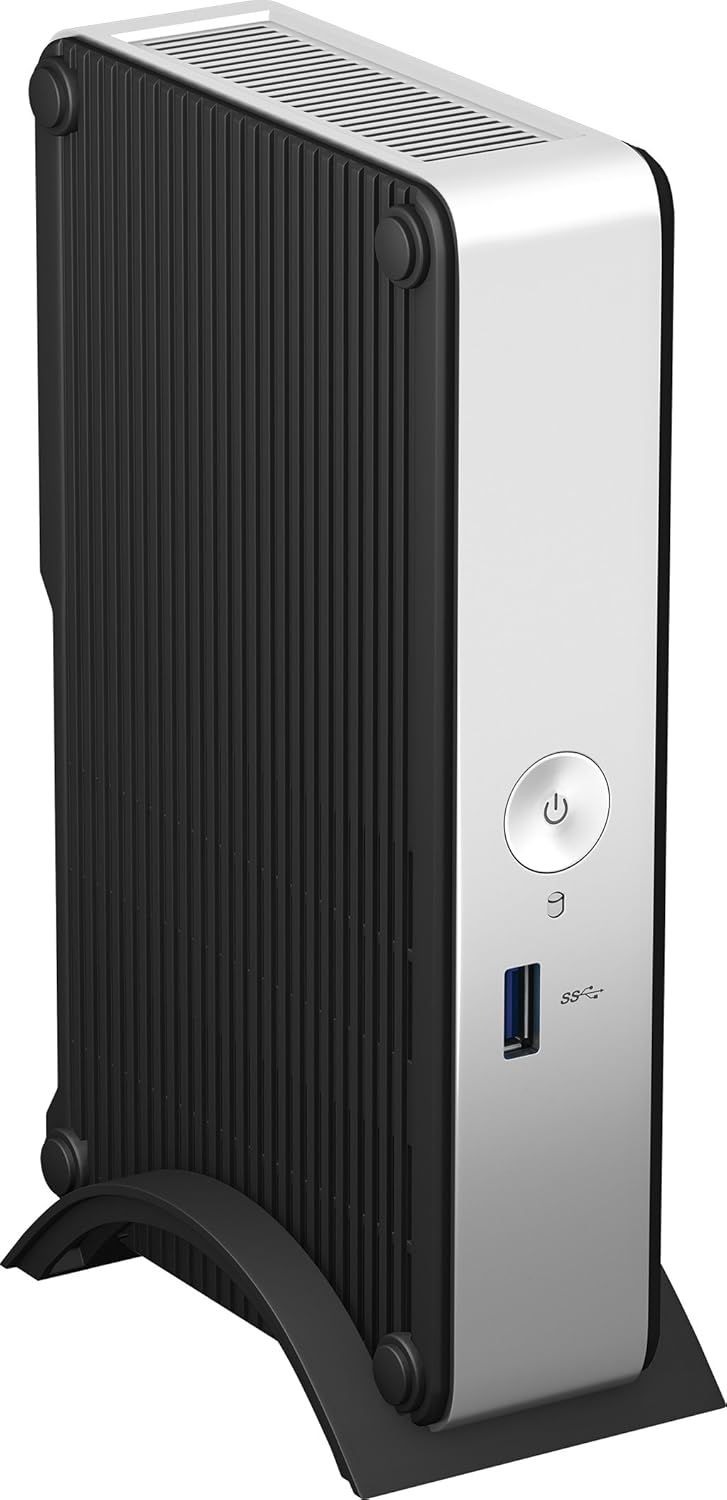
Dealbh 1: Aghaidh view of the Intel NUC DE3815TYKHE. This image displays the compact, fanless design of the unit, highlighting the power button and a single blue USB 3.0 port on the front for easy access.
- Putan Cumhachd: Air a chleachdadh gus an aonad a thionndadh air no dheth.
- Port USB 3.0: Airson innealan USB àrd-astar a cheangal.
3.2 Cùl Pannal
The rear panel houses various ports for display, network, and peripherals.

Dealbh 2: Cùl view of the Intel NUC DE3815TYKHE. This image details the available rear ports, including VGA, HDMI, two USB ports, an Ethernet port, and a headphone/microphone jack, along with the power input.
- Port VGA: For connecting to older monitors or projectors.
- Port HDMI: For connecting to modern displays with audio support.
- Puirt USB 2.0 (x2): Airson innealan USB àbhaisteach a cheangal.
- Port Ethernet (RJ-45): Airson ceangal lìonra uèirleas.
- Seac Fònaichean-cluaise/Maicreafòn: Airson cuir a-steach agus toradh claisneachd.
- Cur a-steach Cumhachd DC: Airson an inneal-atharrachaidh cumhachd AC a cheangal.
3.3 Pàirtean a-staigh
Accessing the internal components is necessary for memory and storage installation.
Dealbh 3: Intel NUC DE3815TYKHE unit displayed alongside its internal motherboard. This view illustrates the compact size of the main unit and the layout of the internal components, including the processor, memory slot, and connectors for storage.
- DDR3L SODIMM Slot: For installing system memory.
- 2.5-inch Drive Bay: For installing a SATA HDD or SSD.
- Antennas gun uèir: Built-in for wireless connectivity.
- eMMC Storage: 4GB embedded storage for operating system or data.
4. Suidhich
Follow these steps to prepare your Intel NUC for operation.
4.1 A’ stàladh Cuimhne (RAM)
- Unscrew and remove the bottom cover of the NUC unit.
- Locate the DDR3L SODIMM slot on the motherboard.
- Cuir an t-eag air a’ mhodúl SODIMM còmhla ris an eag san t-slot.
- Insert the module at a 45-degree angle and press down until the retaining clips snap into place.
4.2 Installing a 2.5-inch Storage Drive
- With the bottom cover removed, locate the 2.5-inch drive bay.
- Connect the SATA data and power cables from the NUC to your 2.5-inch HDD or SSD.
- Daingnich an draibh taobh a-staigh a’ bhàigh le bhith a’ cleachdadh nan sgriothan a tha air an toirt seachad (mas e iomchaidh).
- Replace the bottom cover and secure it with screws.
4.3 Ceangal iomaill
- Taisbeanadh: Connect your monitor to the HDMI or VGA port.
- Meur-chlàr agus luchag: Connect USB keyboard and mouse to any available USB ports.
- Lìonra: For wired internet, connect an Ethernet cable to the RJ-45 port. For wireless, ensure antennas are clear.
- Fuaim: Connect headphones or speakers to the audio jack if needed.
4.4 A’ cur cumhachd air adhart
- Connect the AC power adapter to the DC power input on the rear panel.
- Plug an adapter cumhachd a-steach do bhalla a-muigh.
- Press the power button on the front panel to turn on the NUC.
5. Stàladh Siostam-obrachaidh
The Intel NUC DE3815TYKHE supports multiple operating systems. You will need to install your preferred OS onto the internal eMMC storage or the 2.5-inch drive you installed.
- Prepare a bootable USB drive with your chosen operating system (e.g., Windows, Linux).
- Connect the USB drive to a USB port on the NUC.
- Power on the NUC and enter the BIOS/UEFI setup (usually by pressing F2 during boot) to configure the boot order.
- Lean an stiùireadh air-sgrìn gus an siostam obrachaidh a stàladh.
6. Cumail suas
The fanless design of the Intel NUC DE3815TYKHE minimizes maintenance requirements.
- Glanadh: Periodically wipe the exterior with a soft, dry cloth. Avoid using liquid cleaners directly on the unit.
- Fionnarachadh: Ensure the ventilation slots are not obstructed to allow for proper passive cooling.
- Ùrachaidhean bathar-bog: Cùm an siostam obrachaidh agus na draibhearan agad ùraichte airson an coileanadh agus an tèarainteachd as fheàrr.
7. A ’dèanamh trioblaid
Ma thachras tu ri duilgheadasan, thoir sùil air na ceumannan cumanta fuasgladh-cheistean a leanas.
- Gun chumhachd: Ensure the power adapter is securely connected to both the NUC and a working power outlet. Test the outlet with another device.
- Gun taisbeanadh: Verify that the monitor is powered on and correctly connected to the NUC's HDMI or VGA port. Try a different cable or monitor if possible.
- Siostam-obrachaidh gun a bhith a’ tòiseachadh: Check the boot order in the BIOS/UEFI settings. Ensure the installed storage drive is detected and contains a valid operating system.
- Innealan-iomaill gun lorg: Ensure USB devices are properly seated in the ports. Try a different USB port or device.
- Gun Cheangal Lìonra: For wired connections, check the Ethernet cable and router. For wireless, ensure Wi-Fi is enabled in the OS and the NUC is within range of a network.
8. Sònrachaidhean
| Feart | Mion-fhiosrachadh |
|---|---|
| Ainm Modail | DE3815TYKHE |
| Pròiseasar | Intel Atom Processor (e.g., E3815) |
| RAM | 4 GB DDR3L 1333 (SODIMM slot for expansion) |
| Stòradh a-staigh | 4GB eMMC (embedded MultiMediaCard) |
| Leudachadh stòraidh | Internal 2.5-inch SATA HDD/SSD bay |
| Grafaigean | Grafaigean Intel aonaichte |
| Toradh bhidio | hdmi, vga |
| Puirt USB | 1x USB 3.0 (aghaidh), 2x USB 2.0 (cùl) |
| Fuaim | Fòn-cluaise / microfòn combo Jack |
| Lìonra | Ethernet (RJ-45), Built-in Wireless Antennas |
| Dealbhadh | Gun fan |
| Taic siostam-obrachaidh | Multiple OS options (e.g., Windows, Linux) |
| Dath | Metallic gray plastic ring with black sides |
9. Barantas agus Taic
Airson fiosrachadh barantais agus taic theicnigeach, thoir sùil air làrach-lìn oifigeil Intel. weblàrach no cuir fios chun àite ceannach agad. Cùm dearbhadh do cheannach airson tagraidhean barantais.
- Taic air-loidhne: Tadhail Intel Support for DE3815TYKHE for drivers, downloads, and troubleshooting resources.
- Cuir fios gu: Refer to the Intel support page for contact options.