
Ro-ràdh
This manual provides detailed instructions for the setup, operation, and maintenance of your iBall Tarang F5 5.1 Speakers for PC. Please read this manual thoroughly before using the product to ensure proper functionality and to prevent damage.
Susbaint pacaid
Dearbhaich gu bheil na nithean gu lèir a tha air an liostadh gu h-ìosal an làthair sa phacaid agad:
- 1 x Aonad Fo-fhuaimeadair
- 5 x Satellite Speaker Units
- 1 x Smachd Iomallach
- Audio Connection Cables (RCA to 3.5mm, RCA to RCA)
- Leabhar-làimhe cleachdaiche (an sgrìobhainn seo)
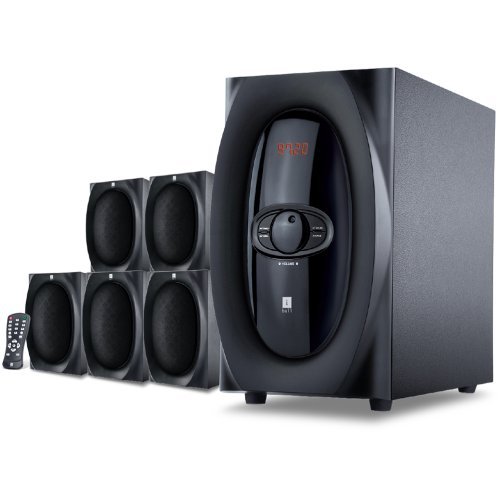
Ìomhaigh: Tharview of the iBall Tarang F5 5.1 Speaker System, showing the subwoofer and five satellite speakers.
Stiùiridhean rèiteachaidh
- Luchd-labhairt air an suidheachadh: Place the subwoofer on a stable surface, preferably on the floor. Arrange the five satellite speakers around your listening area for optimal 5.1 surround sound. Typically, one center speaker, two front left/right, and two rear left/right speakers.
- Connecting Satellite Speakers: Connect each satellite speaker to the corresponding output ports on the rear panel of the subwoofer unit. Ensure correct polarity (positive to positive, negative to negative) if applicable, or match color-coded connectors.
- Connecting Audio Source:
- For PC/MP3 Player (2.1Ch or 5.1Ch input): Use the provided audio cables to connect the audio output of your device to the "Audio Input" ports on the subwoofer. For 5.1 channel input, ensure your source device supports 5.1 output and connect all relevant channels (Front L/R, Rear L/R, Center/Sub). For 2.1 channel, connect to the stereo input.
- For USB/SD/MMC Card: Insert your USB drive or SD/MMC card into the designated slot on the front panel of the subwoofer.
- Ceangal cumhachd: Connect the power cord to the subwoofer unit and then plug it into a standard AC power outlet.
- Cumhachd air: Turn on the main power switch located on the rear or front panel of the subwoofer. The LED display should illuminate.

Image: Illustrative diagram of the subwoofer's rear panel, detailing connections for satellite speakers and various audio input sources.
Stiùireadh Obrachaidh
Front Panel Controls and Remote Control
The iBall Tarang F5 can be operated using the controls on the front panel of the subwoofer or via the included full-function remote control.
- Cumhachd air / dheth: Brùth an CUMHACHD button on the remote or the main power switch on the unit.
- Taghadh stòr a-steach: Brùth an IOMPACHADH button on the remote or front panel to cycle through available sources: 2.1Ch, 5.1Ch, USB, SD/MMC, FM Radio. The selected source will be displayed on the LED screen.
- Atharrachadh tomhas-lìonaidh: Cleachd an VOL+ agus VOL- buttons on the remote or the master volume knob on the front panel to adjust the overall volume.
- Atharrachadh Beus/Treble: Cleachd sònraichte BASS +/BAS- agus TREBLE +/TREBLE- buttons on the remote control to fine-tune audio output.
- Gnìomh mute: Brùth an Mute putan air an smachd iomallach gus an claisneachd a chur dheth airson greis. Brùth a-rithist gus a chur dheth.
USB/SD/MMC Playback
When a USB drive or SD/MMC card is inserted, the system will automatically switch to the USB/SD input mode and begin playing compatible audio files. Use the remote control for playback functions:
- Cluich / Stad: Brùth an CLÀR/stad putan.
- An ath cheum / an t-slighe roimhe: Cleachd an ATHAIR agus PREV putanan.
Gnìomh rèidio FM
Gus gnìomh rèidio FM a chleachdadh:
- Switch the input source to FM modh a’ cleachdadh an IOMPACHADH putan.
- Sgan Auto: Brùth agus cùm an CLÀR/stad putan (no putan sònraichte SCAN button if available on the remote) to automatically scan and save available FM stations.
- Tuning Stiùireadh: Cleachd an ATHAIR agus PREV buttons to manually tune to specific frequencies or navigate through saved stations.
Cumail suas
- Glanadh: Use a soft, dry cloth to clean the speaker surfaces. Do not use liquid cleaners, aerosols, or solvents, as these may damage the finish or internal components.
- Fionnarachadh: Dèan cinnteach nach eil fosglaidhean fionnarachaidh an subwoofer air am bacadh gus casg a chur air cus teasachadh.
- Suidheachadh: Seachain na luchd-labhairt a chur ann an solas dìreach na grèine, faisg air stòran teas, no ann an àiteachan le taiseachd no duslach àrd.
- Corda cumhachd: Thoir sùil cunbhalach air a’ chorda cumhachd airson milleadh sam bith. Ma tha milleadh ann, sguir dheth a chleachdadh agus cuir fios gu taic luchd-cleachdaidh.
Fuasgladh thrioblaidean
| Trioblaid | Adhbhar a dh’fhaodadh a bhith ann | Fuasgladh |
|---|---|---|
| Gun chumhachd | Power cord not connected; Power switch off; Power outlet faulty | Ensure power cord is securely connected. Turn on the power switch. Test the power outlet with another device. |
| Gun fhuaim | Incorrect input source; Volume too low; Audio cables loose/damaged; Mute function active | Select the correct input source. Increase volume. Check all audio cable connections. Deactivate mute. |
| Fuaim air a mhilleadh | Volume too high; Source audio quality poor; Speaker cables loose | Reduce volume. Test with a different audio source. Check satellite speaker connections. |
| Chan eil smachd iomallach ag obair | Batteries depleted; Obstruction between remote and unit; Remote sensor blocked | Replace remote control batteries. Ensure clear line of sight to the subwoofer's IR sensor. |
| Fàilteachas FM bochd | Antenna gun a bhith air a leudachadh/air a shuidheachadh gu ceart; Raon comharra lag | Extend and adjust the FM antenna for better reception. Try auto-scanning again. |
Sònrachaidhean
| Feart | Mion-fhiosrachadh |
|---|---|
| Brand | iBall |
| Modail | Tarang F5 |
| Configuration sianal | 5.1 Fuaim mun cuairt |
| Meud Draibhear Subwoofer | 5.25 òirlich |
| Satellite Driver Size | 3 Inches (each) |
| Subwoofer Impedance | 8 Ach |
| Satellite Impedance | 4 Ach |
| Innealan co-fhreagarrach | Computers, MP3 Players, SD Cards |
| Teicneòlas ceangail | USB, RCA (for 2.1Ch/5.1Ch input) |
| Feartan sònraichte | FM Radio, USB/SD/MMC Playback, Remote Control, LED Display, Wooden Cabinets |
| Stòr cumhachd | AC |
| Stuth | Fiodh |
| Cuideam nì | 8 kg |
| Meud pacaid (W x H x D) | 40.4 x 34.2 x 32.8 cm |
Barantas agus Taic
Your iBall Tarang F5 5.1 Speakers are covered by a limited warranty from the date of purchase. Please refer to the warranty card included in your package for specific terms and conditions.
For technical support, service, or warranty claims, please contact iBall customer service:
- Weblàrach: www.iball.co.in/support (Exampan ceangal, faodaidh an ceangal fhèin a bhith eadar-dhealaichte)
- Post-d: taic@iball.co.in (Examppost-d, faodaidh am post-d fhèin a bhith eadar-dhealaichte)
- Fòn: 1800-XXX-XXXX (Example number, actual number may vary)
Please have your product model number (Tarang F5) and proof of purchase ready when contacting support.