
DUBH+DECKER D988
BLACK+DECKER D988 Finishing Attachment Sander Instruction Manual
Ro-ràdh
This manual provides essential instructions for the safe and effective use of your BLACK+DECKER D988 Finishing Attachment Sander. Please read this manual thoroughly before operating the tool and retain it for future reference.
Fiosrachadh Sàbhailteachd Cudromach
Lean ceumannan sàbhailteachd bunaiteach an-còmhnaidh gus an cunnart bho theine, clisgeadh dealain agus leòn pearsanta a lughdachadh.
- Cleachd dìon sùla.
- Cleachd dìon claisneachd.
- Dèan cinnteach gu bheil am pìos obrach gu tèarainte clampdeas.
- Cùm làmhan air falbh bho phàirtean gluasadach.
- Disconnect the tool from the power source before changing accessories or performing maintenance.
- Cleachd na goireasan a tha air am moladh a-mhàin.
Suidhich
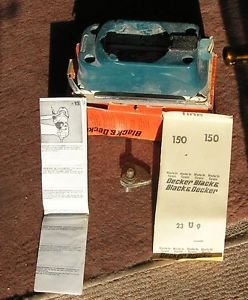
Image showing the BLACK+DECKER D988 Finishing Attachment Sander, a compact sanding head designed to attach to a compatible power unit.
A' dì-phapadh
Carefully remove the finishing attachment sander and all accessories from the packaging. Inspect for any damage.
Attaching to Power Unit
The D988 is an attachment. Ensure your BLACK+DECKER power unit is compatible.
- Align the attachment with the power unit's drive shaft.
- Push the attachment firmly onto the power unit until it clicks into place.
- Verify the attachment is securely fastened before use.
A’ ceangal dhuilleagan gainmhich
The D988 uses hook-and-loop sanding sheets.
- Ensure the power unit is disconnected from the power supply.
- Peel off the old sanding sheet if present.
- Align the new sanding sheet with the base of the attachment, ensuring the holes (if any) match for dust extraction.
- Press the sanding sheet firmly onto the hook-and-loop base.
Stiùireadh Obrachaidh
Obrachadh Coitcheann
Connect the power unit to a suitable power source.
Cùm an inneal gu daingeann leis an dà làmh.
Place the sanding base flat on the workpiece before starting the tool.
Move the sander slowly and evenly over the surface. Avoid applying excessive pressure, as this can reduce efficiency and damage the workpiece or tool.
For optimal results, sand with the grain of the wood.
Tarraing Dust
If your power unit or attachment has a dust extraction port, connect a suitable dust bag or vacuum cleaner to minimize dust exposure.
Cumail suas
Nì cumail suas cunbhalach cinnteach à coileanadh as fheàrr agus leudaichidh e beatha an inneil agad.
Glanadh
After each use, disconnect the tool from the power supply.
Sguab taobh a-muigh an inneil le sanasamp aodach. Na cleachd ceimigean cruaidh no innealan-glanaidh sgudail.
Clear any dust buildup from the ventilation openings to prevent overheating.
Sanding Pad Inspection
Periodically inspect the hook-and-loop sanding pad for wear or damage. A worn pad will not hold sanding sheets effectively. Replace if necessary.
Stòradh
Stòraich an inneal ann an àite tioram, sàbhailte, a-mach à ruigsinneachd chloinne.
Fuasgladh thrioblaidean
| Trioblaid | Adhbhar a dh’fhaodadh a bhith ann | Fuasgladh |
|---|---|---|
| Chan eil an inneal a’ tòiseachadh | Gun solar cumhachd | Check power connection, fuse, or circuit breaker. |
| Droch choileanadh gainmhich | Duilleag gainmhich air a chaitheamh | Replace sanding sheet. |
| Droch choileanadh gainmhich | Chaidh cus cuideam a chuir an sàs | Reduce pressure; let the tool do the work. |
| Sanding sheet detaches | Worn hook-and-loop pad | Cuir an àite am pàipear gainmhich. |
Sònrachaidhean
- Modail: D988
- Brand: DUBH+DECKER
- Cuideam nì: 500 gram
- Astar cuairteachaidh as àirde: 10000 rpm
- ASIN: B00IQQ92IG
- Dèanadair: Dubh & Decker
Barantas agus Taic
For warranty information or technical support, please refer to the documentation provided with your BLACK+DECKER power unit or visit the official BLACK+DECKER weblàrach.
This attachment is covered by the standard BLACK+DECKER warranty applicable to its power tool system.
Ask a question about this manual
Ask about setup, troubleshooting, compatibility, parts, safety, or missing instructions. Manuals+ will review the question and use this page’s manual context to help answer it.