
Gioteck E5SUNI-11-MU
Gioteck EX-05S Universal High Definition Stereo Headset User Manual
Model: EX-05S
1. Toradh thallview
The Gioteck EX-05S High Definition Headset is designed to deliver superior stereo game sound and crystal-clear voice communication. It is compatible with multiple platforms including PS4, PS3, Xbox 360, PC, and Mac. This headset features 40mm high-quality stereo drivers, a noise-isolating microphone, and breathable micro-fibre ear cups for extended comfort.
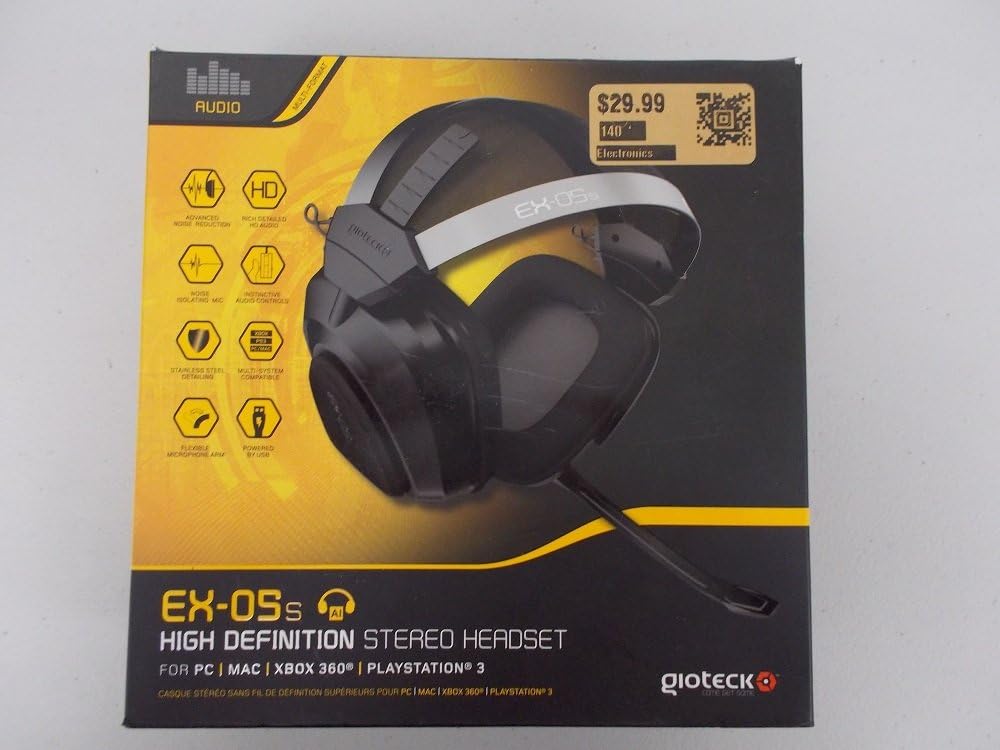
Figure 1.1: Gioteck EX-05S Headset packaging, highlighting key features and compatibility.

Figear 1.2: Taobh view of the Gioteck EX-05S Headset, showing the ear cup and microphone arm.
2. Feartan
- 40mm High Quality Stereo Drivers: Delivering rich, detailed audio for an immersive gaming experience.
- Noise Isolating Microphone: Designed to eliminate echo and external noise for clear communication.
- Breathable Micro-Fibre Ear Cups: Ensures comfort during long gaming sessions.
- Lùghdachadh Fuaim Adhartach: Minimizes game sound interference from external speakers.
- Flexible and 180-Degree Rotating Microphone Arm: Allows for optimal microphone positioning.
- Instinctive and Accessible Controls: Conveniently located controls for voice and game sound adjustments.
- Stainless Steel Detailing: Provides durability and a premium finish.
- Co-fhreagarrachd ioma-ùrlar: Works with PS4, PS3, Xbox 360, PC, and Mac.
3. Pasgan-susbaint
Dèan cinnteach gu bheil na nithean a leanas uile an làthair sa phacaid agad:
- Gioteck EX-05S Universal High Definition Stereo Headset
4. Stiùirich rèiteachaidh
4.1 Connecting to Gaming Consoles (PS4, PS3, Xbox 360)
- Locate the 3.5mm audio jack on your gaming controller or console.
- Insert the 3.5mm connector from the EX-05S headset firmly into the audio jack.
- Ensure your console's audio settings are configured to output game audio and chat through the connected headset. Refer to your console's system settings for specific audio output configurations.
4.2 A’ ceangal ri PC/Mac
- For PCs with separate audio and microphone jacks, you may need a PC splitter cable (not included) to connect the single 3.5mm headset jack to your computer's audio output and microphone input ports.
- For devices with a combined 3.5mm audio/microphone jack, simply plug the headset's 3.5mm connector directly into the port.
- Adjust your computer's sound settings to select the EX-05S headset as the default playback and recording device.
5. Stiùireadh Obrachaidh
5.1 Smachd tomhas-lìonaidh
The EX-05S headset features an inline control box on the cable. Use the volume dial to adjust the overall audio level of your game and chat sound.
5.2 Mùchadh Micreofoin
A switch or button on the inline control box allows you to quickly mute or unmute your microphone. Ensure the microphone is unmuted when you wish to communicate.
5.3 Suidheachadh a’ Mhaicreafòin
The flexible microphone arm can be rotated 180 degrees. Position the microphone approximately 1-2 inches from your mouth for optimal voice clarity and to minimize background noise.
6. Cumail suas agus Cùram
- Glanadh: Use a soft, dry cloth to clean the headset. For ear cups, a slightly damp Faodar clò a chleachdadh, ach dèan cinnteach nach tèid taiseachd a-steach do na griolan luchd-labhairt. Na cleachd ceimigean cruaidh no innealan-glanaidh sgrìobach.
- Stòradh: Stòraich na fònaichean-cluaise ann an àite fionnar, tioram air falbh bho sholas dìreach na grèine agus teòthachd anabarrach. Seachain a bhith a’ ceangal a’ chàball.
- Làimhseachadh: Always grasp the plug when disconnecting the cable, rather than pulling on the cable itself, to prevent damage to the wiring.
- Cupannan-cluaise: The breathable micro-fibre ear cups can be gently wiped clean. Avoid excessive pressure or stretching.
7. A ’dèanamh trioblaid
7.1 Gun fhuaim bho chluas-cinn
- Dèan cinnteach gu bheil an jack 3.5mm air a chuir a-steach gu tur a-steach don phort claisneachd.
- Thoir sùil air an smachd-toirteam in-loidhne air càball nan headset agus dèan cinnteach gu bheil e air a thionndadh suas.
- Verify your device's (console, PC, Mac) audio output settings are configured to send sound to the headset.
- Dèan deuchainn air a’ chluas-cinn air inneal eile gus faighinn a-mach nach eil duilgheadas sònraichte leis an inneal ann.
7.2 Micreofon gun a bhith ag obair
- Check the microphone mute switch on the inline control box and ensure it is unmuted.
- Verify your device's (console, PC, Mac) microphone input settings are configured to receive input from the headset.
- Ensure the microphone arm is positioned correctly and not obstructed.
- Test the microphone on another device or application to confirm functionality.
7.3 Static or Distorted Audio
- Dèan cinnteach gu bheil an ceangal tèarainte agus saor bho sprùilleach.
- Try adjusting the volume levels on both the headset and the connected device.
- Move away from potential sources of electromagnetic interference (e.g., Wi-Fi routers, cordless phones).
- Dèan deuchainn le stòr claisneachd no inneal eile.
8. Sònrachaidhean
| Feart | Mion-fhiosrachadh |
|---|---|
| Ainm Modail | E5SUNI-11-MU |
| Teicneòlas ceangail | Uèir |
| Co-phàirtean air an toirt a-steach | Fòn-cluaise |
| Raon Aois (Tuairisgeul) | Inbheach |
| Stuth | Stàilinn nach meirg |
| Cleachdaidhean sònraichte airson toradh | Geamannan |
| Innealan co-fhreagarrach | Consólan Gèam, Coimpiutairean |
| Seòrsa smachd | Smachd tomhas-lìonaidh |
| Feart càball | Retractable |
| Cuideam nì | 669 gram (1.47 not) |
| Modh smachd | Guth |
| Seòrsa fuaim driver | Dràibhear Dynamic |
| Cruth cluaise | Thar-chluas |
| Fòn-cluaise Jack | 3.5 mm Jack |
| Meudan toraidh | 8.46 x 7.87 x 3.94 òirleach |
9. Barantas agus Taic
Gioteck products are manufactured to high standards and undergo rigorous testing. For information regarding warranty coverage, technical support, or service, please refer to the official Gioteck weblàrach-lìn no cuir fios gu dìreach chun taic teachdaiche aca. Cùm dearbhadh do cheannach airson tagraidhean barantais sam bith.
Airson an fhiosrachaidh taic as ùire, tadhail air: www.gioteck.com/support