
Phanteks PH-ES813P_BL
Phanteks Enthoo Series Primo Ultimate Full Tower Computer Case User Manual
Model: PH-ES813P_BL
Ro-ràdh
The Phanteks Enthoo Primo is a full tower computer case designed for enthusiasts seeking exceptional cooling possibilities and functional design. This manual provides detailed instructions for setting up, operating, maintaining, and troubleshooting your Enthoo Primo case, ensuring optimal performance and longevity.

Figure 1: Phanteks Enthoo Primo Ultimate Full Tower Computer Case (Black/Blue)
Stàladh agus stàladh
Proper installation is crucial for the performance and stability of your system. Follow these steps carefully.
1. Stàladh Aonad Solarachaidh Cumhachd (PSU)
The Enthoo Primo features a unique thermally isolated PSU location at the rear of the case, promoting cooler temperatures and improved cable management.
- Locate the PSU compartment at the bottom rear of the case.
- Slide your PSU into the designated area.
- Daingnich an PSU leis na sgriothan a tha air an toirt seachad bho chùl a’ chùis.
Video 1: Animated demonstration of internal case features, including PSU placement, HDD trays, and cable management. This video highlights the thermally isolated PSU location and hidden cable routing.

Figear 2: Cùl view of the Enthoo Primo case, showing the PSU mounting area at the bottom.
2. Drive Installation (HDD/SSD)
The case supports up to 6 HDDs with dual repositionable and removable HDD cages, and features Drop-n-Lock double stack SSD brackets.
- Access the hidden HDD trays by removing the side panel.
- Slide your 3.5" HDDs into the trays and secure them.
- For 2.5" SSDs, utilize the removable Drop-n-Lock brackets. These can be installed in three different locations within the case.
- Ensure all drives are securely fastened to prevent vibration.

Figear 3: Taobh a-staigh view of the Enthoo Primo, highlighting the hidden HDD trays and SSD mounting points.
3. Motherboard and Component Installation
The Enthoo Primo supports ATX motherboards and offers ample space for various components.
- Install your ATX motherboard onto the standoffs.
- Install your CPU, RAM, and graphics cards as per their respective manuals.
- Utilize the pre-installed cable management tools behind the motherboard tray to route cables neatly.
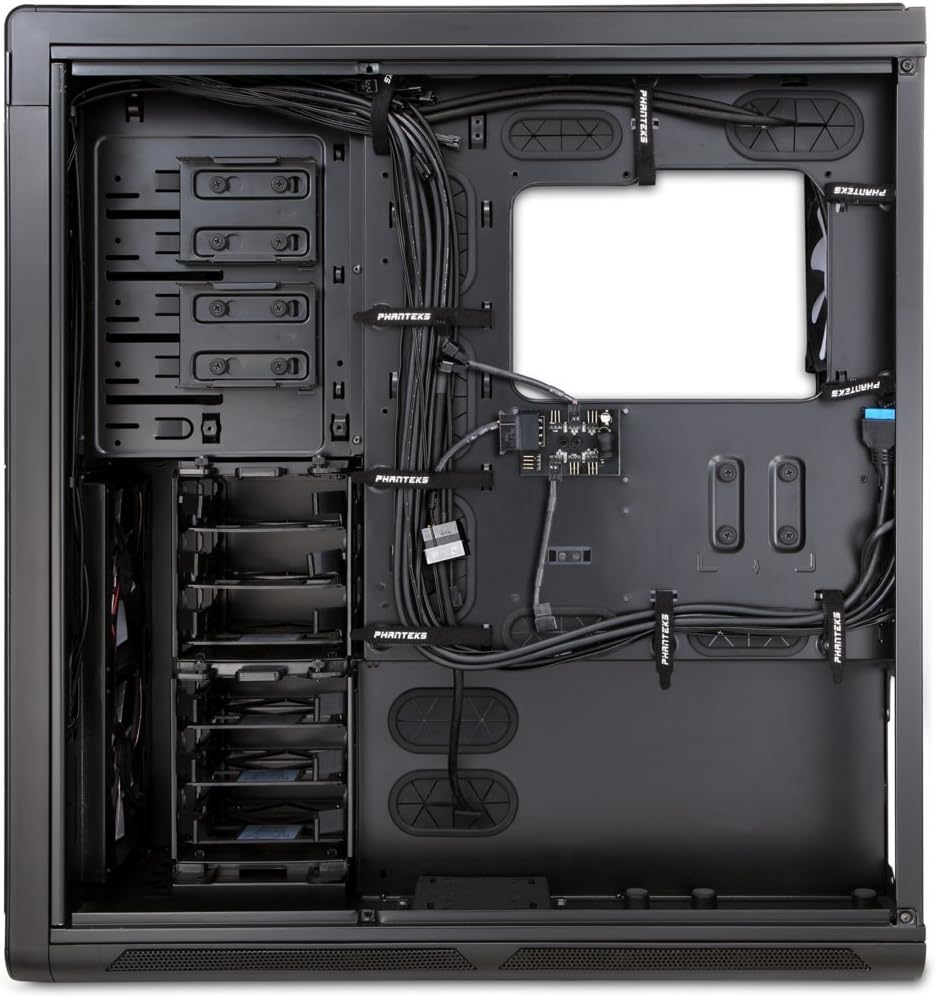
Figear 4: Taobh a-staigh view of the Enthoo Primo, showcasing the cable management features behind the motherboard tray.
Feartan obrachaidh
The Enthoo Primo is designed with user convenience and optimal performance in mind.
Pannal aghaidh I / O.
The front I/O panel provides easy access to essential ports and controls:
- 2x Port USB 3.0: Airson gluasad dàta aig astar àrd.
- 2x Port USB 2.0: For standard peripheral connections.
- Jack microfòn: Airson cuir a-steach fuaim.
- Jack claisneachd 3.5mm: Airson toradh claisneachd.
- Switch LED: Controls the integrated LED lighting (LED strip & Fan LED).

Figure 5: Top angled view of the Enthoo Primo, illustrating the accessible front I/O panel.
Siostam fuarachaidh
The Enthoo Primo offers extensive cooling support for both air and liquid cooling configurations.
- Luchd-leantainn ro-stàlaichte: Includes 1x 140mm fan on top, 2x 140mm LED fans in front, 1x 140mm fan in the rear, and 1x 140mm fan on the bottom. All are Phanteks' PH-F140SP fans.
- Fuarachadh Adhair: Supports up to 14x 120mm fans or 11x 140mm fans for comprehensive airflow.
- Fuarachadh uisge: Provides up to 5 different installation areas for slim and thick radiators (120mm and 140mm form factors), including clearance for push-pull fan configurations. Innovative liquid cooling mounting systems include radiator brackets and a versatile reservoir/pump bracket.

Figear 6: Aghaidh view of the Enthoo Primo, showcasing the clean design and intake areas.
Cumail suas
Regular maintenance ensures optimal performance and extends the lifespan of your computer case.
- Filters Dust: The Enthoo Primo features removable dust filters located at the front, top, bottom (2x), and side panel (2x). Regularly remove and clean these filters to maintain optimal airflow and prevent dust buildup inside the case.
- Glanadh a-muigh: Cleachd bog, damp cloth to wipe down the aluminum front and top panels. Avoid abrasive cleaners.
- Glanadh a-staigh: Periodically use compressed air to clear dust from internal components and fan blades. Ensure the system is powered off and unplugged before cleaning.
Fuasgladh thrioblaidean
Tha an earrann seo a’ dèiligeadh ri cùisean cumanta a dh’ fhaodadh tu a thighinn tarsainn orra.
- Gun chumhachd:
- Ensure the PSU is properly seated and connected to the motherboard and wall outlet.
- Verify that the front panel power switch cable is correctly connected to the motherboard's header.
- Fans Not Spinning / LED Not Lighting:
- Check fan connections to the motherboard or fan hub.
- Ensure the fan hub is powered (SATA connection).
- Verify the LED switch on the front panel is in the 'on' position.
- Puirt USB nach eil ag obair:
- Confirm that the USB 3.0 and USB 2.0 headers from the front panel are securely connected to the motherboard.
- Fuaim cus:
- Check if all fans are securely mounted and free from obstructions.
- Ensure drive trays are properly secured to minimize vibration.
- Clean dust filters and fan blades if necessary.
Sònrachaidhean
| Feart | Mion-fhiosrachadh |
|---|---|
| Ainm Modail | PH-ES813P_BL |
| Seòrsa cùise | Tùr Làn |
| Co-fhreagarrachd motherboard | ATX |
| Stuth | Aluminum Faceplates, Steel Chassis |
| Dath | Dubh/gorm |
| Meudan (LxWxH) | 23.62 x 9.84 x 25.59 òirleach |
| Cuideam nì | 50 not |
| Puirt USB 3.0 | 2 |
| Puirt USB 2.0 | 2 |
| Puirt claisneachd | 1x Microphone, 1x 3.5mm Audio Jack |
| Slots leudachaidh | 8 |
| Modh fuarachaidh | Adhair / Uisge |
| Fans ro-stàlaichte | 5x 140mm (1 top, 2 front LED, 1 rear, 1 bottom) |
| Taic Luchd-leantainn as motha | 14x 120mm or 11x 140mm |
| Taic Radiator | Up to 5 locations (120mm/140mm form factors) |
Barantas agus Taic
For warranty information and technical support, please refer to the official Phanteks weblàrach-lìn no an leabhar-làimhe cleachdaiche slàn.
You can download the complete user manual in PDF format here: Phanteks Enthoo Primo User Manual (PDF)
Sgrìobhainnean co-cheangailte - PH-ES813P_BL
 |
Leabhar-làimhe cleachdaiche cùis Phanteks Enthoo Primo - Stiùireadh stàlaidh Leabhar-làimhe cleachdaiche is iùl stàlaidh coileanta airson cùis coimpiutair làn-thùir Phanteks Enthoo Primo, a’ còmhdach shònrachaidhean, stàladh phàirtean, suidheachadh fuarachadh-uisge, agus taic. |
 |
Phanteks Enthoo Pro User Manual Comprehensive user manual for the Phanteks Enthoo Pro full tower computer case, detailing specifications, installation guides, and support. |
 |
Phanteks Enthoo Pro Tempered Glass Edition User's Manual This user's manual provides comprehensive instructions for the Phanteks Enthoo Pro Tempered Glass Edition PC case, covering installation, specifications, cooling, RGB features, and support. |
 |
Leabhar-làimhe cleachdaiche Phanteks Enthoo Elite Leabhar-làimhe coileanta airson cùis PC làn-thùir Phanteks Enthoo Elite, le mion-fhiosrachadh mu shònrachaidhean, goireasan a tha air an toirt a-steach, agus stiùiridhean rèiteachaidh airson rèiteachaidhean togail as fheàrr. |
 |
Leabhar-làimhe Cleachdaiche Phanteks Enthoo Evolv ATX Tempered Glass Edition Leabhar-làimhe coileanta airson cùis PC Phanteks Enthoo Evolv ATX Tempered Glass Edition, le mion-fhiosrachadh air sònrachaidhean, modhan-obrach stàlaidh airson co-phàirtean leithid bùird-mhàthraichean, solar cumhachd, draibhearan, agus siostaman fuarachaidh, a bharrachd air roghainnean ùrachaidh agus fiosrachadh taic. |
 |
Leabhar-làimhe Cleachdaiche Cùis PC Phanteks Eclipse P400/P400S Leabhar-làimhe coileanta airson cèisean coimpiutair Phanteks Eclipse P400 agus P400S, a’ còmhdach chomharrachaidhean, stiùiridhean stàlaidh, goireasan, fuasgladh dhuilgheadasan agus fiosrachadh taic. |
Ask a question about this manual
Ask about setup, troubleshooting, compatibility, parts, safety, or missing instructions. Manuals+ will review the question and use this page’s manual context to help answer it.