
Ro-ràdh
This manual provides instructions for the Vivanco RR 220 remote control, designed for compatibility with Samsung Smart TVs. Please read this manual thoroughly before using the device to ensure proper operation and to understand its features.
Susbaint pacaid
- Vivanco RR 220 Remote Control
- An Leabhar-làimhe Cleachdaiche seo
Nota: Chan eil bataraidhean air an toirt a-steach agus feumar an ceannach air leth.
Suidhich
1. Stàladh bataraidh
- Lorg an roinn bataraidh air cùl an smachd iomallach.
- Sleamhnaich còmhdach a’ bhataraidh sìos no brùth air a’ ghlas agus tog suas e gus fhosgladh.
- Cuir a-steach dà (2) bataraidh AAA, a’ dèanamh cinnteach gu bheil na cinn-uidhe adhartach (+) agus àicheil (-) a’ freagairt ris na comharran taobh a-staigh an roinn.
- Replace the battery cover, ensuring it clicks securely into place.
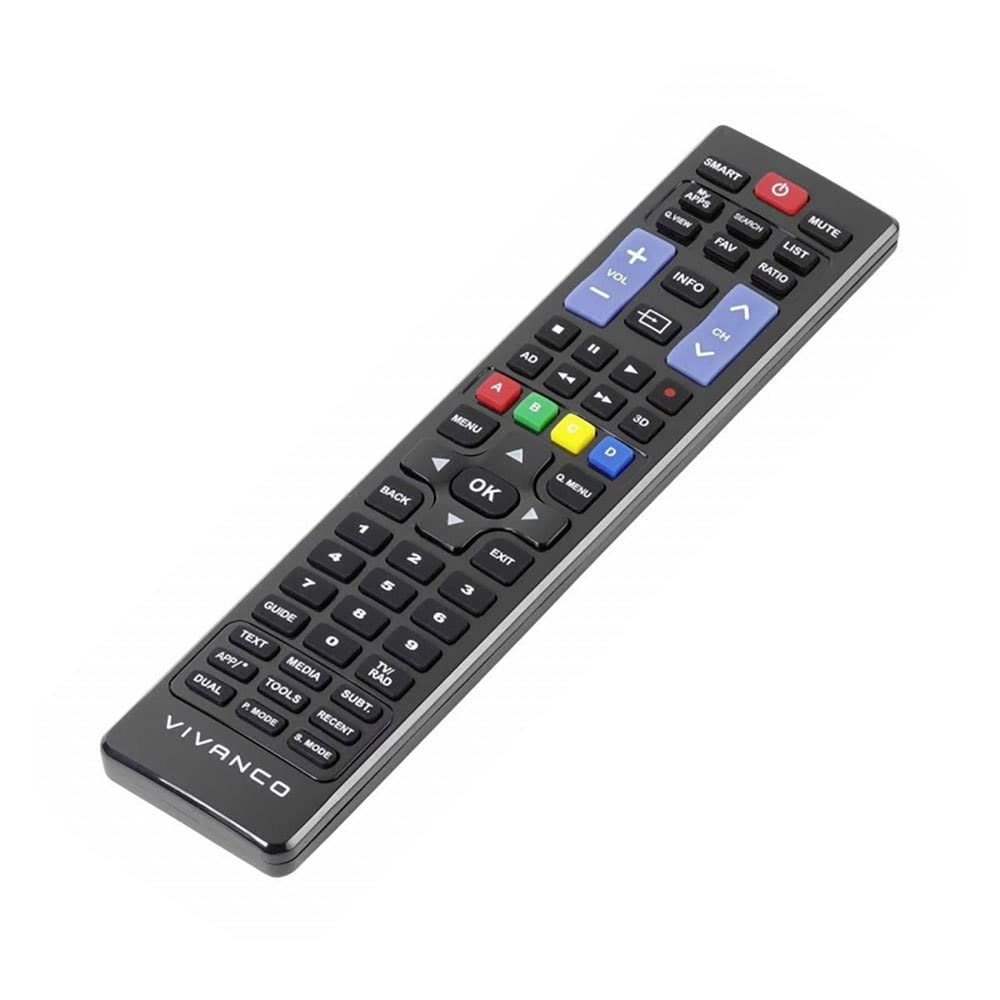
Dealbh 1: Vivanco RR 220 remote control. This image displays the front of the remote control, highlighting its 57 buttons and ergonomic design. The battery compartment is located on the reverse side.
2. Cleachdadh Tòiseachaidh
The Vivanco RR 220 is pre-programmed for Samsung Smart TVs. No additional setup or pairing is typically required. Once batteries are installed, point the remote control towards your Samsung Smart TV and press the Power button to test functionality.
Stiùireadh Obrachaidh
The remote control features 57 buttons, providing comprehensive control over your Samsung Smart TV and compatible devices. Below are common button functions:
- Putan Cumhachd: Tionndaidh an telebhisean air no dheth.
- Putanan Àireamh (0-9): For direct channel selection or data input.
- Meud suas/sìos: Ag atharrachadh an ìre fuaim.
- Sianal Suas/Sìos: Ag atharrachadh seanalan Tbh.
- Putan Mute: A’ cur stad air fuaim an telebhisean.
- Pad Seòlaidh (Suas, Sìos, Clì, Deas, Cuir a-steach): Air a chleachdadh gus clàran-bìdh a sheòladh agus roghainnean a thaghadh.
- Putan Air Ais/Tilleadh: Tilleadh chun sgrion no clàr-taice roimhe.
- Smart Hub/Home Button: Accesses the Smart Hub or main menu of your Samsung Smart TV.
- Stòr / Putan Inntrigidh: A’ taghadh stòran cuir-a-steach (HDMI, AV, msaa.).
- Putanan dath (dearg, uaine, buidhe, gorm): For specific functions within certain applications or menus, as indicated on-screen.
- Playback Controls (Play, Pause, Stop, Fast Forward, Rewind): Controls media playback on compatible devices or apps.
For specific functions related to your TV model, refer to your Samsung TV's user manual.
Cumail suas
Glanadh an smachd iomallach
- Cleachd clò bog, tioram gus uachdar an smachd iomallach a sguabadh.
- Airson salachar stòlda, beagan dampen an t-aodach le uisge no inneal-glanaidh tlàth, neo-dhruim-altachain.
- Na cleachd ceimigean cruaidh, fuasglaidhean, no padaichean glanaidh sgrìobach, oir faodaidh iad sin crìoch no pàirtean a-staigh an smachd iomallach a mhilleadh.
- Ensure no liquid enters the remote control through button gaps or the battery compartment.
Ath-nuadhachadh bataraidh
Replace batteries when the remote's response becomes sluggish or it stops functioning. Always replace both batteries simultaneously with new AAA alkaline batteries. Do not mix old and new batteries or different types of batteries.
Fuasgladh thrioblaidean
| Trioblaid | Adhbhar a dh’fhaodadh a bhith ann | Fuasgladh |
|---|---|---|
| Smachd iomallach gun a bhith ag obair. |
|
|
| Chan eil cuid de na putanan ag obair. |
|
|
Sònrachaidhean
- Brand: Vivanco
- Ainm a' mhodail: RR 220
- Àireamh Modail Bathar: 38016
- Innealan co-fhreagarrach: Home cinema, DVD/Blu-ray player, Television (Samsung Smart TV compatible)
- Teicneòlas ceangail: Wireless IR (Infrared)
- Àireamh de phutanan: 57
- Seòrsa bataraidh: 2 x AAA (Alcaileach air a mholadh)
- Bataraidhean air an toirt a-steach: Chan eil
- Meudan toraidh: 18 x 4.8 x 2.3 cm
- Cuideam toraidh: 80 g
- Raon as àirde: 15 meatairean
- Feartan sònraichte: IPTV, DVB-T, HDTV compatibility