
Ro-ràdh
This manual provides essential instructions for the safe and effective use of your Fujifilm FinePix HS50EXR digital camera. Please read this manual thoroughly before using the camera and keep it in a safe place for future reference.

Figear 1: Aghaidh view of the Fujifilm FinePix HS50EXR Digital Camera, showcasing dealbhadh a lionsa agus a chuirp.
Suidhich
1. Dì-phapadh agus sgrùdadh tùsail
Thoir a h-uile nì a-mach às a’ phacaid gu faiceallach. Dèan cinnteach gu bheil na pàirtean a leanas an làthair:
- Fujifilm FinePix HS50EXR Digital Camera body
- Bataraidh Li-ion ath-chuairteachail
- Charger bataraidh
- Strap ghualainn
- Càball USB
- Cap Lens
- CD-ROM (containing software and full manual)
2. A 'cur cosgais air a' Bhataraidh
Before first use, fully charge the supplied rechargeable Li-ion battery. Insert the battery into the charger and connect the charger to a power outlet. The charging indicator will show the charging status and turn off when charging is complete.
3. A’ cur a-steach bataraidh agus cairt-chuimhne
- Fosgail còmhdach roinn a’ bhataraidh/cairt-chuimhne aig bonn a’ chamara.
- Cuir a-steach am bataraidh làn-luchdaichte leis an t-slighe cheart gus an cliog e na àite.
- Insert a compatible SD or microSD memory card (sold separately) into the card slot until it clicks. Ensure the card is facing the correct direction.
- Dùin còmhdach na roinne gu tèarainte.
4. A’ ceangal an strapa gualainn
Thread the shoulder strap through the strap lugs on the camera body as illustrated in the full manual on the CD-ROM. Ensure it is securely fastened to prevent accidental drops.
Ag obrachadh a 'chamara
1. Cumhachd air / dheth
To power on the camera, slide the power switch located on the top of the camera. To power off, slide the switch again.
2. Modhan Bunasach Losgaidh
Leigidh an dial modh air mullach a’ chamara leat diofar mhodhan losgaidh a thaghadh:
- AUTO: For fully automatic shooting, where the camera selects optimal settings.
- P (Prògram AE): The camera sets aperture and shutter speed for optimal exposure, while you can adjust other settings.
- A (Prìomhachas Fosglaidh AE): You set the aperture, and the camera automatically adjusts the shutter speed.
- S (Prìomhachas Còmhla AE): You set the shutter speed, and the camera automatically adjusts the aperture.
- M (Làimh-làimhe): Bidh smachd agad air an dà chuid an fosgladh agus an astar còmhlachan airson smachd cruthachail iomlan.
- EXR: Utilizes the EXR CMOS II sensor's capabilities for enhanced image quality in various conditions.
- SGEULACHDAN: Select from various scene presets (e.g., Portrait, Landscape, Sport) for specific shooting situations.
3. Obrachadh Zoom
The FinePix HS50EXR features a manual Fujinon 42x optical zoom lens (24-1000mm equivalent). Rotate the zoom barrel on the lens directly to adjust the focal length. This manual control provides precise and intuitive zooming.
4. Fòcas
The camera employs an Intelligent Hybrid AF system, combining high-speed phase detection AF and contrast AF for rapid and accurate focusing. You can also switch to manual focus by rotating the focus ring on the lens.
- AF singilte (AF-S): Focuses when the shutter button is pressed halfway.
- AF leantainneach (AF-C): Continuously adjusts focus for moving subjects.
- Fòcas Làimhe (MF): Cuairtich fàinne fòcais air an lionsa gus fòcas atharrachadh le làimh.
5. Stabilization Ìomhaigh
The camera features lens shift optical image stabilization to reduce blur caused by camera shake, especially when shooting at longer focal lengths or in low light conditions.
6. LCD and Viewlorgar
The camera is equipped with a 3.0-inch Vari-angle LCD screen (920K-dot) that can be rotated and tilted for flexible shooting angles. It also has a high-resolution electronic viewfinder (EVF) with an eye sensor, which automatically switches between the LCD and EVF when you bring your eye to the viewlorgadair.
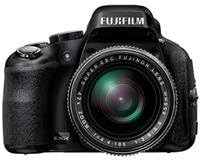
Figear 2: Taobh view of the Fujifilm FinePix HS50EXR Digital Camera, showing the vari-angle LCD screen extended for flexible viewing.
7. Clàradh Bhidio
To record movies, set the mode dial to the movie icon. The camera supports Full HD (1080p) video recording at 60 frames per second (60fps) with continuous phase detection autofocus.
8. Seilg leantainneach
The FinePix HS50EXR can capture images at up to 11 frames per second (fps) in full resolution, allowing you to capture fast-moving action.
9. Cleachdadh Flash
The camera has a built-in flash. Press the flash button to pop it up. Various flash modes (e.g., Auto, Fill-in, Slow Sync) can be selected via the menu.
10. Ceangalachd
The camera supports HDMI and USB connectivity for transferring images and videos to a computer or displaying them on a TV. It also features Wi-Fi for wireless image transfer and remote control via a compatible smartphone app.
Cumail suas
1. Glanadh a’ Chamara
- Lionsa: Use a soft, lint-free cloth or a lens brush to gently remove dust. For stubborn smudges, use a lens cleaning solution applied to a cloth, not directly to the lens.
- Corp: Wipe the camera body with a soft, dry cloth. For heavy dirt, use a cloth lightly dampnigh le uisge, an uair sin tiormaich e. Seachain fuasglaidhean organach a chleachdadh.
- Sgrion LCD: Cleachd clò bog, tioram. Seachain brùthadh cruaidh air an sgrion.
2. Cùram Bataraidh
- Cleachd bataraidh agus charger fìor Fujifilm an-còmhnaidh.
- Cùm bataraidhean ann an àite fionnar, tioram nuair nach eilear gan cleachdadh.
- Na cuir a-mach bataraidhean gu teòthachd anabarrach no solas dìreach.
3. Stòradh
When storing the camera for extended periods, remove the battery and memory card. Store the camera in a dry, well-ventilated area, away from dust and direct sunlight. Use a desiccant if storing in a humid environment.
Fuasgladh thrioblaidean
Ma thachras tu ri duilgheadasan leis a’ chamara agad, thoir sùil air na duilgheadasan agus na fuasglaidhean cumanta a leanas:
| Trioblaid | Adhbhar / Fuasgladh a dh’fhaodadh a bhith ann |
|---|---|
| Chan eil an camara a’ dol air. | Tha am bataraidh air a leigeil sìos no air a chur a-steach gu ceàrr. Dèan cinnteach gu bheil am bataraidh air a luchdadh agus air a chur a-steach gu ceart. |
| Tha dealbhan doilleir. | Camera shake: Use image stabilization, a faster shutter speed, or a tripod. Incorrect focus: Ensure the camera is properly focused on the subject. |
| Cha lasas am flash. | Flash is closed or disabled. Pop up the flash and check flash settings in the menu. |
| Mearachd cairt cuimhne. | Card is full, damaged, or incorrectly inserted. Try reinserting the card, using a different card, or formatting the card (this will erase all data). |
| Bidh bataraidh a’ drèanadh gu sgiobalta. | Frequent use of LCD, flash, or video recording. Reduce usage or carry a spare charged battery. |
For more detailed troubleshooting, refer to the full instruction manual on the supplied CD-ROM.
Sònrachaidhean
| Feart | Mion-fhiosrachadh |
|---|---|
| Seòrsa mothachaidh | 1/2-inch 16 MP BSI-CMOS |
| Lionsa | Fujinon 42x Optical Zoom (24-1000mm equivalent), f/2.8-f/11 aperture |
| Stabilization Ìomhaigh | Optical |
| Sgrion LCD | 3.0-inch Vari-angle, 920K-dot |
| Viewlorgar | Electronic (EVF), 920K-dot, with eye sensor |
| Fuasgladh bhidio | Làn HD 1080p aig 60fps |
| File Cruthan | JPEG (Exif Ver 2.3), RAW (RAF format), RAW+JPEG |
| Luas Shutter | 30 diogan gu 1/4000 diogan |
| Smachd nochdaidh | Program AE, Shutter Priority AE, Aperture Priority AE, Manual |
| Siostam Fòcas | Intelligent Hybrid AF (Phase Detection, Contrast AF), Manual Focus |
| Ceangalachd | HDMI, USB, Wi-Fi |
| Meadhanan stòraidh | SD, microSD (UHS-I compatible) |
| Cuideam | Approx. 2.3 Pounds (1.04 kg) |
Fiosrachadh Barantais
Your Fujifilm FinePix HS50EXR Digital Camera comes with a manufacturer's warranty. Please refer to the warranty card included in your product packaging or visit the official Fujifilm weblàrach-lìn airson teirmichean is cumhaichean mionaideach a thaobh còmhdach barantais agus seirbheis.
Taic
For further assistance, technical support, or to download the full instruction manual and software updates, please visit the official Fujifilm support weblàrach:
You may also contact Fujifilm customer service directly through the contact information provided on their weblàrach.