
1. Ro-ràdh
The MFJ-4115 is a compact switching power supply designed to provide stable 13.8 VDC output with a continuous current of 15 Amps (17 Amps surge). It features over-voltage and over-current protection systems, a quiet fan, and super regulation. This manual provides essential information for the safe and efficient operation of your MFJ-4115 power supply.
Fiosrachadh Sàbhailteachd
- Always ensure proper ventilation around the unit. Do not block air vents.
- Na cuir an aonad fo bhuaidh taiseachd no teòthachd anabarrach.
- Dì-cheangail an cumhachd mus dèan thu ceanglaichean no obair-chàraidh sam bith.
- Dèan cinnteach gu bheil a h-uile ceangal tèarainte agus gu bheilear a’ cumail ri poilearachd cheart.
2. Feartan toraidh
- Toradh Voltage: 13.8 VDC
- Toradh an-dràsta: 15 Amps leantainneach, 17 Amps surge
- Input Voltage: AC 90 to 130 Volts
- Siostaman dìon: Thar-voltage agus dìon thar-làthaireach
- Comharran: Load fault indicator
- Feartan a bharrachd: Automatic shut-down, quiet fan, super regulation
- Meudan teann: Approximately 3.75 inches (W) x 2.25 inches (H) x 7.75 inches (D)
- Cuideam: Mu 5.89 not
- Ceanglaichean: One set of 5-way binding post connections
3. Suidhich
Follow these steps to set up your MFJ-4115 Switching Power Supply:
- Dèan dì-phapadh agus sgrùdadh: Carefully remove the power supply from its packaging. Inspect the unit for any visible damage.
- Suidheachadh: Place the power supply on a stable, flat surface that allows for adequate ventilation. Ensure the fan vents are not obstructed.
- Inneal ceangail: Connect your device (e.g., radio equipment) to the 5-way binding post connections on the front of the power supply. Ensure correct polarity: the red terminal is positive (+), and the black terminal is negative (-). Tighten the connections securely.
- Ceangail AC Power: Connect the provided AC power cord to the AC input receptacle on the rear of the power supply. Then, plug the other end of the AC power cord into a standard AC wall outlet (90-130V AC).
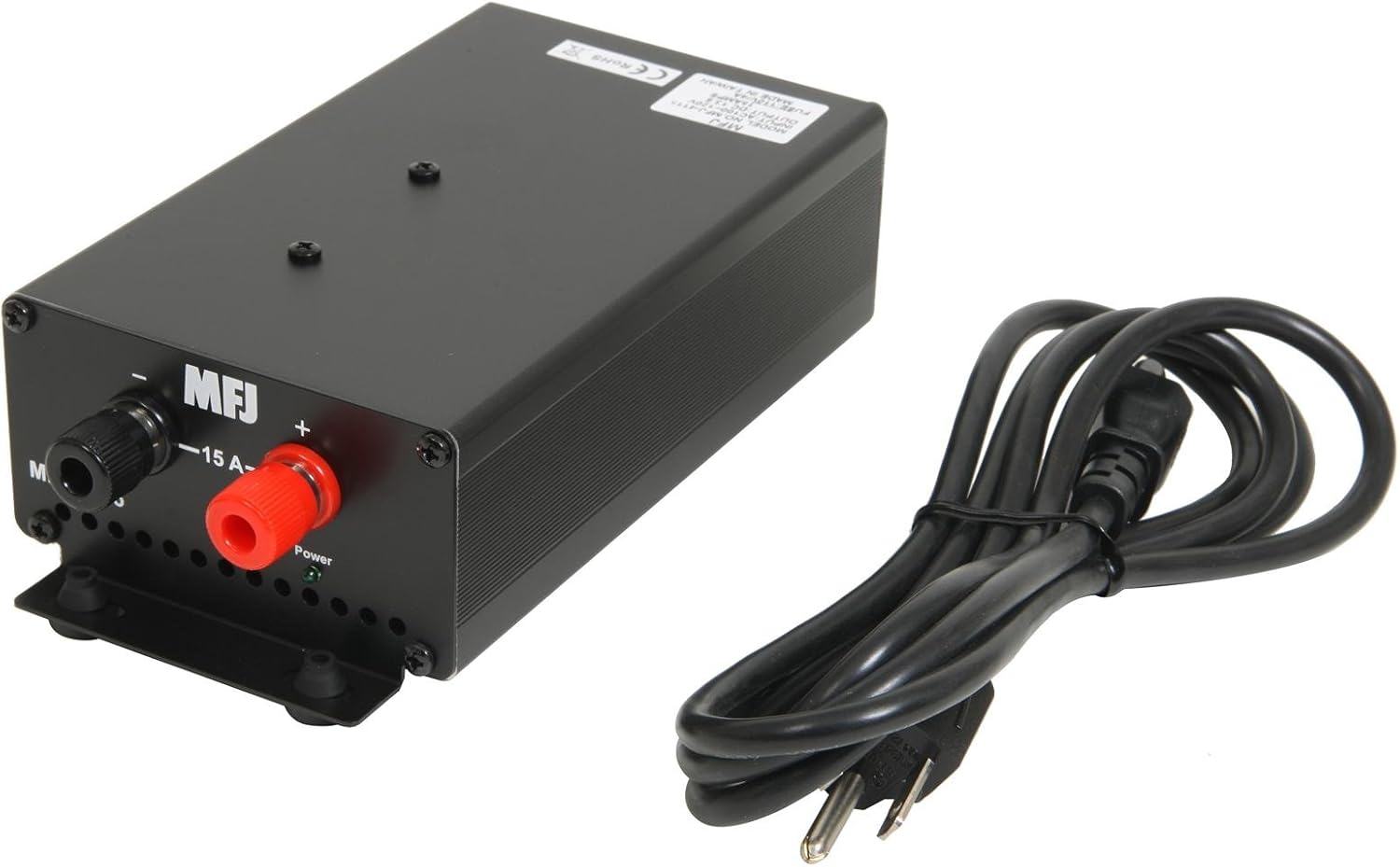
Figear 1: Aghaidh view showing the 5-way binding posts for device connection and the included power cord.

Figear 2: Cùl view illustrating the AC power input, power switch, and cooling fan for ventilation.
4. Stiùireadh Obrachaidh
Once the power supply is properly set up and connected:
- Cumhachd air: Locate the power switch on the rear of the unit (refer to Figure 2) and switch it to the 'ON' position.
- Obrachadh sgrùdaidh: The power supply will now provide 13.8 VDC to your connected device. Observe the load fault indicator. If it illuminates or the unit automatically shuts down, refer to the Troubleshooting section.
- Cumhachd dheth: To turn off the power supply, switch the power switch to the 'OFF' position. For extended periods of non-use, it is recommended to unplug the AC power cord from the wall outlet.
5. Cumail suas
Proper maintenance ensures the longevity and reliable operation of your power supply:
- Glanadh: Keep the unit clean and free from dust. Use a soft, dry cloth for cleaning. Do not use liquid cleaners or solvents.
- Fionnarachadh: Regularly check that the fan vents are clear of obstructions to ensure proper airflow and cooling.
- Fuaim fan: The internal cooling fan may produce some noise, especially upon startup or in colder environments. This is often normal and may subside after a short period of operation. If excessive or persistent noise occurs, ensure proper ventilation.
6. A ’dèanamh trioblaid
If you encounter issues with your MFJ-4115 power supply, refer to the following common problems and solutions:
- Chan eil an aonad a’ dol air:
- Check that the AC power cord is securely plugged into both the power supply and the wall outlet.
- Ensure the power switch on the rear of the unit is in the 'ON' position.
- Verify the wall outlet is supplying power.
- Load Fault Indicator Active / Automatic Shut-down:
- This indicates an over-current or over-voltage condition. Immediately disconnect the load from the power supply.
- Verify that the connected device's current draw does not exceed the power supply's continuous rating of 15 Amps or surge rating of 17 Amps.
- Check for any short circuits in the connected device or its wiring.
- If the issue persists with a known good load within specifications, the power supply may require service.
- Noisy Fan:
- A slight fan noise, especially at startup or in cold conditions, is normal. It should quiet down after a short operating period.
- Ensure the unit has adequate ventilation and the fan vents are not blocked.
- If the noise is excessive or persistent, and not related to startup or cold, contact customer support.
7. Sònrachaidhean
| Sònrachadh | Luach |
|---|---|
| Modail Àireamh | 4115 |
| Toradh Voltage | 13.8 VDC |
| An-dràsta leantainneach | 15 Amps |
| Surge Current | 17 Amps |
| Input Voltage | AC 90-130 Volts |
| Dètage | 207 watt |
| Meudan toraidh (L x W x H) | 7.75 x 3.75 x 2.25 òirleach |
| Cuideam nì | 5.89 not |
| Modh fuarachaidh | Air (with 1 fan) |
| Seòrsa ceangail | Postan ceangail 5-slighe |
8. Barantas agus Taic
For warranty information, technical assistance, or service inquiries regarding your MFJ-4115 Switching Power Supply, please contact MFJ customer service directly. Refer to the official MFJ weblàrach-lìn no pacaigeadh an toraidh airson am fiosrachadh conaltraidh agus na teirmichean barantais as ùire.