
1. Fiosrachadh Sàbhailteachd Cudromach
Please read all instructions carefully before attempting installation or repair. Failure to follow these instructions may result in electric shock, fire, or other hazards. Always prioritize safety.
- Cumhachd dì-cheangail: Always ensure the appliance is completely disconnected from the main power supply before beginning any work.
- Stàladh proifeiseanta air a mholadh: Installation of this electrical component involves working with wiring and potentially soldering. It is strongly recommended that installation be performed by a qualified and certified electrician or appliance repair technician.
- Innealan Gas: If the appliance is gas-powered, any repairs must be carried out by a Gas Safe registered engineer to prevent gas leaks or other serious hazards.
- Uidheam Dìon Pearsanta: Wear appropriate personal protective equipment (PPE) such as safety glasses and insulated gloves during installation.
2. Toradh thallview
The Homdox Diplomat & Hygena Hood Light Selector Switch Assembly (Part Number: W0000051) is a replacement control unit designed for various Diplomat and Hygena cooker hoods. This assembly features four push buttons: one button for controlling the hood light and three buttons for adjusting the fan speed.
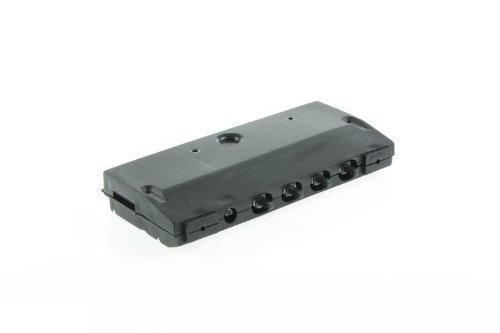
This image shows the Homdox Diplomat & Hygena Hood Light Selector Switch Assembly, featuring four push buttons for controlling hood functions.
3. Co-fhreagarrachd
This selector switch assembly is compatible with the following Diplomat and Hygena cooker hood models:
- Hygena Models: app2180, app2410, app2412, app2420, app2440, app2442, app2510, app2512, app2513, app2540, app2542, app2543, APP2500
- Diplomat Models: aca2300, aca2302, aca2400, aca2403
Always verify the part number (W0000051) and visual appearance against your existing component before installation to ensure correct compatibility.
4. Stiùiridhean stàlaidh
RABHADH: Due to the electrical nature of this component and the potential need for soldering, installation should only be performed by a qualified technician. Improper installation can lead to appliance damage, personal injury, or fire.
- Dì-cheangal cumhachd: Ensure the cooker hood is completely disconnected from the main power supply at the circuit breaker or fuse box. Verify with a voltage deuchainniche.
- Faigh cothrom air an suidse a th’ ann mar-thà: Carefully remove the necessary panels or covers of your cooker hood to gain access to the existing light selector switch assembly.
- Uèirleadh Sgrìobhainn: Before disconnecting any wires, take clear photographs or make a detailed diagram of the existing wiring connections. Note the color and position of each wire.
- Dì-cheangail an Seann Cho-chruinneachadh: Carefully disconnect all wires from the old switch assembly. Some connections may be via terminal blocks, while others may require desoldering.
- Stàlaich Seanadh Ùr: Position the new Homdox switch assembly in place.
- Ceangal Wiring: Reconnect the wires to the new assembly according to your documentation. If soldering is required, ensure clean, strong solder joints. The assembly typically has connections for the light and three fan speeds.
- Co-chruinneachadh tèarainte: Secure the new switch assembly firmly within the hood.
- Reassemble Hood: Cuir na pannalan agus na còmhdaichean uile a chaidh a thoirt air falbh nan àite.
- Thoir air ais cumhachd agus deuchainn: Restore power to the cooker hood at the circuit breaker. Test all functions of the new switch assembly (light and fan speeds) to ensure proper operation.
5. Stiùireadh Obrachaidh
This switch assembly provides intuitive control over your cooker hood's light and fan functions.
- Putan Solais: Press the dedicated light button to turn the hood light ON or OFF.
- Putanan Luas Fan: The three remaining buttons control the fan speed. Press the desired button to select the corresponding fan speed (e.g., Low, Medium, High). Pressing a different speed button will switch the fan to that speed.
6. Cumail suas
The Homdox Hood Light Selector Switch Assembly requires minimal maintenance. To ensure longevity and proper function:
- Glanadh: Periodically wipe the surface of the buttons with a soft, damp cloth. Avoid using abrasive cleaners or solvents, as these can damage the plastic.
- Sgrùdadh: If the hood covers are removed for other maintenance (e.g., filter cleaning), visually inspect the wiring connections to ensure they remain secure.
- Dì-cheangal cumhachd: Always disconnect power to the hood before performing any cleaning or inspection that involves opening the appliance.
7. A ’dèanamh trioblaid
If you experience issues with your cooker hood's light or fan functions after installing this switch assembly, consider the following:
- Gun chumhachd: Ensure the cooker hood is properly connected to the main power supply and that the circuit breaker has not tripped.
- Solas nach eil ag obair: Check if the light bulb itself is faulty and needs replacement. Verify the wiring connection to the light circuit on the switch assembly.
- Fan Not Responding: Check the wiring connections to the fan motor from the switch assembly. Ensure no wires are loose or disconnected.
- Gnìomh eadar-amail: Loose connections or faulty soldering can cause intermittent operation. Re-inspect all connections.
If troubleshooting steps do not resolve the issue, it is recommended to contact a qualified appliance repair technician for further diagnosis and repair.
8. Sònrachaidhean
| Feart | Sònrachadh |
|---|---|
| Brand | Homdox |
| Pàirt Àireamh | W0000051 |
| Stuth | Plastaig |
| Dath | Dubh |
| Feart sònraichte | Compact |
| Co-chruinneachadh a dhìth | Tha |
| UPC | 798256063886 |
| GTIN | 798256063886 |
9. Barantas agus Taic
For information regarding the product warranty, please refer to the documentation provided with your purchase or contact Homdox customer support directly. Keep your proof of purchase for warranty claims.
If you require technical assistance or have questions not covered in this manual, please reach out to Homdox customer service through their official weblàrach no seanalan conaltraidh.