
Ro-ràdh
This manual provides detailed instructions for the setup, operation, and maintenance of your iLive ISB212B Bluetooth Speaker. This compact speaker delivers audio wirelessly from compatible Bluetooth devices and also supports wired connections. Please read this manual thoroughly before using your speaker.
Susbaint pacaid
- iLive ISB212B Bluetooth Speaker
- Mini-USB to USB Charging Cable
Feartan toraidh
- Wireless audio streaming via Bluetooth
- LED pairing indicator for connection status
- Compact, cylindrical design
- Rechargeable battery with approximately 2 hours of playback
- Mini-USB port for battery recharging
- 3.5mm Audio Input for wired connections
Smachdan agus comharran
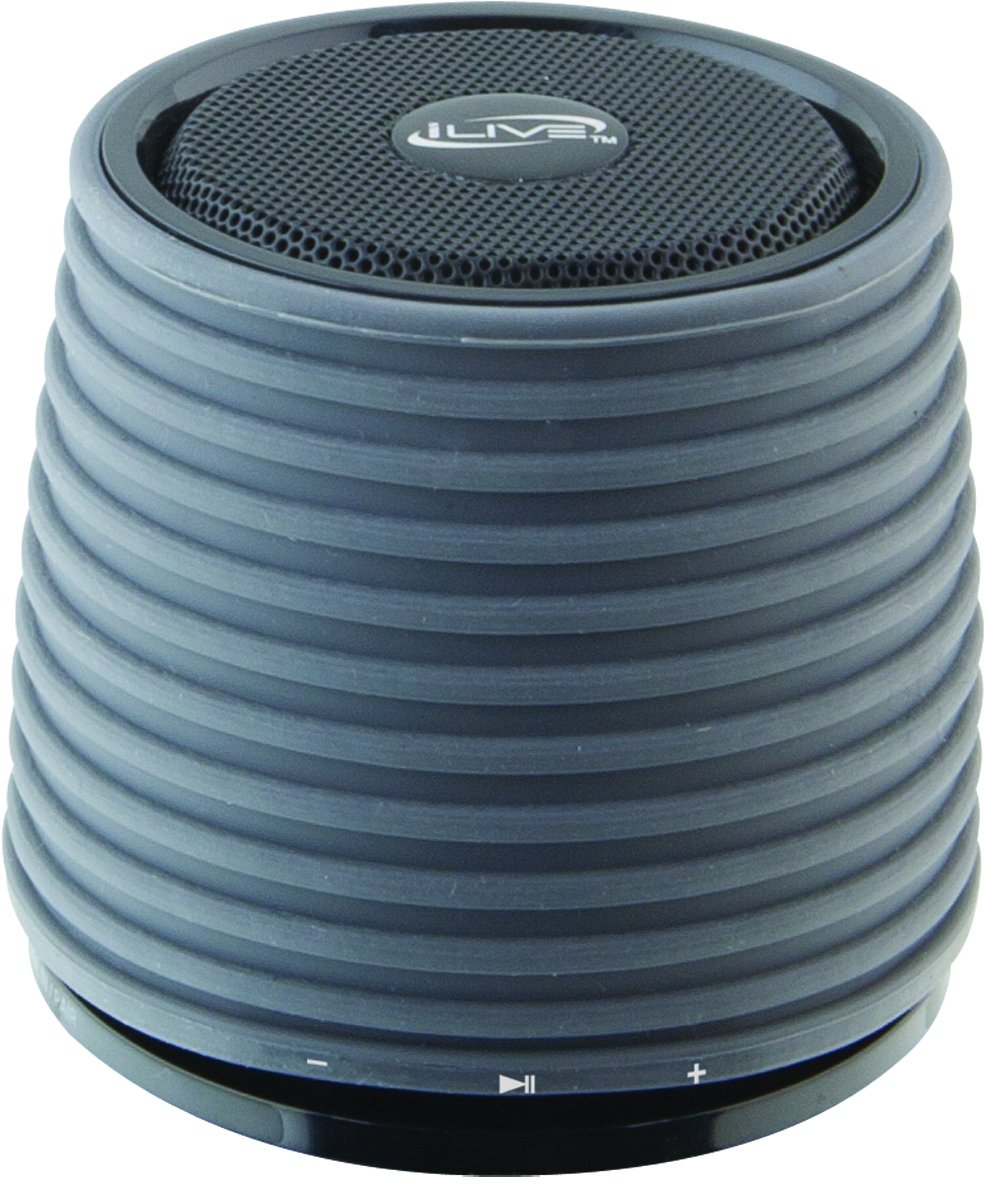
This image displays the iLive ISB212B Bluetooth Speaker. It features a cylindrical shape with a textured grey body and a black speaker grille on top. A band around the middle shows control buttons for play/pause, volume up/next track, and volume down/previous track.
- Putan Cumhachd: Brùth agus cum gus cumhachd air / dheth.
- Putan Cluich/Pause: A’ cumail smachd air ath-chluich claisneachd.
- Putan Meud-thomhais / An ath-òran: Brùth goirid airson an tomhas-lìonaidh a mheudachadh, brùth fada airson an ath òran.
- Putan Lùghdachadh Meud / An Trac Roimhe: Brùth goirid airson an tomhas-lìonaidh a lùghdachadh, brùth fada airson an trac roimhe.
- LED Pairing Indicator: Shows Bluetooth connection status.
- Port Mini-USB: Airson a’ bhataraidh a-staigh a ghearradh.
- Cuir a-steach claisneachd 3.5mm: For connecting external audio devices via an auxiliary cable (not included).
Suidhich
1. A 'cur cosgais air a' Bhataraidh
- Connect the small end of the included Mini-USB to USB charging cable to the Mini-USB port on the speaker.
- Connect the large end of the USB charging cable to a powered USB port (e.g., computer, USB wall adapter).
- Lasaidh an comharra LED suas fhad ’s a bhios e a’ cur cosgais agus tionndaidhidh e dheth no atharraichidh e dath nuair a bhios e làn-chosgais.
- Bheir làn chosgais timcheall air 2 uairean de ùine ath-chluich.
2. A ’toirt cumhachd air / dheth
- To power on, press and hold the Power button until the LED indicator illuminates.
- To power off, press and hold the Power button again until the LED indicator turns off.
Stiùireadh Obrachaidh
1. Càraid Bluetooth
- Dèan cinnteach gu bheil an neach-labhairt air agus taobh a-staigh 30 troigh bhon inneal Bluetooth agad.
- The LED pairing indicator will flash, indicating it is in pairing mode.
- On your Bluetooth device (smartphone, tablet, etc.), enable Bluetooth and search for new devices.
- Select "iLive ISB212B" from the list of available devices.
- Once paired, the LED pairing indicator will become solid, and you may hear an audible confirmation.
- Mura soirbhich leis a’ chàradh, cuir dheth an neach-labhairt agus an inneal agad, agus an uairsin ath-aithris na ceumannan.
2. A ’cluich claisneachd
- Às dèidh paidhreachadh Bluetooth soirbheachail, tòisich a’ cluich claisneachd air an inneal ceangailte agad.
- Use the Play/Pause button on the speaker to control playback.
- Use the Volume Up/Down buttons for volume adjustment. Long press for track navigation.
3. Using the 3.5mm Audio Input
- Connect one end of a 3.5mm audio cable (not included) to the 3.5mm Audio Input port on the speaker.
- Ceangail ceann eile a’ chàball ris a’ phort-cluaise no ris an toradh claisneachd air an inneal claisneachd taobh a-muigh agad.
- Bidh an neach-labhairt ag atharrachadh gu fèin-ghluasadach gu modh cuir a-steach cuideachail.
- Adjust volume using your external device and the speaker's volume controls.
Cumail suas
- Glan an neach-labhairt le clò bog, tioram. Na cleachd innealan-glanaidh sgrìobach no fuasglaidhean.
- Keep the speaker away from water, moisture, and extreme temperatures. This product is not waterproof.
- Stòraich an neach-labhairt ann an àite fionnar, tioram nuair nach eilear ga chleachdadh airson ùine mhòr.
- Na feuch ri an neach-labhairt a thoirt às a chèile no atharrachadh. Cuiridh seo às don bharantas.
Fuasgladh thrioblaidean
| Trioblaid | Fuasgladh |
|---|---|
| Chan eil an neach-labhairt a’ dol air. | Ensure the battery is charged. Connect the speaker to a power source using the Mini-USB cable. |
| Cha ghabh paidhir le inneal Bluetooth. |
|
| Gun fhuaim no meud ìosal. |
|
| Beatha bataraidh goirid. | Ensure the speaker is fully charged before use. Battery life can vary based on volume level and usage. |
Sònrachaidhean
| Feart | Mion-fhiosrachadh |
|---|---|
| Modail Àireamh | ISB 212B |
| Ceangalachd | Bluetooth, 3.5mm Auxiliary, Mini-USB (charging) |
| Cumhachd toraidh neach-labhairt | 3 watt |
| Seòrsa bataraidh | 1 Lithium Ion (air a ghabhail a-steach) |
| Beatha bataraidh (approx.) | 2 Uairean |
| Meudan toraidh | 7.8 x 7.8 x 7.01 cm |
| Cuideam nì | 295 g |
| Dùthaich Tùs | Sìona |
| Uisge-dhìonach | Chan eil |
Barantas agus Taic
This iLive ISB212B Bluetooth Speaker comes with a Barantas 90-latha from the date of purchase. This warranty covers manufacturing defects. For technical support or warranty claims, please refer to the contact information provided with your product packaging or visit the official iLive weblàrach.