
Fysic FX-6000
Leabhar-làimhe Cleachdaiche Fòn DECT le Putanan Mòra Physic FX-6000
Modail: FX-6000
1. Ro-ràdh
Tapadh leibh airson ceannachasing the Fysic FX-6000 Big Button DECT Phone. This manual will guide you through the setup, operation, and maintenance of your new cordless telephone. Please read these instructions carefully before using the phone to ensure proper functionality and safety. Keep this manual for future reference.
2. Fiosrachadh Sàbhailteachd Cudromach
- Cleachd an inneal-atharrachaidh cumhachd agus na bataraidhean a tha air an toirt seachad a-mhàin.
- Na cuir am fòn fo uisge no cus taiseachd.
- Seachain am fòn a chur faisg air stòran teas no solas dìreach na grèine.
- Na feuch ri am fòn fhosgladh no a chàradh thu fhèin. Thoir aire do luchd-obrach teisteanasach airson a h-uile seirbheis.
- Cuir às do bhataraidhean gu ciallach a rèir riaghailtean ionadail.
3. Pasgan-susbaint
Dèan cinnteach gu bheil a h-uile nì an làthair sa phacaid agad:
- Fysic FX-6000 Handset
- Stèisean Bunait
- Inneal-atharrachaidh Cumhachd airson Stèisean Bunait
- Corda loidhne fòn
- 2 x Bataraidhean Ath-luchdaichte AAA NiMH
- Leabhar-làimhe cleachdaiche
4. Toradh thallview
The Fysic FX-6000 features large buttons and a clear display for ease of use.

Figear 4.1: Aghaidh view of the Fysic FX-6000 handset in its charging base, highlighting the large, easy-to-read buttons and the clear, backlit display.
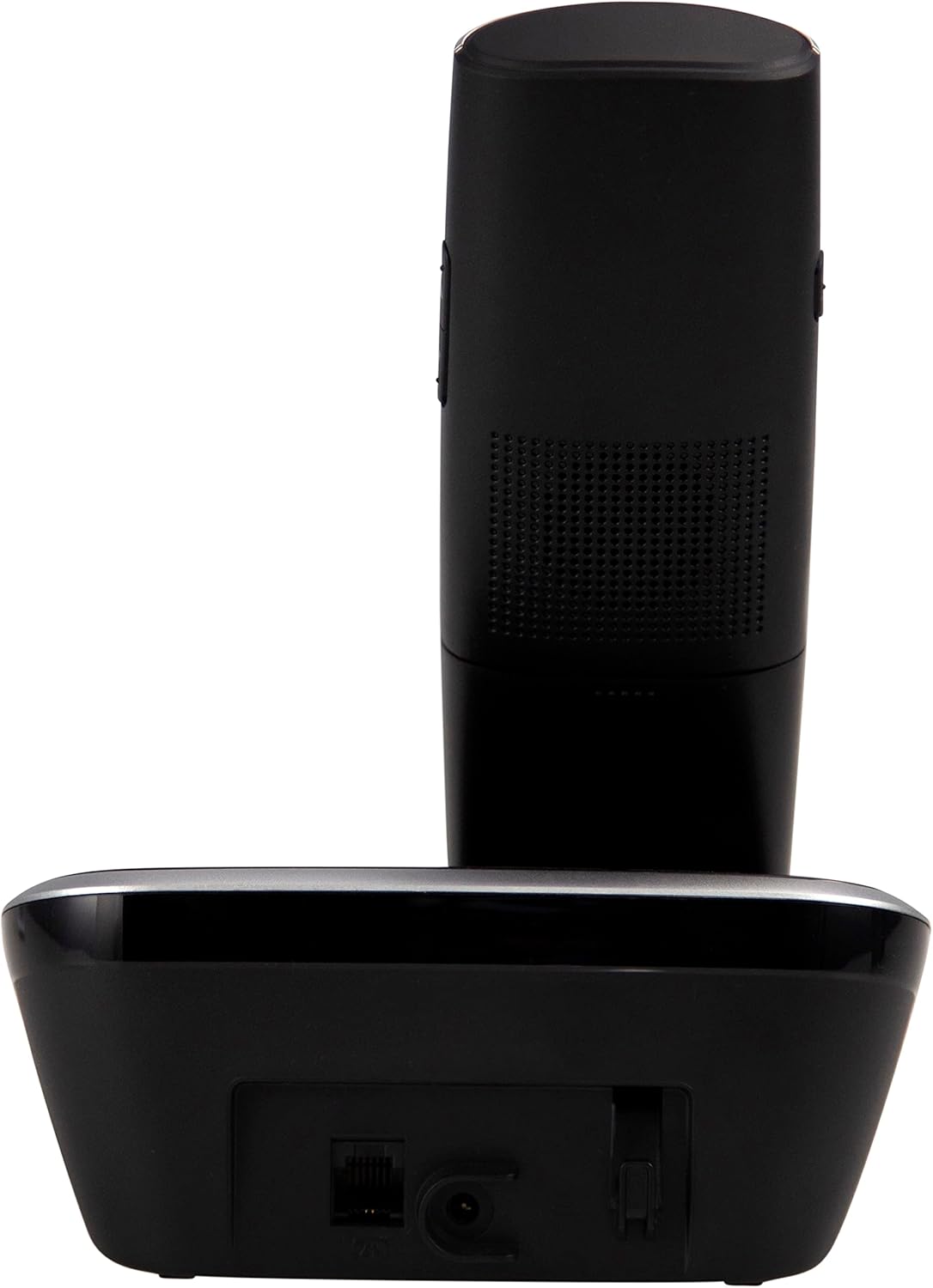
Figear 4.2: Taobh view of the Fysic FX-6000 handset docked in its base station, showing the ergonomic design and side volume buttons.

Figear 4.3: Detailed close-up of the Fysic FX-6000 phone's keypad, emphasizing the large, clearly labeled buttons for easy dialing.

Figear 4.4: Faisg air làimh view of the Fysic FX-6000 phone's backlit display, showing clear icons for battery status, signal strength, and call information.
Cruth Handset
- Taisbeanadh: 1.8-inch backlit screen for caller ID, menu, and status.
- Iuchraichean seòlaidh: For menu navigation and volume adjustment.
- Pad Dial: Large, easy-to-read numeric keys (0-9, *, #).
- Putanan gairm/crìochnachaidh: Green button to answer/make calls, Red button to end calls.
- Memory Keys (M1, M2, M3): For speed dialing frequently used numbers.
- Putan Fòn-labhairt: To activate hands-free mode.
Cruth Stèisean Bunait
- Cradle luchdachadh: Airson an inneal-làimhe a ghearradh.
- Putan Duilleag: Gus inneal-làimhe a chaidh a chall a lorg.
- Soicéad cumhachd: Airson an adapter cumhachd a cheangal.
- Telephone Line Socket: For connecting to the telephone line.
5. Suidhich
5.1 Stàladh bataraidh
- Fosgail an còmhdach roinn bataraidh air cùl an inneal-làimhe.
- Insert the two supplied AAA NiMH rechargeable batteries, observing the correct polarity (+ and -).
- Dùin an còmhdach roinn bataraidh gu tèarainte.
5.2 A’ ceangal an stèisein bhunait
- Connect one end of the telephone line cord to the telephone line socket on the base station.
- Ceangail ceann eile càball na loidhne-fòn ri socaid balla an teileafòn agad.
- Connect the power adapter to the power socket on the base station.
- Cuir an inneal-atharrachaidh cumhachd a-steach do shoitheach dealain freagarrach (220-240V).
5.3 Cosgais Tùsail agus Clàradh Fòn-làimhe
Place the handset on the base station. The handset will automatically begin charging. For optimal battery performance, allow the handset to charge for at least 16 hours before its first use. The handset is pre-registered to the base station from the factory. If for any reason the handset loses its registration, refer to the troubleshooting section for re-registration steps.
6. Stiùireadh Obrachaidh
6.1 A’ dèanamh gairm
- Ro-dhiailiú: Enter the phone number using the dial pad, then press the Gairm Uaine putan.
- Còmhradh dìreach: Brùth an Gairm Uaine button, then enter the phone number.
- Using Memory Keys (M1, M2, M3): Press and hold the desired memory key (M1, M2, or M3) to dial the stored number.
6.2 A’ faighinn fios
Nuair a bhios am fòn a’ glaodhaich, brùth air a’ phutan Gairm Uaine button to answer. The display will show the caller's number if Caller ID service is active.
6.3 Cuir crìoch air gairm
Brùth an Deireadh Dearg a’ Ghairm brùth air a’ phutan no cuir an inneal-làimhe air ais air an stèisean bonn.
6.4 Atharrachadh na Meud-fhuaime
During a call, use the volume up/down buttons on the side of the handset to adjust the earpiece volume. The ringtone volume can be adjusted via the phone's menu settings.
6.5 Obrachadh gun làmhan
Rè gairm, brùth air an Fòn-labhairt button to switch to hands-free mode. Press it again to return to earpiece mode.
6.6 Leabhar-fòn
The phonebook allows you to store frequently called numbers. Refer to the on-screen menu for options to add, edit, or delete contacts.
6.7 Ath-ghairm
Brùth an Deargail button (often integrated with the call log or a dedicated button) to view and redial the last dialed numbers.
6.8 Gnìomh mute
Rè gairm, brùth air an Mut button to temporarily disable your microphone. The other party will not hear you. Press it again to unmute.
7. Cumail suas
7.1 Glanadh
Sguab am fòn agus an stèisean-bonn le clò bog, tioram.amp clò. Na cleachd innealan-glanaidh sgrìobach no fuasglaidhean. Dèan cinnteach gu bheil am fòn air a dhì-cheangal bhon chumhachd mus glan thu e.
7.2 Cùram Bataraidh
- Always use the supplied rechargeable NiMH batteries.
- Mura tèid am fòn a chleachdadh airson ùine mhòr, thoir air falbh na bataraidhean gus casg a chur air aodion.
- Cuir bataraidhean ùra an àite nuair a dh’fhàsas an coileanadh nas miosa gu mòr.
8. A ’dèanamh trioblaid
| Trioblaid | Adhbhar a dh’fhaodadh a bhith ann | Fuasgladh |
|---|---|---|
| Gun fhuaim dial | Telephone line not connected; Power adapter not connected; Handset out of range or not registered. | Check all cable connections; Ensure base station is powered; Move handset closer to base; Re-register handset (see manual for specific steps). |
| Chan eil an inneal-làimhe a’ cur cosgais air | Handset not properly seated in cradle; Dirty charging contacts; Faulty batteries. | Ensure handset is correctly placed; Clean charging contacts on handset and base with a dry cloth; Replace batteries if necessary. |
| Droch chàileachd gairm / Statach | Handset too far from base; Interference from other electronic devices. | Move closer to the base station; Move base station away from other electronic devices (Wi-Fi routers, microwaves). |
| Tha an taisbeanadh falamh | Batteries are depleted or not inserted correctly. | Charge handset for at least 16 hours; Check battery polarity. |
9. Sònrachaidhean Teicnigeach
- Modail: FX-6000
- Brand: Fisic
- Dath: Dubh
- Seòrsa Fòn: Fòn DECT gun uèir
- Taisbeanadh: LCD cùl-sholais 1.8-òirleach
- Bataraidhean: 2 x AAA NiMH Rechargeable (1.2V, 500 mAh)
- Base Power Supply: 6 VDC, 300 mA
- Prìomh chumhachd: 220-240V
- Ùine còmhraidh: Suas ri 10 uairean a thìde
- Am Fuireach: Suas ri 100 uairean a thìde
- Raon a-staigh: Suas gu 50 meatair
- Raon a-muigh: Suas gu 300 meatair
- Meudan (L x W x H): Approximately 8 x 20 x 17 cm (Handset in base)
- Cuideam: Mu 534 gram
- Feartan sònraichte: Large buttons, Hearing aid compatible, Adjustable ringtone/call volume, Mute function, Hands-free operation, GAP compatible.
10. Barantas agus Taic
Fysic products are designed and manufactured to the highest quality standards. For information regarding warranty terms and conditions, please refer to the warranty card included with your product or visit the official Fysic website. For technical support or service inquiries, please contact Fysic customer service through their official channels. Keep your purchase receipt as proof of purchase.
Ask a question about this manual
Ask about setup, troubleshooting, compatibility, parts, safety, or missing instructions. Manuals+ will review the question and use this page’s manual context to help answer it.