
1. Ro-ràdh
The ACV ISO Wiring Harness Adapter (part_B006QTOC30) is an essential component for integrating aftermarket audio systems, such as Parrot hands-free kits or new head units, into specific Volvo vehicles. This adapter ensures a plug-and-play connection, preserving the vehicle's original wiring integrity and simplifying the installation process. It is specifically designed for Volvo S40, V50, and XC90 models equipped with High Performance audio systems.
This manual provides comprehensive instructions for the safe and correct installation and operation of your wiring harness adapter.
2. Setup agus Stàladh
Sàbhailteachd an toiseach: Before beginning any installation, ensure the vehicle's ignition is off and the negative terminal of the battery is disconnected to prevent electrical shorts or damage.
2.1 Susbaint a’ phacaid
- ACV ISO Wiring Harness Adapter (part_B006QTOC30)
2.2 Ceumannan stàlaidh
- Ullaich an carbad: Ensure the vehicle is turned off and the battery's negative terminal is disconnected. Carefully remove the existing car stereo or access the vehicle's factory wiring harness behind the dashboard. Refer to your vehicle's service manual for specific instructions on dashboard disassembly.
- Comharraich luchd-ceangail: Locate the vehicle's factory wiring harness connectors. These are typically multi-pin connectors that plug into the back of the original radio.
- Ceangail an Adapter: Plug the vehicle-specific end of the ACV ISO Wiring Harness Adapter into the corresponding factory wiring harness connectors in your Volvo. Ensure a secure and firm connection.
- Connect Aftermarket Unit: Connect the ISO connectors of the ACV adapter to the ISO connectors on your aftermarket car stereo or Parrot hands-free kit. The adapter is designed to match the standard ISO pinout, making this connection straightforward.
- Uèir tèarainte: Route all cables neatly and securely to prevent pinching or interference. Use cable ties if necessary.
- Gnìomhachd deuchainn: Before fully reassembling the dashboard, reconnect the vehicle's battery. Turn on the ignition and test the functionality of the newly installed aftermarket unit. Verify power, audio output, and any other integrated features (e.g., steering wheel controls if applicable and supported by the aftermarket unit and adapter).
- Ath-thionndaidh: Once all functions are confirmed, carefully reassemble the dashboard components.
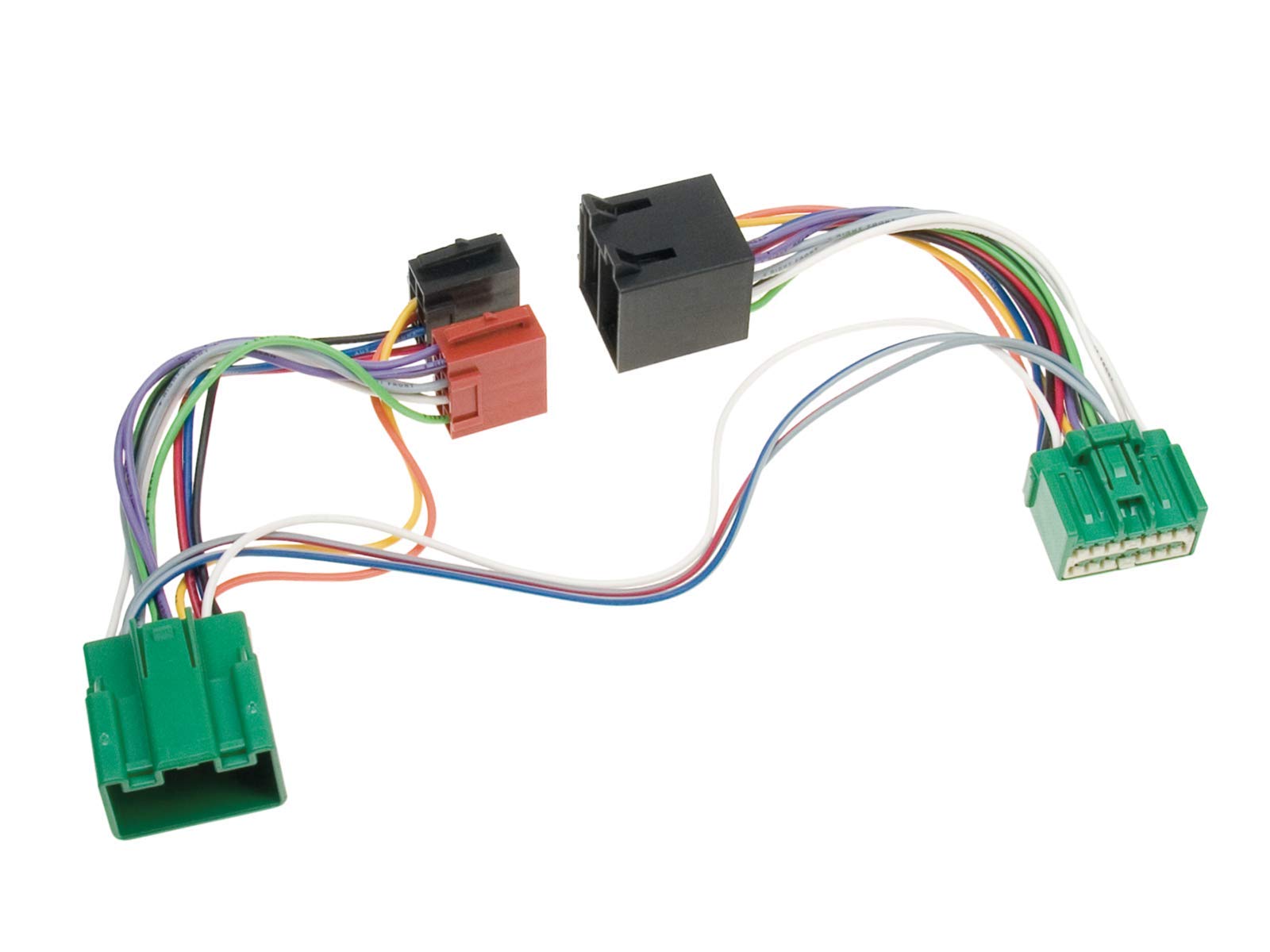
Figear 1: The ACV ISO Wiring Harness Adapter. This image displays the multi-colored wires connecting various black, red, and green plastic connectors, illustrating the adapter's design for connecting different audio components within a vehicle's electrical system.
Thoir an aire: If you are unsure about any step of the installation process, it is highly recommended to seek assistance from a qualified car audio installer or automotive technician.
3. A’ cleachdadh an inneal-atharrachaidh
The ACV ISO Wiring Harness Adapter is a passive component designed to facilitate electrical connections. Once correctly installed, it operates seamlessly in the background, allowing your aftermarket audio system or hands-free kit to function as intended with the vehicle's electrical system. There are no user-operable controls on the adapter itself.
4. Cumail suas
The ACV ISO Wiring Harness Adapter requires minimal maintenance. To ensure its longevity and proper function:
- Keep the adapter and its connections dry and free from moisture.
- Seachain an inneal-atharrachaidh a nochdadh do theodhachd anabarrach no do sholas dìreach na grèine airson ùine mhòr.
- Do not bend, twist, or pull the wires excessively, as this can damage the internal conductors or connections.
- Ensure all connections remain secure over time.
5. A ’dèanamh trioblaid
If you encounter issues after installing the ACV ISO Wiring Harness Adapter, consider the following troubleshooting steps:
| Trioblaid | Adhbhar a dh’fhaodadh a bhith ann | Fuasgladh |
|---|---|---|
| Aftermarket unit has no power. | Loose connection; Blown fuse; Incorrect wiring. | Check all connections for tightness. Inspect vehicle's fuse box and aftermarket unit's fuse. Verify wiring against diagrams. |
| Gun fhuaim bho luchd-labhairt. | Speaker wires disconnected; Amplifier issue (if applicable); Incorrect speaker polarity. | Ensure speaker wires are correctly connected to the adapter and aftermarket unit. Check amplifier power and connections. Verify speaker polarity. |
| Unit powers on but no sound/intermittent sound. | Poor ground connection; Damaged wire. | Ensure the ground wire is securely connected to a clean metal surface. Inspect wires for any visible damage. |
| Vehicle-specific functions (e.g., steering wheel controls) not working. | Adapter does not support feature; Aftermarket unit not configured. | Confirm if the specific adapter model supports these features. Check aftermarket unit's settings for steering wheel control configuration. Additional interfaces may be required. |
If problems persist after troubleshooting, contact customer support or a professional installer.
6. Sònrachaidhean
- Brand: Acv
- Àireamh Modail: part_B006QTOC30
- Stuth: Copar, Poileibhinil Chlòraid (PVC)
- Seòrsa ceangail: ISO
- Co-chòrdalachd: Volvo S40, V50, XC90 (High Performance audio systems)
- Dèanadair: ACV
7. Barantas agus Taic
This product is covered by the standard manufacturer's warranty. Please refer to the warranty information provided at the time of purchase or contact your retailer for details regarding warranty terms and conditions.
For technical support, installation assistance, or inquiries about product compatibility, please contact the manufacturer (ACV) or your authorized dealer. Keep your purchase receipt as proof of purchase for any warranty claims.