
1. Ro-ràdh
Tapadh leibh airson ceannachasing the Caliber RMD 068-2 Car Radio USB/SD Player. This manual provides detailed instructions for the installation, operation, and maintenance of your new car radio. Please read this manual thoroughly before using the product to ensure proper functionality and safety. Keep this manual for future reference.
2. Fiosrachadh Sàbhailteachd
- Stàladh: Ensure the unit is installed by a qualified technician to prevent damage to the vehicle's electrical system. Incorrect wiring can cause fire or electrical shock.
- Solar cumhachd: Ceangail an aonad ri bataraidh càr 12V DC le talamh àicheil a-mhàin.
- fuses: Always replace fuses with new ones of the specified rating. Using an incorrect fuse can cause damage to the unit or vehicle.
- Ìre Tomhais: Do not operate the unit at excessively high volume levels, as this may impair your ability to hear external traffic sounds and could be dangerous.
- Glanadh: Cleachd clò bog, tioram airson glanadh. Na cleachd luchd-glanaidh sgudail no solventan.
- Taiseachd: Na cuir an aonad gu taiseachd no uisge.
3. Pasgan-susbaint
Feuch an dèan thu cinnteach gu bheil na nithean uile an làthair:
- Caliber RMD 068-2 Car Radio Unit
- Pannal aghaidh so-ruigsinneach
- Uidheam Uèiridh ISO
- Frèam sreap
- Disassembly Keys (2 pcs)
- Leabhar-làimhe cleachdaiche (an sgrìobhainn seo)
4. Toradh thallview
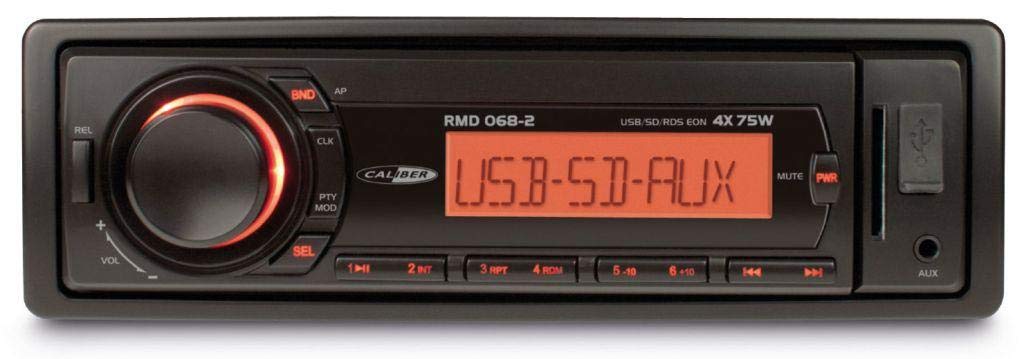
Figear 1: Aghaidh view of the Caliber RMD 068-2 Car Radio. This image shows the main unit with its detachable front panel, including the display, control buttons, USB port, and SD card slot.
4.1 Smachdan Pannal aghaidh
- POWER/MODE Button: Press to turn on/off. Short press to switch between Radio, USB, SD, AUX modes.
- Knob VOLUME: Rotate to adjust volume. Press to access audio settings (Bass, Treble, Balance, Fader).
- DISPLAY: Shows current time, radio frequency, track information, etc.
- Port USB: Ceangail draibhearan USB flash airson ath-chluich meadhanan.
- Slot cairt SD: Cuir a-steach cairtean SD airson ath-chluich meadhanan.
- Cuir a-steach AUX (Seacaid 3.5mm): Ceangail innealan claisneachd taobh a-muigh.
- BAND/AMS Button: In radio mode, press to select radio band (FM1, FM2, FM3). Long press for Automatic Memory Store.
- Putanan ro-shuidhichte (1-6): Store and recall radio stations. In USB/SD mode, use for direct track selection.
- Putan PLAY / PAUSE: Cluich no stad ath-chluich nam meadhanan.
- FORWARD/BACKWARD Buttons: Skip tracks or tune radio frequency.
- Putan TOIRT A-MACH: Release the detachable front panel.
4.2 Ceanglaichean Cùil
The rear of the unit features standard ISO connectors for power and speakers, along with an antenna input.
- ISO Power Connector: For connecting to the vehicle's power supply (constant 12V, ignition 12V, ground).
- ISO Speaker Connector: For connecting to the vehicle's speakers (Front Left, Front Right, Rear Left, Rear Right).
- Cuir a-steach antenna: For connecting the car's radio antenna.
5. Suidhich
5.1 Stàladh
- Disconnect Bataraidh: Before starting, disconnect the negative terminal of your car battery to prevent short circuits.
- Thoir air falbh an t-Seann Aonad: Carefully remove your existing car radio from the dashboard.
- Stàlaich Frèam Suidheachaidh: Insert the supplied mounting frame into the dashboard opening and bend the tabs to secure it.
- Ceangal Wiring: Refer to the wiring diagram in section 5.2. Connect the ISO wiring harness to the car's wiring and then to the Caliber RMD 068-2 unit. Connect the antenna cable.
- Slide Unit In: Carefully slide the Caliber RMD 068-2 unit into the mounting frame until it clicks into place.
- Ath-cheangail bataraidh: Reconnect the negative terminal of your car battery.
- Ceangail am pannal aghaidh: Attach the detachable front panel to the main unit.
5.2 Diagram uèiridh
The Caliber RMD 068-2 uses standard ISO connectors. Ensure correct connections as shown below. If your vehicle does not have ISO connectors, an adapter may be required.
| Pin Àir. | Wire Color (Typical) | Gnìomh |
|---|---|---|
| 4 | Buidhe | 12V seasmhach (Bataraidh) |
| 7 | Dearg | Tionndadh 12V (Ignition) |
| 8 | Dubh | Talamh |
| 5 | Gorm | Antenna Remote Out |
| Pin Àir. | Wire Color (Typical) | Gnìomh |
|---|---|---|
| 1 | Purpaidh | Cùl deas (+) |
| 2 | Purpaidh/Dubh | Cùl deas (-) |
| 3 | Uaine | Cùl air chlì (+) |
| 4 | Uaine/Dubh | Cùl clì (-) |
| 5 | Glas | Aghaidh dheas (+) |
| 6 | Liath/Dubh | Aghaidh dheas (-) |
| 7 | Geal | Aghaidh chlì (+) |
| 8 | Geal/Dubh | Aghaidh chlì (-) |
Note: Wire colors may vary depending on vehicle manufacturer. Always consult your vehicle's wiring diagram.
6. Stiùireadh Obrachaidh
6.1 Gnìomhan Bunaiteach
- Cumhachd air / dheth: Brùth an CUMHACHD / MODE putan gus an aonad a thionndadh air no dheth.
- Smachd tomhas-lìonaidh: Rothaich an LUACHMHOR tionndaidh an cnap deiseal gus an fhuaim a mheudachadh, tuathal gus a lùghdachadh.
- Taghadh Modh: Brùth goirid air an CUMHACHD / MODE button to cycle through available modes: Radio (FM), USB, SD, AUX.
- Roghainnean Fuaim: Brùth an LUACHMHOR knob to enter audio settings. Rotate the knob to select settings like BASS, TREBLE, BALANCE, FADER. Press the knob again to confirm or move to the next setting.
6.2 Obrachadh Rèidio
- Taghadh Còmhlan: Ann am modh rèidio, brùth air a’ phutan BAND / AMS putan gus atharrachadh eadar còmhlain FM1, FM2, agus FM3.
- Tuning Stiùireadh: Brùth goirid air an Air adhart/air ais putanan gus an tricead a ghleusadh gu mionaideach.
- Rannsachadh fèin-ghluasadach: Brùth fada air an Air adhart/air ais putanan gus an ath stèisean làidir a lorg gu fèin-ghluasadach.
- Presets Bùth: Tune to your desired station. Long press one of the RO-SHUIDHEADH (1-6) buttons until you hear a beep. The station is now stored.
- Ath-ghairm Presets: Short press one of the RO-SHUIDHEADH (1-6) buttons to recall a stored station.
- Stòradh Cuimhne Fèin-ghluasadach (AMS): Brùth fada air an BAND / AMS putan gus na stèiseanan as làidire a sganadh agus a stòradh gu fèin-ghluasadach ann an ro-shuidheachaidhean a’ chòmhlain làithreach.
Ath-chluich USB/SD 6.3
- Cuir a-steach Meadhanan: Cuir draibh USB a-steach don phort USB no cairt SD a-steach don t-slot cairt SD. Bidh an aonad gu fèin-ghluasadach a’ gluasad gu modh USB/SD agus a’ tòiseachadh air ath-chluich.
- Cluich / Stad: Brùth an CLÀR/stad putan gus stad no ath-chluich ath-thòiseachadh.
- Slighe leum: Brùth goirid air an Air adhart/air ais putanan gus leum chun ath cheum no slighe roimhe.
- Fast Forward / Rewind: Brùth fada air an Air adhart/air ais putanan airson gluasad air adhart no air ais taobh a-staigh òrain.
- Seòladh Pasgan: Cleachd an PREAS 5 agus PREAS 6 buttons to navigate between folders on your USB/SD media.
Cuir a-steach 6.4 AUX
- Inneal ceangail: Connect your external audio device (e.g., smartphone, MP3 player) to the 3.5mm AUX input jack on the front panel using an audio cable.
- Tagh Modh AUX: Brùth an CUMHACHD / MODE button repeatedly until "AUX" is displayed.
- Ath-chluich smachd: Control playback (play, pause, skip) directly from your connected external device. The car radio will control the volume.
7. Cumail suas
- A 'glanadh an aonaid: Use a soft, dry cloth to wipe the front panel and display. Do not use harsh chemicals, cleaning sprays, or abrasive cloths, as these can damage the surface.
- Detachable Front Panel: When detaching the front panel, handle it carefully. Store it in a protective case (if supplied) to prevent scratches or damage.
- Puirt USB/SD: Keep the USB port and SD card slot free from dust and debris.
8. A ’dèanamh trioblaid
| Trioblaid | Adhbhar a dh’fhaodadh a bhith ann | Fuasgladh |
|---|---|---|
| Gun chumhachd | Fiùs air a shèideadh; Uèirleadh ceàrr; Ceangal sgaoilte | Check and replace fuse; Verify wiring connections (Yellow to constant 12V, Red to ignition 12V, Black to ground); Ensure front panel is securely attached. |
| Gun fhuaim | Volume too low; Mute activated; Incorrect speaker wiring; Damaged speakers | Meudaich an tomhas-lìonaidh; Thoir sùil a bheil am fuaim balbh gnìomhach; Dearbhaich ceanglaichean luchd-labhairt; Dèan deuchainn le luchd-labhairt a tha aithnichte mar luchd-labhairt math. |
| Glacadh rèidio bochd | Antenna not connected; Damaged antenna; Weak signal area | Ensure antenna is securely connected; Check antenna for damage; Try tuning to a stronger station or move to a different location. |
| Chan eil USB/SD a’ cluich | Gun taic file format; Corrupted media; Incorrectly inserted media; Max capacity exceeded | Dèan cinnteach files are MP3/WMA format; Try a different USB/SD card; Reinsert media correctly; Check media capacity (max 32GB recommended). |
| Front panel cannot be detached | Eject button not fully pressed; Mechanism jammed | Press the EJECT button firmly; Do not force the panel. |
If the problem persists after trying these solutions, please contact your dealer or a qualified service center.
9. Sònrachaidhean
- Modail: Caliber RMD 068-2
- Toradh cumhachd: 4 x 75 Watts Max
- Solar cumhachd: 12V DC (10.8V-15.6V), Negative Ground
- fiùs: 10A
- Cruthan claisneachd le taic: MP3, WMA (via USB/SD)
- USB/SD Compatibility: Suas ri 32GB (cruth FAT32)
- Tuner FM: RDS, 18 Presets
- Input AUX: Stereo Jack 3.5mm
- Detachable Front Panel: Tha
- Cuideam: Mu 0.95 kg (2.09 lbs)
10. Barantas agus Taic
This Caliber product is covered by a warranty in accordance with applicable European laws. For detailed warranty terms and conditions, please refer to the warranty card included with your product or visit the official Caliber website. For technical support, troubleshooting assistance, or service inquiries, please contact your authorized Caliber dealer or the customer service department in your region. Please have your product model number (RMD 068-2) and proof of purchase ready when contacting support.
Note: Specifications and design are subject to change without notice for improvement.