
Sonic Alert SBJ525SS
Leabhar-stiùiridh airson Cloc-rabhaidh Didseatach Sonic Alert SBJ525SS
Model: SBJ525SS
Ro-ràdh
This manual provides comprehensive instructions for the setup, operation, and maintenance of your Sonic Alert SBJ525SS Digital Alarm Clock. Please read this manual thoroughly before using the device to ensure proper function and longevity. This alarm clock is designed to provide reliable timekeeping and alarm functions, including a powerful vibrating bed shaker, loud audible alarm, and visual alert features.
Fiosrachadh Sàbhailteachd
- Ensure the power adapter is connected to a standard electrical outlet.
- Na cuir an aonad fo uisge no cus taiseachd.
- Seachain an aonad a chur faisg air stòran teas no ann an solas dìreach na grèine.
- Cùm a-mach à ruigsinn chloinne.
- Use only the provided power adapter and bed shaker.
Susbaint pacaid
Dèan cinnteach gu bheil a h-uile rud anns a’ phacaid agad:
- Sonic Alert SBJ525SS Digital Alarm Clock Unit
- 12-Volt Vibrating Bed Shaker
- Adapter cumhachd
- Leabhar-làimhe stiùiridh
Bathar seachadview
Familiarize yourself with the various parts and controls of your alarm clock.
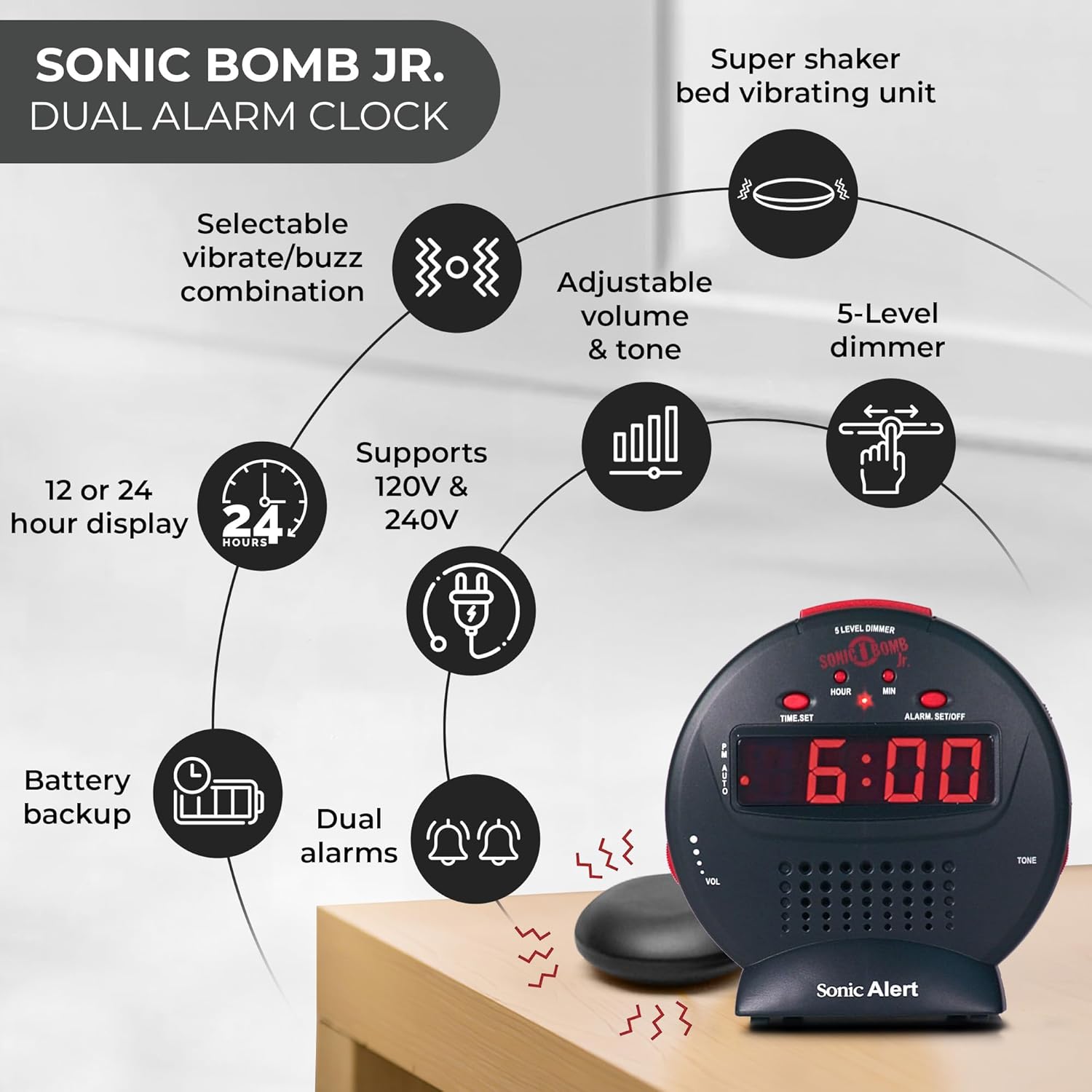
Tuairisgeul Ìomhaigh: A diagram illustrating the Sonic Alert SBJ525SS Digital Alarm Clock. Key features highlighted include the 12 or 24-hour display, battery backup, dual alarms, selectable vibrate/buzz combination, adjustable volume and tone, 5-level dimmer, and the super shaker bed vibrating unit. The clock supports 120V & 240V power.
The clock features a large digital display, control buttons for time and alarm settings, and adjustment knobs for volume and tone. A dedicated port is available for the bed shaker connection.
Suidhich
1. Ceangal Cumhachd
- Connect the power adapter to the DC IN jack on the back of the alarm clock.
- Plug the power adapter into a standard electrical wall outlet. The display will illuminate.
2. Stàladh cùl-taic bataraidh
The alarm clock requires 2 AA batteries (not included) for battery backup functionality. This ensures your time and alarm settings are retained during a power outage.
- Lorg roinn a’ bhataraidh aig bonn an aonaid.
- Fosgail an còmhdach roinn bataraidh.
- Cuir a-steach 2 bataraidh AA, a’ cumail sùil air a’ phòlaireachd cheart (+/-).
- Cuir an àite còmhdach roinn bataraidh.

Tuairisgeul Ìomhaigh: A graphic illustrating the battery backup feature of the alarm clock. It shows the clock on a nightstand with a small circular battery icon (CR2032, 3V) next to it, indicating the type of battery used for backup. The text emphasizes that batteries are not included and are for retaining settings during power outagtha.
3. Suidheachadh ùine
- Brùth agus cùm an SEANN TIOMNAIDH putan. Tòisichidh na figearan uair a’ priobadh.
- Brùth an UAIR brùth air a’ phutan a-rithist is a-rithist gus an uair atharrachadh. Thoir sùil air a’ chomharra PM airson an suidheachadh AM/PM ceart.
- Brùth an MIN brùth air a’ phutan a-rithist is a-rithist gus na mionaidean atharrachadh.
- Brùth SEANN TIOMNAIDH a-rithist gus an ùine a dhearbhadh.
- Gus atharrachadh eadar cruth 12-uair agus 24-uair, brùth air a’ phutan 12/24h button (if available, otherwise it might be part of time set cycle).
4. Ceangal Crith-leapa
The vibrating bed shaker is an integral part of the Sonic Alert system, designed for heavy sleepers or individuals with hearing impairments.
- Locate the jack labeled Shaker on the back of the alarm clock.
- Insert the plug of the bed shaker into this jack.
- Place the bed shaker under your pillow, between your mattress and box spring, or under a fitted sheet for optimal vibration.

Tuairisgeul Ìomhaigh: A composite image showing three different methods for placing the super bed shaker: under a pillow, under a fitted sheet, and under a mattress. The image also highlights the 6ft long cable of the shaker.
Stiùireadh Obrachaidh
1. Setting Alarms (Dual Alarms)
The SBJ525SS features dual alarms, allowing you to set two independent wake-up times.
- Brùth agus cùm an ALARM SET/OFF button once for Alarm 1. The hour digits for Alarm 1 will flash.
- Cleachd an UAIR agus MIN putanan gus an ùine rabhaidh a tha thu ag iarraidh a shuidheachadh.
- Brùth ALARM SET/OFF again to confirm Alarm 1 and proceed to Alarm 2. The hour digits for Alarm 2 will flash.
- Cleachd an UAIR agus MIN buttons to set the desired time for Alarm 2.
- Brùth ALARM SET/OFF a third time to confirm Alarm 2 and exit alarm setting mode.
- To activate or deactivate an alarm, press the ALARM SET/OFF button briefly (not held). Each press cycles through Alarm 1 ON, Alarm 2 ON, Both Alarms ON, Both Alarms OFF. An indicator light on the display will show which alarm(s) are active.

Tuairisgeul Ìomhaigh: A bedroom scene with a couple sleeping, and the Sonic Alert alarm clock prominently displayed on a nightstand. The text overlay emphasizes the "Dual Alarm Clock" feature, allowing two different alarms to be set for reliable wake-up times.
2. Alarm Modes (Vibrate, Sound, Both)
The alarm clock offers various alert modes:
- Vibrate Only: The bed shaker will activate without an audible alarm.
- Fuaim a-mhàin: The audible alarm will sound without bed shaker activation.
- An dà chuid: Both the bed shaker and audible alarm will activate simultaneously.
To select the alarm mode, use the MODAR ALARM switch located on the side or back of the unit. Cycle through the options until your desired mode is selected.

Tuairisgeul Ìomhaigh: A woman sleeping in bed with the Sonic Alert alarm clock and its bed shaker visible on the adjacent nightstand. The image highlights the clock's features: a powerful 6-volt bed shaker, 102dB loud alarm with adjustable tone and volume, alarm and bed shaker test mode, and built-in red flashing lights.
3. Gnìomh Snooze
Nuair a chluinneas tu an inneal-rabhaidh, brùth air a’ phutan mhòr SNOZE button on top of the unit to temporarily silence the alarm. The alarm will sound again after the set snooze duration.
- The snooze duration is adjustable from 1 to 30 minutes. Refer to the full instruction manual for specific steps on adjusting the snooze time.
Tuairisgeul Ìomhaigh: A man sleeping in bed with the Sonic Alert alarm clock on his bedside table. An overlay graphic shows a slider indicating the adjustable snooze duration from 1 to 30 minutes.
4. Brightness Dimmer
Adjust the display brightness to your preference using the 5-level dimmer function.
- Lorg an DIMMHOR control (often a slider or button) on the unit.
- Adjust the control to cycle through the 5 brightness levels, from brightest (5) to dimmest (1).

Tuairisgeul Ìomhaigh: A woman sleeping in a bedroom with the Sonic Alert alarm clock on her nightstand. Below, a series of five clock images illustrate the different brightness levels of the display, from level 5 (brightest) to level 1 (dimmest), demonstrating the five-level dimmer feature.
5. Atharrachadh tomhas-lìonaidh agus tòna
Customize the audible alarm sound to your preference.
- Cleachd an VOL (Volume) knob/slider to increase or decrease the alarm's loudness.
- Cleachd an TÒIN knob/slider to adjust the pitch of the alarm sound.

Tuairisgeul Ìomhaigh: A faisg air làimh view of the Sonic Alert alarm clock, specifically highlighting the volume control slider on its side. The accompanying text explains how to adjust the sound with ease using the knobs for volume and tone.

Tuairisgeul Ìomhaigh: The Sonic Alert alarm clock on a white surface, with a graphic overlay demonstrating the adjustable tone feature. Sound waves emanate from the clock, and a slider indicates the range of tone adjustments available.
6. USB Charging Port Usage
The alarm clock includes a built-in USB port for charging compatible handheld devices.
- Locate the USB charging port on the side or back of the unit.
- Ceangail càball cosgais USB an uidheim agad ris a’ phort.
- Ensure your device begins charging. Note that charging speed may vary depending on the device and cable.

Tuairisgeul Ìomhaigh: A woman reaching for her smartphone, which is connected and charging via the built-in USB port on the Sonic Alert alarm clock, placed on a nightstand next to her bed.
Cumail suas
- Glanadh: Sguab an aonad le clò bog, tioram. Na cleachd innealan-glanaidh leaghaidh no stuthan sgrìobach.
- Ath-nuadhachadh bataraidh: Replace backup batteries annually or when the battery low indicator appears to ensure continuous backup functionality.
- Stòradh: Ma tha thu a’ stòradh an aonaid airson ùine mhòr, thoir air falbh na bataraidhean cùl-taic gus casg a chuir air aodion.
Fuasgladh thrioblaidean
| Trioblaid | Adhbhar a dh’fhaodadh a bhith ann | Fuasgladh |
|---|---|---|
| Tha taisbeanadh a’ chloca dheth no a’ priobadh. | Power adapter not connected or faulty; power outage. | Ensure power adapter is securely plugged in. Check wall outlet. If power outage, battery backup should maintain time (display will be off). |
| Chan eil an inneal-rabhaidh a’ dèanamh fuaim/crith. | Alarm not activated; incorrect alarm mode selected; volume too low; bed shaker not connected. | Verify alarm is ON (indicator light). Check alarm mode switch. Increase volume. Ensure bed shaker is securely plugged in. |
| Thèid roghainnean ùine/rabhaidh a chall às dèidh a’ chumhachd a chuir dheth.tage. | Tha bataraidhean cùl-taic marbh no gun a bhith air an stàladh. | Install fresh AA batteries in the battery compartment. |
| Tha cosgais USB slaodach no chan eil e ag obair. | Device incompatibility; faulty USB cable; device requires higher power output. | Try a different USB cable. Ensure your device is compatible with standard USB charging. The clock's USB port provides standard charging output. |
Sònrachaidhean
| Brand | Sonic Alert |
| Modail Àireamh | SBJ525SS |
| Seòrsa Taisbeanaidh | Didseatach |
| Feartan sònraichte | Alarm, Auto Dimmable, Snooze, Vibrating Bed Shaker, USB Charging Port, Red Flashing Alert Lights |
| Stòr cumhachd | Corded Electric with Battery Backup (2 AA batteries required, not included) |
| Meudan toraidh | 5"L x 5"À |
| Stuth | Plastaig |
| Fuaim rabhaidh | Up to 102dB (with bed shaker) |
Barantas agus Taic
The Sonic Alert SBJ525SS Digital Alarm Clock comes with a Limited Warranty. For specific warranty terms and conditions, please refer to the warranty card included with your product or visit the official Sonic Alert weblàrach.
For technical support, troubleshooting assistance, or to inquire about replacement parts, please contact Sonic Alert customer service:
- Weblàrach: www.sonicalert.com
- Fiosrachadh conaltraidh: Thoir sùil air an oifigeach weblàrach-lìn no pacaigeadh toraidh airson am fiosrachadh conaltraidh as ùire.
Tuairisgeul Ìomhaigh: An open instruction manual for the Sonic Bomb Jr. alarm clock, showing detailed operational instructions and diagrams. This image signifies that a manual is included with the product for user guidance.