
1. Ro-ràdh
Tapadh leibh airson ceannachasing the Atlanta 1669/19 Quartz Alarm Clock. This digital alarm clock features a silent movement, a light sensor for automatic display illumination, and a snooze function. This manual provides detailed instructions for setup, operation, and maintenance to ensure optimal performance and longevity of your device.
2. Fiosrachadh Sàbhailteachd
- Cùm an inneal air falbh bho uisge agus àrd taiseachd.
- Seachain a bhith a’ nochdadh a’ chloc do sholas dìreach na grèine no teòthachd anabarrach.
- Na feuch ri an gleoc a thoirt às a chèile no a chàradh thu fhèin. Cuir fios gu luchd-obrach seirbheis teisteanasach.
- Cuir às do bataraidhean cleachdte gu ciallach a rèir riaghailtean ionadail.
- Na bi a’ measgachadh bataraidhean sean is ùr, no diofar sheòrsaichean bataraidhean.
3. Pasgan-susbaint
- Atlanta 1669/19 Quartz Alarm Clock Unit
- Leabhar-làimhe cleachdaiche (an sgrìobhainn seo)
Nota: Chan eil bataraidhean air an toirt a-steach agus feumar an ceannach air leth.
4. Toradh thallview
The Atlanta 1669/19 features a clear digital display, intuitive controls, and a light sensor for enhanced visibility in low-light conditions.
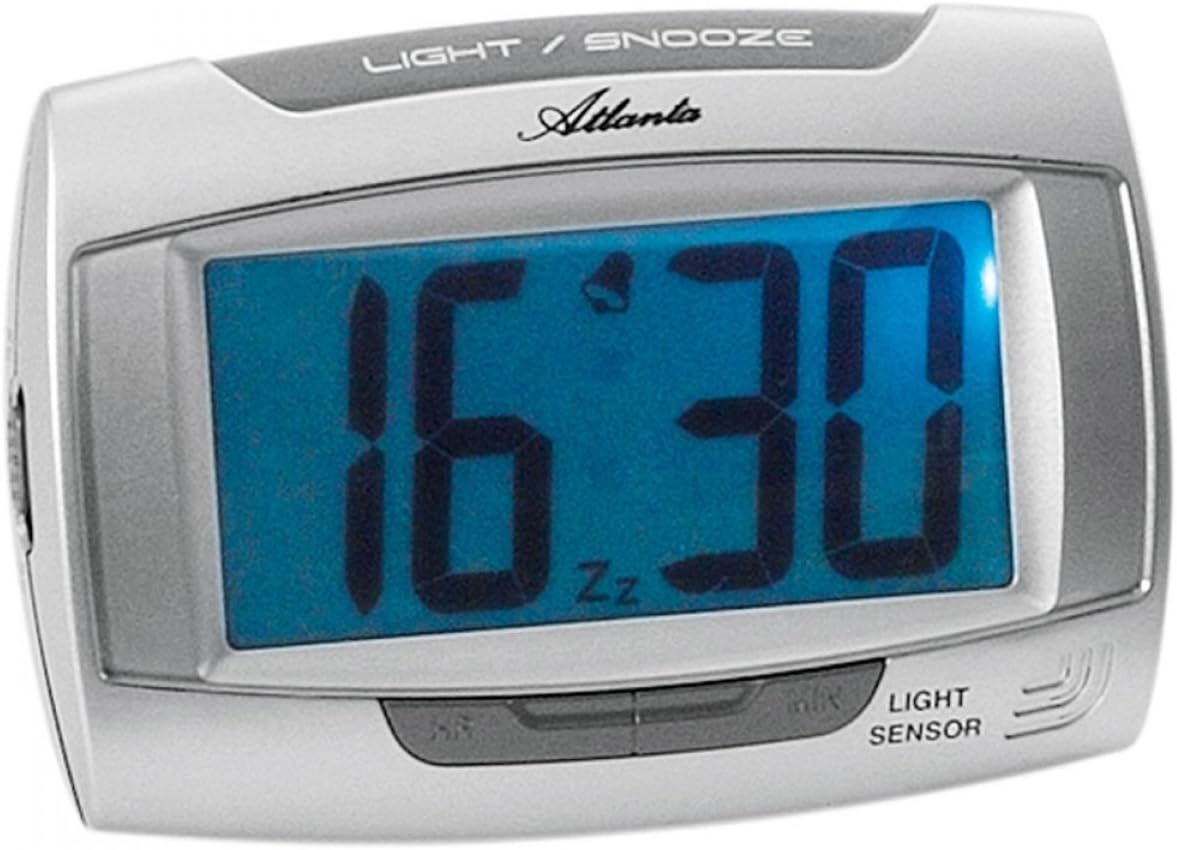
Figear 1: Aghaidh view of the Atlanta 1669/19 Quartz Alarm Clock. The clock features a large digital display, a "LIGHT / SNOOZE" button at the top, and a "LIGHT SENSOR" indicator at the bottom right. The display shows the time 16:30, with an alarm bell icon and 'Zz' indicating snooze functionality.
Prìomh cho-phàirtean:
- Taisbeanadh didseatach: A’ sealltainn an ùine agus inbhe an rabhaidh.
- LIGHT / SNOOZE Button: Activates temporary backlight and snooze function.
- Sensor Solais: Automatically illuminates the display in dark environments.
- Control Buttons (Rear/Side): For setting time and alarm.
- Battery Compartment (Rear): A’ cumail na bataraidhean a tha a dhìth.
5. Suidhich
5.1. Stàladh bataraidh
- Lorg còmhdach roinn a’ bhataraidh air cùl a’ chloc-rabhaidh.
- Remove the cover by sliding or lifting it.
- Insert the required batteries (typically 1x AA, refer to compartment markings) ensuring correct polarity (+ and -).
- Cuir an àite còmhdach roinn bataraidh gu tèarainte.
5.2. Suidheachadh Tùsail na h-Ùine
Upon battery installation, the display will typically show a default time. You will need to set the current time.
- Locate the time setting buttons, usually labeled "SET", "HOUR", and "MINUTE" or similar, on the back or side of the clock.
- Press the "SET" button (or equivalent) to enter time setting mode. The hour digits may start flashing.
- Use the "HOUR" button to adjust the hour.
- Press "SET" again to move to minute setting. The minute digits may start flashing.
- Use the "MINUTE" button to adjust the minutes.
- Press "SET" one more time to confirm and exit time setting mode.
6. Stiùireadh Obrachaidh
6.1. A ’suidheachadh an inneal-rabhaidh
- Locate the alarm setting buttons, typically labeled "ALARM SET", "ALARM HOUR", and "ALARM MINUTE" or similar.
- Press the "ALARM SET" button to enter alarm setting mode. The alarm hour digits may flash.
- Use the "ALARM HOUR" button to adjust the desired alarm hour.
- Press "ALARM SET" again to move to alarm minute setting. The alarm minute digits may flash.
- Use the "ALARM MINUTE" button to adjust the desired alarm minutes.
- Press "ALARM SET" one more time to confirm and exit alarm setting mode.
6.2. A’ cur an inneal-rabhaidh an gnìomh/dì-ghnìomhachadh
There is usually a switch or button to turn the alarm on or off. Look for a switch labeled "ALARM ON/OFF" or an alarm icon button. When the alarm is active, an alarm icon (e.g., a bell) will typically appear on the display.
6.3. Gnìomh Snooze
When the alarm sounds, press the large "LIGHT / SNOOZE" button located on the top of the clock. This will temporarily silence the alarm, and it will sound again after a few minutes (typically 5-9 minutes). The "Zz" icon on the display indicates that the snooze function is active.
6.4. Light Sensor and Display Backlight
- Automatic Backlight (Light Sensor): The clock is equipped with a light sensor. When enabled, the display will automatically illuminate with a soft, constant light in dark environments, making it easy to read the time at night without pressing any buttons. Look for a switch or button labeled "SENSOR ON/OFF" or similar to enable or disable this feature.
- Temporary Backlight: To briefly illuminate the display in any lighting condition, press the "LIGHT / SNOOZE" button on the top of the clock. The backlight will stay on for a few seconds and then turn off automatically.
7. Cumail suas
- Glanadh: Sguab an gleoc le clò bog, tioram. Na cleachd innealan-glanaidh sgrìobach no fuasglaidhean, oir dh’fhaodadh iad sin milleadh a dhèanamh air a’ ghleoc.asing no taisbeanadh.
- Ath-nuadhachadh bataraidh: When the display dims or the clock stops functioning correctly, it is time to replace the batteries. Follow the battery installation steps in Section 5.1.
- Stòradh: If the clock will not be used for an extended period, remove the batteries to prevent leakage and damage.
8. A ’dèanamh trioblaid
| Trioblaid | Adhbhar a dh’fhaodadh a bhith ann | Fuasgladh |
|---|---|---|
| Tha taisbeanadh a’ chloca bàn no dorcha. | Bataraidhean ìosal no marbh; stàladh ceàrr bataraidh. | Cuir bataraidhean ùra an àite, a’ dèanamh cinnteach à polarity ceart. |
| Chan eil an inneal-rabhaidh a’ fuaimeachadh. | Alarm is not activated; alarm time is incorrect; low batteries. | Ensure alarm is switched ON (bell icon visible); verify alarm time setting; replace batteries. |
| Automatic backlight not working. | Light sensor feature is disabled; insufficient darkness. | Ensure the light sensor switch is ON; test in a completely dark room. |
| Tha an t-àm ceàrr. | Time was not set correctly; batteries were removed/replaced. | Reset the current time following Section 5.2. |
9. Sònrachaidhean
| Modail | 1669/19 |
| Brand | Atlantaig |
| Modh obrachaidh | Didseatach |
| Feartan sònraichte | Alarm, Lighting (Light Sensor) |
| Stuth | Plastaig |
| Stuth frèam | Plastaig |
| Seòrsa stàladh | Clàr-bùird |
| Dath | Blue (display), Silver-coloured (case) |
| Bataraidhean a dhìth | Yes (Type not specified, typically AA or AAA for such clocks) |
| Bataraidhean air an toirt a-steach | Chan eil |
| Meudan (Mu thuairmse) | 11 x 7 cm |
10. Barantas agus Taic
Airson fiosrachadh barantais no taic theicnigeach, thoir sùil air na sgrìobhainnean a chaidh a thoirt seachad aig àm a’ cheannaich no cuir fios chun neach-reic agad. Cùm dearbhadh do cheannach airson tagraidhean barantais sam bith.