
Ro-ràdh
Tapadh leibh airson ceannachasing the Optimus F-1760 16-inch Wave Oscillating Stand Fan. This manual provides important information regarding the safe operation, assembly, maintenance, and troubleshooting of your fan. Please read these instructions thoroughly before use and retain them for future reference.

Image: The Optimus F-1760 stand fan positioned in a bedroom, showcasing its design and size relative to furniture.
Stiùireadh sàbhailteachd cudromach
Nuair a bhios tu a’ cleachdadh innealan dealain, bu chòir ceumannan bunaiteach a leantainn gus an cunnart bho theine, clisgeadh dealain agus leòn do dhaoine a lughdachadh, a’ toirt a-steach na leanas:
- Leugh a h-uile stiùireadh mus cleachd thu an neach-leantainn seo.
- Cleachd an inneal-leantainn seo a-mhàin mar a tha air a mhìneachadh san leabhar-làimhe seo. Dh’fhaodadh cleachdaidhean eile nach eilear a’ moladh teine, clisgeadh dealain no dochann adhbhrachadh do dhaoine.
- Gus dìon an aghaidh clisgeadh dealain, na cuir an neach-leantainn ann an uinneag, na bog an aonad, am pluga no an corda ann an uisge agus na spraeadh le lionntan.
- Tha feum air sùil gheur nuair a bhios clann a’ cleachdadh inneal sam bith no faisg air làimh.
- Unplug fan from outlet when not in use, when moving fan from one location to another, and before cleaning.
- Do not operate fan in the presence of explosive and/or flammable fumes.
- Na cuir fan no pàirtean sam bith faisg air lasair fosgailte, còcaireachd no inneal teasachaidh eile.
- Do not operate fan with a damaged cord or plug, or after the fan malfunctions or has been dropped or damaged in any manner.
- Seachain conaltradh le pàirtean gluasadach.
- Gus dì-cheangal a dhèanamh, grèim air a 'phlug agus tarraing bhon bhalla a-muigh. Na cuir a-mach air corda a-riamh.
- Cleachd an-còmhnaidh air uachdar tioram, còmhnard.
- Na bi a ’crochadh no a’ cur suas fan air balla no mullach.
- Na bi ag obair às aonais griolan fan ceart nan àite.
- This product employs overload protection (fuse). A blown fuse indicates an overload or short-circuit situation. If the fuse blows, unplug the product from the outlet. Replace the fuse as per the servicing instructions (follow product marking for proper fuse rating) and check the product. If the replacement fuse blows, a short-circuit may be present and the product should be discarded or returned to an authorized service facility for examination and/or repair.
Suidheachadh agus Seanadh
The Optimus F-1760 fan requires minimal assembly. Ensure all components are present and undamaged before proceeding.
- Bun-chruinneachadh: Attach the weighted base legs to the main pole. Ensure they are securely fastened to provide stability. The base is designed to be sturdy, with weights at the ends of the feet.
- Atharrachadh àirde: The fan's height can be adjusted. Loosen the height adjustment knob on the pole, extend or retract the pole to the desired height, and then securely tighten the knob.
- Ceangal Ceann Fan: Ensure the fan head is securely attached to the top of the pole. The motor housing and fan blade are plastic, while the grill is metal.
- Suidheachadh: Place the fan on a dry, level surface. Ensure there is adequate space around the fan for proper air circulation and oscillation.
Stiùireadh Obrachaidh
The Optimus F-1760 fan offers multiple control options and features for customized comfort.
Pannal Smachd
The fan features a 4-position push-button switch on the pole for basic operation.
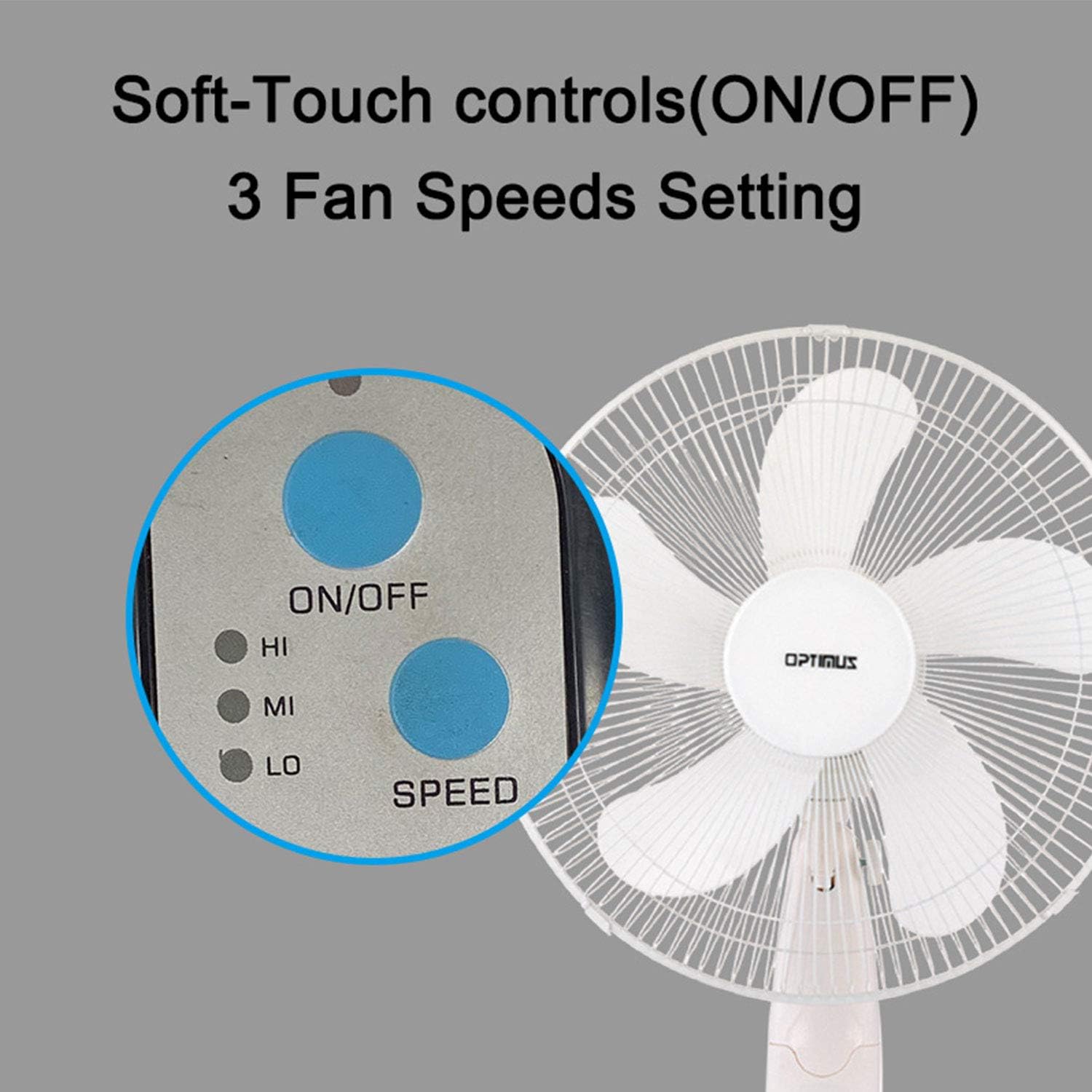
Image: The fan's soft-touch control panel, showing buttons for ON/OFF and SPEED, with indicators for High (HI), Medium (MI), and Low (LO) fan speeds.
- AIR / OFF: Brùth gus an neach-leantainn a thionndadh air no dheth.
- Roghainnean astair: Select from Low, Medium, or High speeds. The 3-speed, energy-saving, whisper-quiet operation motor provides efficient airflow.
Smachd Iomallach
The fan comes with a remote control for convenient operation from a distance. (Batteries not included).

Image: The remote control for the fan, featuring buttons for Mode, Time, Speed, and ON/OFF functions.
- AIR / OFF: Tionndaidh an neach-leantainn air no dheth.
- Astar: Cycles through the three fan speeds (Low, Medium, High).
- stiùiridhean: Selects between different wind modes.
- TIME: Activates and sets the shut-off timer.
Modhan gaoithe
The fan offers three distinct wind modes to suit your preference:

Image: The fan's control panel highlighting the MODE button and indicators for Normal, Natural, and Sleep wind modes.
- Modh àbhaisteach: The fan blows at a constant speed based on your selected setting.
- Modh Nàdarra: The fan speed fluctuates to mimic a natural breeze.
- Modh cadail: The fan operates at a lower, quieter speed, ideal for sleeping, with gentle speed variations.
Oscillation
The F-1760 features unique wave oscillation for comprehensive air distribution.

Image: A diagram illustrating the fan's capability for both vertical (up/down) and horizontal (left/right) wave oscillation, providing wider air coverage.
- Up/Down & Left/Right Wave Oscillating: Activates a unique oscillation pattern that moves the fan head both horizontally and vertically, distributing air throughout the room.
- Gus stad a chur air an oscillation, brùth air a’ phutan oscillation a-rithist.
Gnìomh timer
Suidhich an neach-leantainn gus tionndadh dheth gu fèin-ghluasadach às dèidh ùine shònraichte.

Image: The fan's control panel showing the TIME button and indicators for 1 hour (1H), 2 hours (2H), and 4 hours (4H) timer settings. The fan can be programmed for up to 7 hours.
- The timer can be set for 1, 2, 4, or up to 7 hours. Press the TIME button repeatedly to cycle through the desired duration.
Glanadh agus cumail suas
Bidh glanadh cunbhalach a’ cuideachadh le bhith a’ cumail suas coileanadh an neach-leantainn agus a’ leudachadh a bheatha.
- Mus tèid a ghlanadh: Tarraing am pluga den neach-leantainn a-mach às an t-socaid dealain an-còmhnaidh mus glan thu e.
- Glanadh a-muigh: Cleachd bog, damp clò airson uachdar a-muigh an fhuaradair a ghlanadh. Na cleachd innealan-glanaidh sgrìobach no fuasglaidhean.
- Grill Cleaning: The metal grill can be cleaned with a soft brush or vacuum cleaner to remove dust. For thorough cleaning, the grill may need to be carefully removed.
- Glanadh lann: If necessary, the fan blades can be cleaned. Ensure the fan is completely off and unplugged. The care instructions specify "Hand Wash" for components.
- Stòradh: Nuair nach eilear ga chleachdadh airson ùine mhòr, stòraich an neach-leantainn ann an àite fionnar, tioram, mas fheàrr san phacaid thùsail aige.
Fuasgladh thrioblaidean
| Trioblaid | Adhbhar a dh’fhaodadh a bhith ann | Fuasgladh |
|---|---|---|
| Chan eil an neach-leantainn a’ tionndadh air. | No power supply. Blown fuse. | Ensure the fan is plugged into a working outlet. Check the fuse in the plug and replace if necessary (refer to safety instructions for fuse replacement). |
| Fan operates but air movement is weak. | Low speed setting. Dust accumulation on blades/grill. | Increase the fan speed. Clean the fan blades and grills as per maintenance instructions. |
| Chan eil smachd iomallach ag obair. | Dead batteries. Obstruction between remote and fan. | Replace batteries in the remote control. Ensure a clear line of sight between the remote and the fan's receiver. |
| Fan changes speed automatically or unexpectedly. | Interference from other remote controls (e.g., TV remote). | This fan may respond to frequencies from other remote controls. Try operating the fan manually or repositioning the fan/other devices to minimize interference. |
| Fan makes clicking noises during oscillation. | Normal operation of oscillation gears. | A slight clicking noise from the oscillation gears can occur during normal operation. If the noise is excessive or new, ensure the fan head is securely attached. |
| Fan feels unstable. | Base not properly assembled or tightened. Uneven surface. | Ensure all base components are securely fastened and the fan is placed on a firm, level surface. |
Sònrachaidhean
- Ainm a' mhodail: F-1760
- Brand: Optimus
- Trast-thomhas fan: 16 òirlich
- Dealbhadh luchd-leantainn dealain: Fan Làr
- Stòr cumhachd: Electric Corded
- Dètage: 60 watt
- Voltage: 6 Volt
- Àireamh de lannan: 3
- Roghainnean astair: 3 RPM (Low, Medium, High)
- Modh smachd: Iomallach, Putan-putaidh
- Feartan sònraichte: Up/Down & Left/Right Wave Oscillating, Adjustable Height, Timer Function (up to 7 hours), Wind Modes (Normal, Natural, Sleep)
- Cleachdadh a-staigh/a-muigh: A-staigh
- Cuideam nì: 9.9 not
- Co-phàirtean air an toirt a-steach: Toradh, Leabhar-làimhe
Fiosrachadh Barantais
This Optimus F-1760 fan comes with a Barantas cuibhrichte 1-bliadhna from the date of purchase. This warranty covers defects in materials and workmanship under normal use. It does not cover damage resulting from misuse, accident, alteration, or unauthorized repair. Please retain your proof of purchase for warranty claims.
Taic Luchd-cleachdaidh
For technical assistance, warranty claims, or questions regarding your Optimus F-1760 fan, please contact Optimus customer service. Refer to the product packaging or the official Optimus weblàrach-lìn airson an fhiosrachadh conaltraidh as ùire.