
1. Ro-ràdh
The SANYO VPC-CG20 is a compact, high-definition camcorder and 10-megapixel digital camera designed for capturing both video and still images. This device features Full HD 1080i video recording at 60 frames per second, a 10-megapixel still image sensor, and a 5x optical zoom lens. It includes a 2.7-inch wide LCD monitor for easy framing and playback, along with optical image stabilization for clearer footage and photos. This manual provides essential information for setting up, operating, and maintaining your VPC-CG20 camcorder.
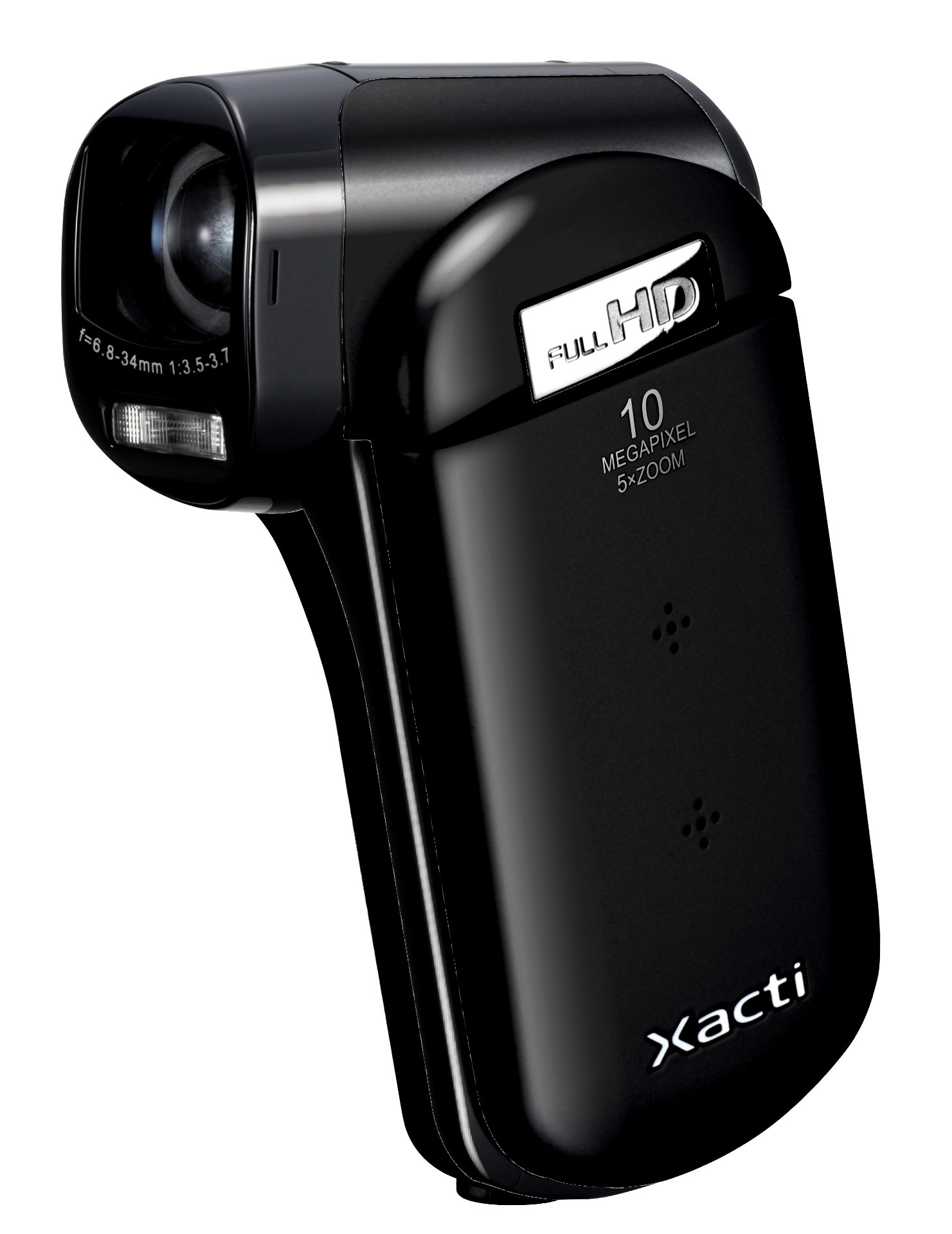
Dealbh 1.1: Aghaidh view of the SANYO VPC-CG20 High Definition Camcorder.
2. Pasgan-susbaint
Dèan cinnteach gu bheil na nithean a leanas uile air an toirt a-steach sa phacaid toraidh agad:
- SANYO VPC-CG20 Camcorder
- Bataraidh ath-thagraidh
- AC Adapter / Charger
- Càball USB
- Càball AV
- Strap caol-dùirn
- Leabhar-làimhe cleachdaiche (an sgrìobhainn seo)
3. Pàirtean agus Smachdan
Dèan eòlas ort fhèin air na diofar phàirtean agus smachdan den chamcorder agad.
3.1. Aghaidh View
The front of the camcorder features the lens, flash, and microphone.
3.2. Cùl View
The rear panel typically includes the record button and power indicator.
3.3. Taobh View (LCD Monitor Open)
When the 2.7-inch LCD monitor is open, you will find navigation buttons, menu access, and the zoom lever. The USB and AV ports are also located on the side, often beneath a protective cover.
3.4. Bun View
The bottom of the camcorder houses the battery compartment and the SD card slot.
4. Suidhich
4.1. A 'cur cosgais air a' Bhataraidh
- Insert the rechargeable battery into the camcorder's battery compartment, ensuring correct orientation.
- Connect the AC adapter to the camcorder's power input.
- Plug the AC adapter into a wall outlet. The charging indicator light will illuminate.
- Charge the battery until the indicator light changes or turns off, signaling a full charge.
4.2. Inserting an SD Memory Card
The VPC-CG20 uses SD memory cards for storage.
- Open the SD card slot cover, usually located on the bottom or side of the camcorder.
- Insert the SD card with the metal contacts facing the correct direction (refer to the diagram near the slot). Push until it clicks into place.
- Dùin còmhdach slot a’ chairt SD gu tèarainte.
Thoir an aire: Ensure the SD card is not locked (write-protected) before insertion.
5. A’ cleachdadh a’ chamara-camara
5.1. A ’toirt cumhachd air / dheth
- To power on, open the LCD monitor. The camcorder will typically power on automatically.
- To power off, close the LCD monitor.
5.2. Clàradh Bhidio
The VPC-CG20 records Full HD 1080i video (1920 x 1080) at 60 frames per second in H.264/MPEG-4 format.
- Ensure the camcorder is in video recording mode (check the mode switch or menu).
- Frèamaich do dhealbh a’ cleachdadh an sgrìn LCD 2.7-òirleach.
- Brùth an Clàr button to start recording. The record indicator will light up.
- Brùth an Clàr putan a-rithist gus stad a chlàradh.
5.3. A 'togail dhealbhan
The camcorder can capture 10-megapixel still images in JPEG format.
- Switch the camcorder to still image mode.
- Compose your shot on the LCD monitor.
- Brùth an Còmhdaiche button halfway to focus, then press fully to take the picture.
5.4. A’ cleachdadh Zoom
Use the zoom lever to adjust the 5x optical zoom. Push the lever towards 'T' for telephoto (zoom in) and 'W' for wide-angle (zoom out).
5.5. Stabilization Ìomhaigh
The VPC-CG20 features optical image stabilization to reduce blur from camera shake during both video recording and photo capture. This feature is typically active by default.
5.6. Ath-chluich
- Tionndaidh an camara-camara gu modh ath-chluich.
- Use the navigation buttons to select the desired video or photo.
- Brùth an Seinn putan gu view videos or display photos.
5.7. A 'ceangal ri coimpiutair
Gus gluasad files, connect the camcorder to your computer using the supplied USB cable. The camcorder will appear as a removable storage device, allowing you to copy files.
6. Cumail suas
6.1. Glanadh a’ chamara-camara
- Cleachd clò bog, tioram gus corp a’ chamara-camara a ghlanadh.
- Airson an lionsa agus an sgrion LCD, cleachd clò agus fuasgladh sònraichte airson lionsan a ghlanadh. Seachain stuthan sgrìobach.
- Do not use organic solvents such as alcohol or thinner.
6.2. Stòradh
Stòraich an camara-camara ann an àite fionnar, tioram air falbh bho sholas dìreach na grèine agus teòthachd anabarrach. Thoir air falbh am bataraidh ma bhios tu ga stòradh airson ùine mhòr.
7. A ’dèanamh trioblaid
| Trioblaid | Fuasgladh |
|---|---|
| Chan eil an camara-camara a’ dol air. | Ensure the battery is charged and correctly inserted. Try charging the battery. |
| Chan urrainnear bhidio a chlàradh/dealbhan a thogail. | Check if an SD card is inserted and has sufficient free space. Ensure the SD card is not write-protected. |
| Droch chàileachd ìomhaigh/bhidio. | Clean the lens. Ensure adequate lighting. Check shooting mode settings. |
| Computer does not recognize camcorder. | Ensure the USB cable is securely connected. Try a different USB port or cable. Restart both camcorder and computer. |
8. Sònrachaidhean
| Feart | Mion-fhiosrachadh |
|---|---|
| Ainm Modail | VPC-CG20 |
| Fuasgladh glacadh bhidio | 1080p (Full HD 1920 x 1080, 60i) |
| Fuasgladh fhathast èifeachdach | 10 BP |
| Zoom Optical | 5x |
| Stabilization Ìomhaigh | Optical |
| Meud sgrion | 2.7 òirlich |
| Seòrsa Cuimhne Flash | SD (SDHC compatible) |
| Cruth glacadh bhidio | H.264, MPEG-4 |
| Cruth ìomhaigh le taic | JPEG |
| Teicneòlas ceangail | USB |
| Seòrsa Fòcas | Fòcas fèin-ghluasadach |
| Modhan losgadh | Dearbhadh aghaidh |
| Cuideam nì | 0.35 notaichean (timcheall air 159 graman) |
9. Barantas agus Taic
For information regarding the product warranty, please refer to the warranty card included in your original packaging or visit the official SANYO support website. For technical assistance, troubleshooting beyond this manual, or service inquiries, please contact SANYO customer support through their official channels.
Feuch an glèidh thu an dearbhadh ceannach agad airson tagraidhean barantais.