
1. Os a chionnview
The Microsoft LifeCam Cinema is a high-definition webcam designed for clear and smooth video communication. It features 720p HD video chat capabilities, a high-precision glass element lens for sharp image quality, and is certified for Skype. The webcam offers 360° rotation and incorporates TrueColor Technology with face tracking for bright and colorful video output.
Prìomh fheartan:
- 720p HD video chat
- High precision glass element lens for sharp image quality
- Certified for Skype
- cuairteachadh 360 °
- TrueColor Technology with face tracking for bright and colorful video
2. Dè tha sa bhogsa
Nuair a dh’fhosglas tu am pasgan, dèan cinnteach gu bheil na pàirtean a leanas uile an làthair:
- Taigh-dhealbh Microsoft LifeCam Webcam
- Càball USB (aonaichte)
- Leabhar-làimhe cleachdaiche (an sgrìobhainn seo)
- Sliabh Adhesive lùbte
- Bucall Suidheachaidh
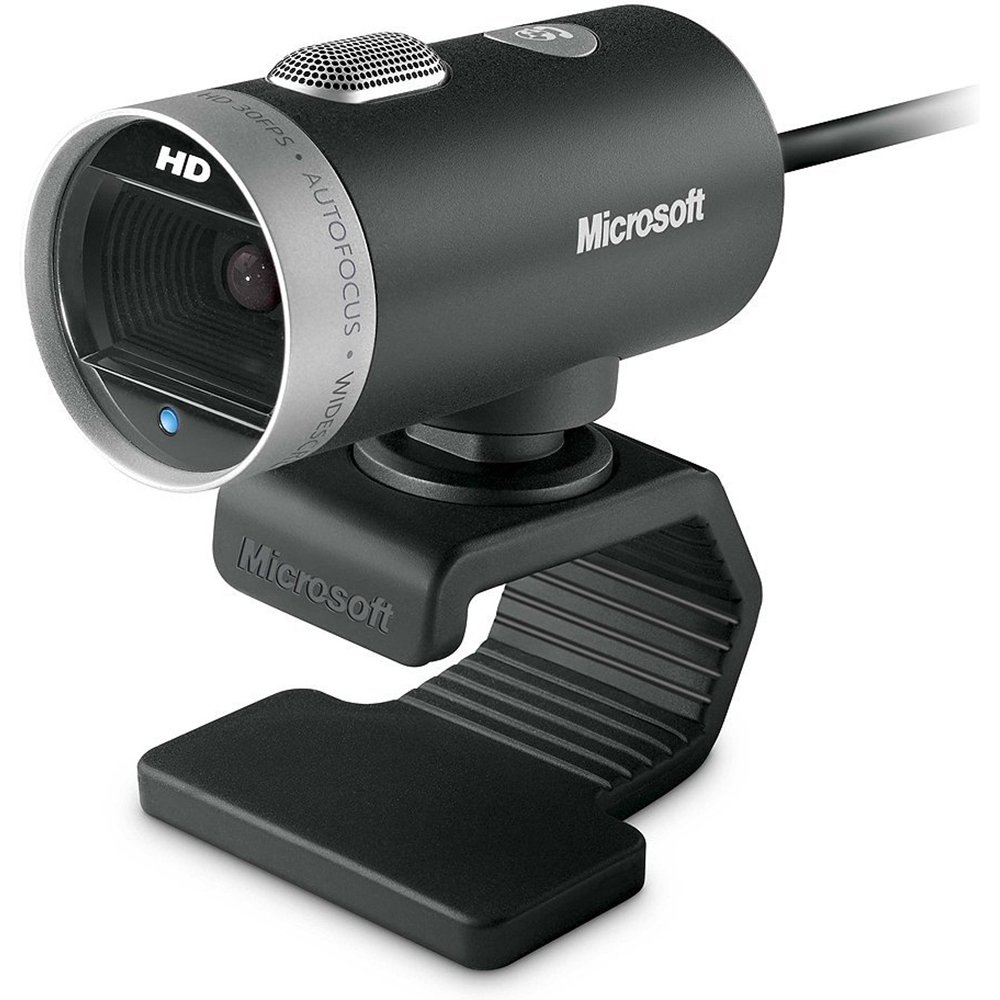
Image: The Microsoft LifeCam Cinema webcam, showing its main body, lens, microphone, and flexible stand with integrated USB cable.
3. Suidhich
- A 'suidheachadh an Webcam: Place the LifeCam Cinema on top of your monitor or a flat surface. The flexible stand allows for stable placement.
- Connecting to your Computer: Plug the integrated USB cable into an available USB port on your computer.
- Stàladh an dràibhear: Your operating system (Windows is supported) should automatically detect the device and install the necessary drivers. If prompted, follow the on-screen instructions. You may need to download the latest drivers from the official Microsoft support weblàrach airson an coileanadh as fheàrr.
- Stàladh bathar-bog: Install any accompanying LifeCam software if desired, which may offer additional features or settings.

Image: The Microsoft LifeCam Cinema webcam securely positioned on top of a computer monitor, demonstrating its stable mounting design.
Video: An official product video demonstrating the features and usage of the Microsoft LifeCam Cinema webcam, including its 720p HD widescreen video, auto focus, high-precision glass element lens, ClearFrame Technology, and digital microphone.
4. Stiùireadh Obrachaidh
- Starting a Video Call: Open your preferred video conferencing application (e.g., Skype, Zoom, Microsoft Teams). The LifeCam Cinema should be automatically recognized as your primary camera and microphone.
- Suidheachadh suidheachadh: Tha an webcam features 360° rotation, allowing you to easily adjust the camera angle without moving the base.
- Fòcas fèin-ghluasadach: The camera automatically adjusts focus to keep you sharp and clear during video calls.
- TrueColor Technology: This feature automatically adjusts exposure for bright and colorful video, even in varying lighting conditions.
- Digital Microphone: The built-in digital microphone provides clear audio capture. Ensure it is selected as the input device in your application settings if you experience audio issues.
5. Cumail suas
- A 'glanadh an lens: Use a soft, lint-free cloth specifically designed for optics to gently wipe the camera lens. Avoid abrasive materials or harsh chemicals.
- A 'glanadh a' chuirp: Sguab an webcam's body with a soft, damp cloth. Do not immerse the device in water or use excessive moisture.
- Stòradh: Nuair nach eilear gan cleachdadh, stòraich an webcamara ann an àite glan, tioram air falbh bho theodhachd anabarrach agus solas dìreach na grèine.
- Cùram càball: Seachain cus lùbadh no tionndadh a’ chàball USB gus casg a chuir air milleadh a-staigh.
6. A ’dèanamh trioblaid
- No Video/Camera Not Detected:
- Dèan cinnteach gu bheil an càball USB ceangailte gu tèarainte ris an dà chuid webcamara agus a’ choimpiutair.
- Feuch ri plugging an webcam a-steach do phort USB eadar-dhealaichte.
- Ath-thòisich an coimpiutair agad.
- Thoir sùil air Manaidsear Innealan (Windows) a’ choimpiutair agad gus faicinn a bheil an webcam is listed and if there are any driver issues. Reinstall drivers if necessary.
- Verify that your video conferencing software is configured to use the LifeCam Cinema as the video input device.
- Gun Chlaisneachd/Maicreafòn Gun Obrachadh:
- Check your computer's sound settings to ensure the LifeCam Cinema microphone is selected as the default recording device.
- Verify that your video conferencing software is configured to use the LifeCam Cinema as the audio input device.
- Ensure the microphone is not muted in your system settings or within the application.
- Càileachd bhidio truagh:
- Dèan cinnteach gu bheil lionsa a’ chamara glan.
- Check your internet connection speed; a slow connection can affect video quality.
- Ensure adequate lighting in your environment. TrueColor Technology helps, but sufficient ambient light is always best.
- Dùin aplacaidean eile a dh’ fhaodadh a bhith ag ithe ghoireasan an t-siostaim.
7. Sònrachaidhean
| Feart | Mion-fhiosrachadh |
|---|---|
| Brand | Microsoft |
| Modail Àireamh | H5D-00001 |
| Fuasgladh glacadh bhidio | 720p |
| Teicneòlas sensor dhealbhan | CMOS |
| Teicneòlas ceangail | USB |
| Dath | Dubh |
| Feartan | Low Light, Auto Focus, TrueColor Technology, Digital Microphone |
| Meudan nì (D x W x H) | 0.71"D x 2.19"W x 1.81"H |
| Cuideam nì | 0.87 Punnd |
| Siostam-obrachaidh | Windows |
| Viewann an Ceàrn | 360 Degrees (rotation) |
| Luas Glacadh Ìomhaigh | 30 fps |
| Innealan co-fhreagarrach | PCs with specified system requirements; Skype |
8. Barantas agus Taic
The Microsoft LifeCam Cinema (Model H5D-00001) comes with a Barantas 3 Bliadhnaichean Earranta from the manufacturer, Microsoft.
For technical support, driver downloads, or further assistance, please visit the official Microsoft support weblàrach-lìn no thoir sùil air an fhiosrachadh conaltraidh a tha air a thoirt seachad air pasgan an toraidh agad.
You can also find additional resources and FAQs on the Microsoft support pages for LifeCam products.


