
Ro-ràdh
Thank you for choosing the Technoline WT 182 Radio-Controlled Alarm Clock. This manual provides detailed instructions for the setup, operation, and maintenance of your new device. Please read this manual thoroughly before use and keep it for future reference. The WT 182 is designed to provide accurate time, indoor temperature, date, and day of the week, along with a reliable alarm function.
Fiosrachadh Sàbhailteachd
- Na cuir an inneal fo theodhachd anabarrach, solas dìreach na grèine, no taiseachd àrd.
- Seachain a bhith a’ leigeil às no fo smachd an inneal gu buaidhean làidir.
- Na bi a’ measgachadh bataraidhean sean is ùr, no diofar sheòrsaichean bataraidhean.
- Thoir air falbh bataraidhean sgìth gu sgiobalta gus casg a chuir air aodion.
- Cuir às do bataraidhean a rèir riaghailtean ionadail.
- Na feuch ri an aonad a thoirt às a chèile no a chàradh thu fhèin. Thoir aire do luchd-obrach teisteanasach airson a h-uile seirbheis.
Susbaint pacaid
Dèan cinnteach gu bheil a h-uile nì an làthair agus ann an deagh staid:
- Technoline WT 182 Radio-Controlled Alarm Clock Unit
- Leabhar-làimhe cleachdaiche (an sgrìobhainn seo)
Thoir an aire: 2 x AA Mignon LR06 batteries are required and are not included in the package.
Bathar seachadview
The Technoline WT 182 features a clear digital display showing time, date, day of the week, and indoor temperature. It includes an alarm with a snooze function and a backlight for easy viewing ann an suidheachaidhean aotrom ìosal.

Figear 1: Aghaidh view of the Technoline WT 182 alarm clock, displaying the current time, date, day of the week, and indoor temperature. The 'RADIO CONTROLLED' text is visible at the top, and 'techno line' branding is at the bottom.

Figear 2: Taobh shuas view of the alarm clock, highlighting the 'SNOOZE LIGHT' button located on the top edge of the device. This button is used to activate the backlight and the snooze function.

Figear 3: Cùl view of the alarm clock, showing the battery compartment cover and the product information label. The label includes manufacturer details and the model number WT 182.
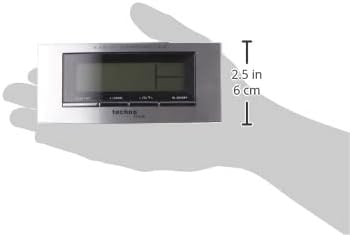
Figure 4: The alarm clock held in a hand, providing a visual reference for its compact dimensions (approximately 14 cm wide and 6 cm high).
Suidhich
1. Stàladh bataraidh
- Open the battery compartment cover on the back of the unit (refer to Figure 3).
- Insert 2 new AA Mignon LR06 batteries, observing the correct polarity (+ and - markings).
- Dùin an còmhdach roinn bataraidh gu tèarainte.
2. Initial Setup and Radio Control
Upon battery insertion, the clock will automatically start searching for the DCF-77 radio signal. This process can take several minutes. During this time, the radio control icon will flash on the display. Once the signal is received, the exact time will be set automatically, and the icon will become steady.
- Place the clock near a window for better signal reception.
- Avoid placing it near electronic devices that may cause interference.
3. Manual Time and Date Setting (if radio signal is unavailable)
If the radio signal cannot be received, or if you wish to set the time manually:
- Press and hold the 'MODE' button (usually located on the front or side) for a few seconds until the time display starts flashing.
- Use the '+' or '-' buttons (often labeled 'ADJ' or similar) to adjust the hour, then press 'MODE' to confirm and move to minutes.
- Dèan a-rithist airson mionaidean, bliadhna, mìos agus latha.
- Press 'MODE' again to exit the setting mode.
4. Suidheachadh Sòn Àm
The clock allows for a time zone adjustment of ± 12 hours. This is useful if you are in a region where the DCF-77 signal is received but the local time zone differs from Central European Time.
- In normal time display mode, press and hold the 'ADJ' or similar button until the time zone offset starts flashing.
- Use the '+' or '-' buttons to adjust the offset.
- Press the 'ADJ' button again to confirm and exit.
Ag obrachadh
1. Time Display (12/24 Hour Format)
The clock can display time in either 12-hour (with AM/PM indicator) or 24-hour format.
- To switch between formats, briefly press the 'ADJ' or a dedicated 12/24H button.
2. Date and Day of the Week Display
The display shows the current date (Month-Day) and the day of the week. The day of the week can be displayed in 5 different languages.
- To change the day of the week language, press the 'MODE' button repeatedly until the language setting flashes, then use '+' or '-' to select.
3. Taisbeanadh Teòthachd a-staigh
The clock continuously measures and displays the indoor temperature.
- The temperature is typically displayed in Celsius. There might be an option to switch to Fahrenheit by pressing a specific button (e.g., 'C/F' or 'ADJ' in temperature mode).
4. Suidheachadh rabhaidh
The WT 182 features a single alarm.
- Press the 'ALARM' button once to display the current alarm time.
- Press and hold the 'ALARM' button until the alarm time starts flashing.
- Use the '+' or '-' buttons to set the desired alarm hour, then press 'ALARM' to confirm and move to minutes.
- Use the '+' or '-' buttons to set the desired alarm minutes, then press 'ALARM' to confirm and exit.
- To activate/deactivate the alarm, briefly press the 'ALARM ON/OFF' or 'ALARM' button. An alarm icon will appear/disappear on the display.
5. Gnìomh Snooze agus Backlight
Nuair a tha an inneal-rabhaidh a 'fuaimeachadh:
- Press the 'SNOOZE/LIGHT' button (located on top, refer to Figure 2) to activate the snooze function. The alarm will pause for approximately 5 minutes and then sound again.
- To stop the alarm completely, press any other button (e.g., 'ALARM' or 'MODE'). The alarm will reset for the next day.
- To activate the backlight at any time, briefly press the 'SNOOZE/LIGHT' button. The backlight will illuminate for a few seconds.
Cumail suas
Glanadh
Sguab an inneal le bog, damp clò. Na cleachd innealan-glanaidh sgrìobach no fuasglaidhean, oir dh’ fhaodadh iad sin milleadh a dhèanamh air an taisbeanadh no air a’ choimpiutair.asing.
Ath-nuadhachadh bataraidh
When the display becomes dim or the clock functions erratically, it is time to replace the batteries. Follow the battery installation steps in the 'Setup' section.
Fuasgladh thrioblaidean
| Trioblaid | Adhbhar a dh’fhaodadh a bhith ann | Fuasgladh |
|---|---|---|
| Gun taisbeanadh no taisbeanadh dorcha | Batteries are exhausted or incorrectly inserted. | Cuir bataraidhean ùra an àite, a’ dèanamh cinnteach à polarity ceart. |
| Àm ceàrr air a thaisbeanadh | Poor radio signal reception or manual setting error. | Relocate the clock to an area with better signal. Perform manual time setting if radio signal is consistently poor. Check time zone setting. |
| Chan eil an inneal-rabhaidh a’ fuaim | Chan eil an inneal-rabhaidh air a ghnìomhachadh no air a shuidheachadh gu ceàrr. | Ensure the alarm icon is visible on the display. Re-check alarm time settings. |
| Backlight nach eil ag obair | Batteries are low or exhausted. | Cuir bataraidhean an àite. |
Sònrachaidhean
- Àireamh Modail:
- WT 182 (SMADH)
- Meudan (L x W x H):
- 140 x 35 x 63 mm (5.5 x 1.4 x 2.5 òirleach)
- Cuideam:
- 150 gram
- Stòr cumhachd:
- 2 x AA Mignon LR06 batteries (not included)
- Seòrsa taisbeanaidh:
- Didseatach
- Cruth ùine:
- 12/24 uair a thìde air a thaghadh
- Taisbeanadh teothachd:
- Teòthachd a-staigh
- Feartan sònraichte:
- Radio-controlled time (DCF-77), Date and Day of Week display (5 languages), Alarm with Snooze, Backlight
- Stuth:
- Plastaig
- Dath:
- Airgead/Dubh
- Modh-obrachaidh:
- Didseatach
- Seòrsa gluasad:
- Ceathramh
- Cleachdadh a-staigh / a-muigh:
- A-staigh
- Dèanadair:
- PK
- Dùthaich Tùs:
- Sìona
Barantas agus Taic
Technoline products are manufactured to high-quality standards. For information regarding warranty terms and conditions, please refer to the warranty card included with your purchase or visit the official Technoline weblàrach. Airson taic theicnigeach no ceistean seirbheis, cuir fios chun neach-reic agad no an neach-dèanamh gu dìreach.
You can find more information and contact details on the official Technoline weblàrach: www.technoline.de