
Ro-ràdh
This manual provides detailed instructions for the proper use and maintenance of your Royal DM2070 Electronic Organizer. Please read this manual thoroughly before operating the device to ensure safe and efficient use. Keep this manual for future reference.
Fiosrachadh Sàbhailteachd
- Na cuir an inneal fo theodhachd anabarrach, solas dìreach na grèine, no taiseachd àrd.
- Seachain an inneal a leigeil sìos no buaidh làidir a thoirt air.
- Na feuch ri an inneal a thoirt às a chèile no a chàradh thu fhèin. Thoir aire do luchd-obrach teisteanasach airson a h-uile seirbheis.
- Cùm an inneal air falbh bho uisge agus lioftaichean eile.
- Use only the specified battery type for replacement.
Susbaint pacaid
Dèan cinnteach gu bheil a h-uile rud anns a’ phacaid agad:
- Royal DM2070 Electronic Organizer
- Stylus (if applicable)
- Stiùireadh tòiseachaidh luath
- Cairt Barantais
Suidhich
1. Stàladh bataraidh
The Royal DM2070 requires batteries for operation. Follow these steps to install them:
- Lorg còmhdach roinn a’ bhataraidh air cùl an inneil.
- Sleamhnaich no tog an còmhdach gus an roinn fhosgladh.
- Insert the required batteries, ensuring correct polarity (+ and -) as indicated inside the compartment.
- Cuir an àite còmhdach roinn bataraidh gu tèarainte.
2. A’ chiad chumhachd air agus roghainnean
After installing batteries, power on your device and configure basic settings:
- Brùth agus cùm an CUMHACHD putan gus an las an sgrion.
- The device may prompt you to set the date and time. Use the navigation buttons or stylus to enter the correct information.
- Confirm your settings to complete the initial setup.
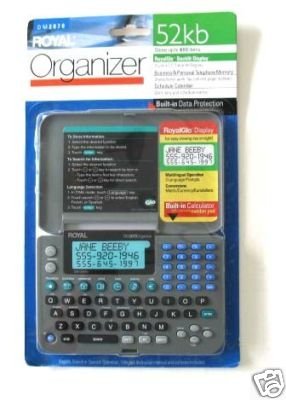
Image: Royal DM2070 Electronic Organizer. This image displays the device's front view, highlighting its screen and keypad, essential for navigation and data entry.
Stiùireadh Obrachaidh
1. Seòladh
The DM2070 features a keypad and potentially a stylus for navigation. Use the arrow keys to move between menu options and press A steach or a designated selection button to confirm.
2. Entering Data
To enter information such as contacts, appointments, or notes:
- Navigate to the desired application (e.g., 'Contacts', 'Calendar', 'Notes').
- Select 'New Entry' or a similar option.
- Use the alphanumeric keypad to input text. Some models may offer an on-screen keyboard via stylus.
- Save your entry before exiting the application.
3. Using Applications
The DM2070 includes various applications:
- Mìosachan: View daily, weekly, or monthly schedules. Add and edit appointments.
- Luchd-fios: Store names, phone numbers, addresses, and email information.
- Notaichean: Create and manage text notes or memos.
- Àireamhair: Perform basic arithmetic calculations.
- Tionndadh airgead: Convert between different currencies (requires manual update of exchange rates on some models).
Cumail suas
1. A ’glanadh an inneal
To keep your DM2070 in optimal condition:
- Sguab an sgrion agus casing with a soft, dry, lint-free cloth.
- Airson comharran stòlda, beagan dampnigh an clò le uisge; seachain ceimigean cruaidh no innealan-glanaidh sgrìobach.
- Dèan cinnteach nach tèid taiseachd a-steach do na fosglaidhean.
2. Cùram Bataraidh
- Cuir bataraidhean ùra an àite a chèile sa bhad nuair a nochdas comharra bataraidh ìosal.
- Thoir air falbh bataraidhean mura tèid an inneal a chleachdadh airson ùine mhòr gus casg a chur air aodion.
Fuasgladh thrioblaidean
If you encounter issues with your Royal DM2070, refer to the following common solutions:
| Trioblaid | Adhbhar a dh’fhaodadh a bhith ann | Fuasgladh |
|---|---|---|
| Chan eil cumhachd aig an inneal. | Bataraidhean marbh no air an stàladh gu ceàrr. | Cuir bataraidhean ùra an àite, a’ dèanamh cinnteach à polarity ceart. |
| Tha an scrion bàn no reòta. | Glitch bathar-bog no bataraidh ìosal. | Try a soft reset (refer to Quick Start Guide for specific button combination) or replace batteries. |
| Data loss. | Battery depletion or improper shutdown. | Ensure batteries are fresh. Always save data before powering off. |
| Meur-chlàr gun fhreagairt. | Dust/debris under keys or internal issue. | Clean keypad gently. If problem persists, contact support. |
Sònrachaidhean
Key technical specifications for the Royal DM2070 Electronic Organizer:
| Feart | Mion-fhiosrachadh |
|---|---|
| Brand | RÌOGHAIL |
| Modail Àireamh | DM2070 |
| Stuth còmhdaich | Leathar |
| Cruth | Eagraiche |
| Cuideam nì | 181 g |
| Meudan nì (LxWxH) | 24.4 x 14.5 x 1 ceudameatairean |
| Luchd-amais Targaid | Inbheach |
Barantas agus Taic
The Royal DM2070 Electronic Organizer comes with a standard manufacturer's warranty. Please refer to the warranty card included in your package for specific terms and conditions. For technical support, service, or inquiries, please contact Royal customer service through the contact information provided on the warranty card or the official Royal weblàrach.