
VTech DS6151
Leabhar-làimhe Cleachdaiche Fòn gun Uèir 2-Loidhne VTech DS6151
Model: DS6151 | Brand: VTech
Bathar seachadview
Manage two different phone lines from one phone using the VTech DS6151 DECT 6.0 Expandable 2-Line Cordless Phone with Answering System and Caller ID. Stay organized by placing and answering calls on distinct lines, while having access to all your messages in one place. This 2-line phone stores up to 13 minutes of recording time per line of incoming messages, outgoing announcements and memos. Dedicated mailboxes for each line make it easy to keep things separated.

The VTech DS6151 2-Line Cordless Phone system, featuring a handset and base unit, designed for efficient communication in home or small business environments.
Prìomh fheartan
- Teicneòlas didseatach DECT 6.0: Ensures interference-free audio, secure transmission, and extended range - ensuring clear, encrypted calls throughout your home, indoors and out.
- Dual Line Support: Manage two distinct phone lines, allowing for call holding, switching, and conferencing.
- Siostam freagairt didseatach: Records up to 13 minutes per line, with dedicated mailboxes for each line.
- ID neach-fios / feitheamh fòn: Stores up to 50 calls, displaying names, numbers, dates, and times.
- Handset and Base Intercom: Facilitates easy communication between handsets and the base unit.
- Co-fhreagarrachd Taic Èisteachd: Provides clear, uninterrupted sound for users with hearing aids.
- Conference Hub: Connects lines 1, 2, and outside calls for seamless group conversations.
- Siostam a ghabhas leudachadh: Supports up to 12 handsets using up to two phone jacks (DS6101 handsets sold separately).
- Blue Backlit Keypad and Display: Ag àrdachadh faicsinneachd ann an suidheachaidhean aotrom ìosal.
Susbaint pacaid
Dèan cinnteach gu bheil na nithean a leanas anns a’ phacaid agad:
- Vtech Ds6151 Dect 6.0 2-Line Expandable Cordless Phone With Digital Answering System And Caller Id
- Silver Handset
- 1-Handset Base
- Bataraidhean
- Remote Charger
- Leabhar-stiùiridh (an sgrìobhainn seo)
Suidheachadh tòiseachaidh
A 'ceangal an Aonad Bunaiteach
- Connect the small end of the power adapter to the POWER jack on the back of the telephone base.
- Cuir ceann mòr an inneal-atharrachaidh cumhachd a-steach do shocaid dealain nach eil fo smachd suidse balla.
- Connect one end of the telephone line cord to the TEL LINE 1 jack on the back of the telephone base.
- Ceangail ceann eile càball na loidhne-fòn ri socaid balla fòn.
- If you have a second telephone line, repeat steps 3 and 4 for TEL LINE 2.

The VTech DS6151 base unit of the VTech DS6151, demonstrating the connection points for two separate telephone lines, providing dual-line operation capability.
Handset Battery Installation and Charging
- Fosgail an còmhdach roinn bataraidh air cùl an inneal-làimhe.
- Ceangail pluga a’ phacaid bataraidh ris an t-seacaid taobh a-staigh an roinn, a’ dèanamh cinnteach gu bheil am polarachd cheart.
- Place the battery pack inside the compartment and close the cover.
- Place the handset in the telephone base or charger with the display facing up. The CHARGE light on the handset will illuminate, indicating proper charging.
- Allow the handset to charge for at least 16 hours before initial use. For optimal performance, keep the handset in the charger when not in use.
A’ suidheachadh Ceann-latha agus Àm
The date and time are typically set automatically by your Caller ID service. If the date and time are incorrect or not displayed, you may need to set them manually. Refer to the full user guide for detailed instructions on manual date and time settings.
Stiùireadh Obrachaidh
Making and Receiving Calls (2-Line Operation)
The DS6151 supports two distinct telephone lines. You can easily switch between lines or place calls on hold.
- Gus gairm a dhèanamh, brùth LINE 1 or LINE 2, an uairsin cuir fòn chun àireamh.
- Gus gairm a thig a-steach a fhreagairt, brùth LINE 1 or LINE 2, or any dial key.
- To switch between active calls on different lines, press the corresponding LINN putan.
The VTech DS6151 base and handset, illustrating the capability for 2-line operation, ideal for managing separate business and personal calls.
A’ cleachdadh an t-Siostam Freagairt Didseatach
The integrated digital answering system records messages for both lines, with up to 13 minutes of recording time per line.
- Gus teachdaireachdan a chluich, brùth PLAY/STOP air bunait a ’fòn.
- To access messages for a specific line, use the dedicated mailbox buttons (MAILBOX LINE 1 or MAILBOX LINE 2).
- You can also access and manage messages from the handset.

The VTech DS6151 base unit highlighting its digital answering system, capable of recording up to 13 minutes of messages per line, ensuring no call is missed.
ID neach-conaltraidh agus feitheamh fòn
The phone stores up to 50 Caller ID entries, allowing you to see who is calling before you answer.
- When a call comes in, the caller's information (name, number, date, time) appears on the display.
- Brùth CID gu review loga ID an neach-fòn.

The VTech DS6151 handset and base displaying Caller ID information, indicating the phone's ability to store up to 50 incoming call details.
Clàr-innse Leabhar-fòn
Store up to 50 contacts in the phonebook for quick dialing.
- To add a new entry, navigate to the Phonebook menu and select "Add New Entry".
- To dial from the phonebook, press DIR and scroll to the desired entry, then press LINE 1 or LINE 2.

The VTech DS6151 handset and base unit, illustrating the phonebook directory feature which allows storage of up to 50 contacts for easy access.
Dreuchd Intercom
Communicate instantly between handsets or between a handset and the base unit.
- To initiate an intercom call, press INT on the handset or base, then select the desired handset.

Two VTech DS6151 handsets demonstrating the intercom feature, allowing for direct communication between units with a single touch.
Gairm Co-labhairt
Easily connect multiple parties, including both phone lines and an outside call, into a single conversation.
- While on a call, you can add another line or an outside party to create a three-way conference. Refer to the full user guide for specific steps.

An illustration of conference calling with the VTech DS6151, showing how multiple individuals can join a single conversation using the phone's capabilities.
Fòn-labhairt
Both the handset and the base unit feature a speakerphone for hands-free conversations.
- Gus am fòn-labhairt a ghnìomhachadh rè gairm, brùth air a’ phutan LAOIDHEACH putan.
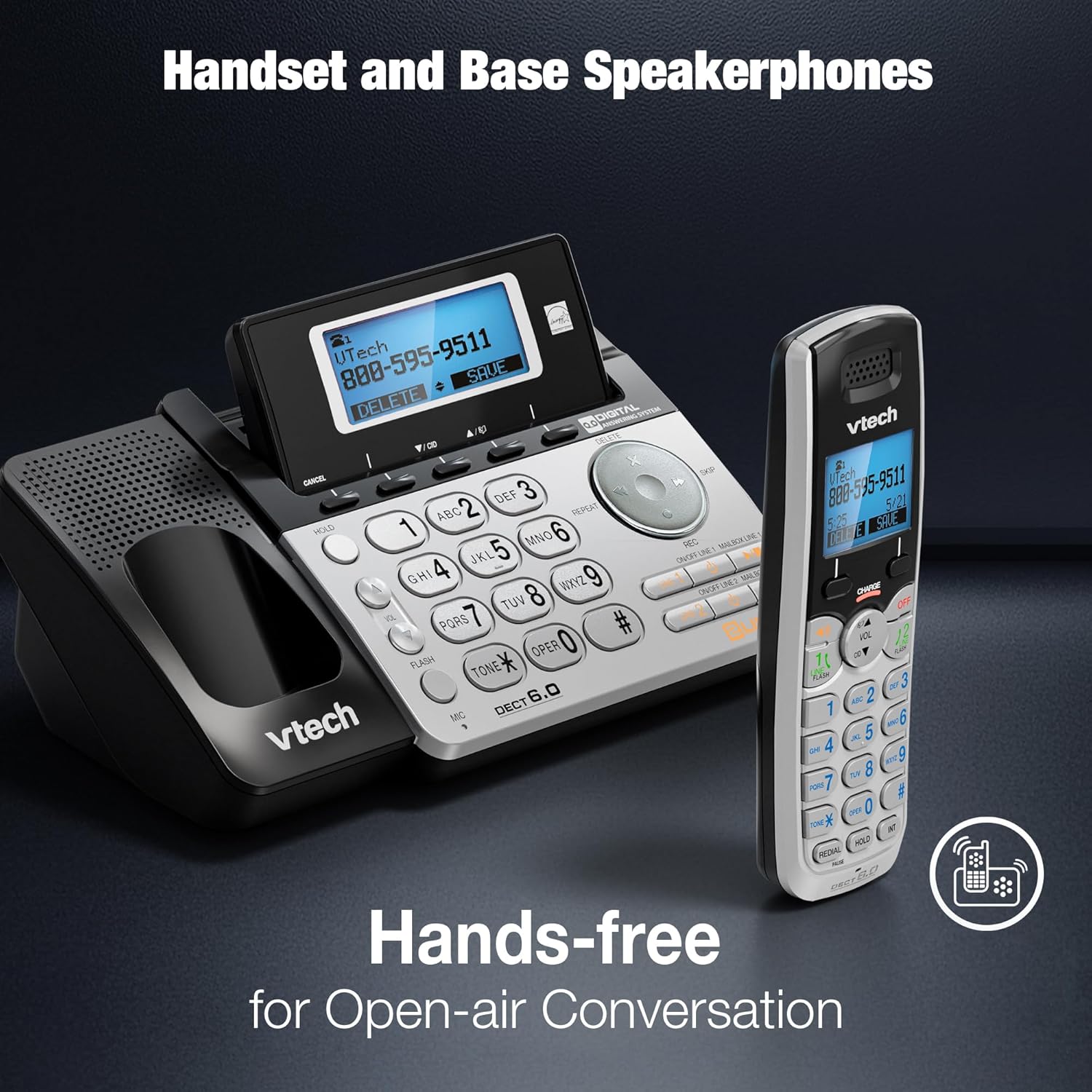
The VTech DS6151 handset and base unit, highlighting their integrated speakerphones for convenient hands-free communication.
Meur-chlàr agus taisbeanadh le solas cùil
The handset features a blue backlit keypad and display, making it easy to see and dial in any lighting condition.

A close-up of the VTech DS6151 handset, showcasing its blue backlit keypad and display for improved visibility in low-light environments.
Cùram is cumail suas
- Glanadh: Glan am fòn agus an aonad bonn le clò bog, tioram.amp clò. Na cleachd spraeirean glanaidh no ceimigean làidir.
- Cùram Bataraidh: For optimal battery life, keep the handset in the charger when not in use. If the phone will not be used for an extended period, remove the battery.
- Suidheachaidhean Àrainneachdail: Seachain am fòn a nochdadh do theodhachd anabarrach, solas dìreach na grèine no taiseachd.
Fuasgladh thrioblaidean
If you experience any issues with your VTech DS6151 phone, please refer to the following table for common problems and solutions.
| Trioblaid | Fuasgladh |
|---|---|
| Gun tòna dial. | Ensure the telephone line cord is securely plugged into the phone base and the wall jack. Check if the power adapter is properly connected. |
| Chan urrainnear gairmean a dhèanamh no fhaighinn. | Verify that the phone line is active. Check if the handset battery is charged. Ensure the phone is not in "Do Not Disturb" mode. |
| Handset display is blank or "Low Battery". | Place the handset in the charger. Allow at least 16 hours for a full charge. Replace the battery if it no longer holds a charge. |
| Tha an t-àm agus an ceann-latha ceàrr. | The time and date are usually set by Caller ID. If incorrect, manually set them via the handset menu. |
| Droch chàileachd claisneachd no statach. | Move the handset closer to the base unit. Avoid placing the phone near other electronic devices that may cause interference. Check for loose connections. |
Sònrachaidhean Teicnigeach
| Feart | Mion-fhiosrachadh |
|---|---|
| Meudan toraidh | 8.9 x 5.8 x 4.7 òirleach |
| Cuideam nì | 2.2 not |
| Modail Àireamh | DS6151 |
| Bataraidhean | 1 Bathar sònraichte bataraidh a dhìth (air a ghabhail a-steach) |
| Seòrsa fòn | Gun sreang |
| Stòr cumhachd | Electric Corded |
| Seòrsa siostam freagairt | Didseatach |
| Teicneòlas | DECT 6.0 |
| Dath | Airgiod |
| Stuth | Criosta |
| Dèanadair | Vtech |
| Dùthaich Tùs | Sìona |

The VTech DS6151 base unit and handset, with key dimensions (length, width, height) indicated for reference.
Barantas agus Taic
For detailed warranty information, please refer to the warranty card included with your product or visit the VTech official weblàrach.
Additional support and comprehensive user guides are available in PDF format:
For further assistance, please contact VTech Customer Support.
Ask a question about this manual
Ask about setup, troubleshooting, compatibility, parts, safety, or missing instructions. Manuals+ will review the question and use this page’s manual context to help answer it.