
1. Ro-ràdh
This manual provides essential information for the safe and efficient use of your Lexmark E260D Monochrome Laser Printer. Please read these instructions carefully before operating the device and retain them for future reference. The Lexmark E260D is designed for fast, high-quality black and white document printing, featuring automatic two-sided printing for efficiency.
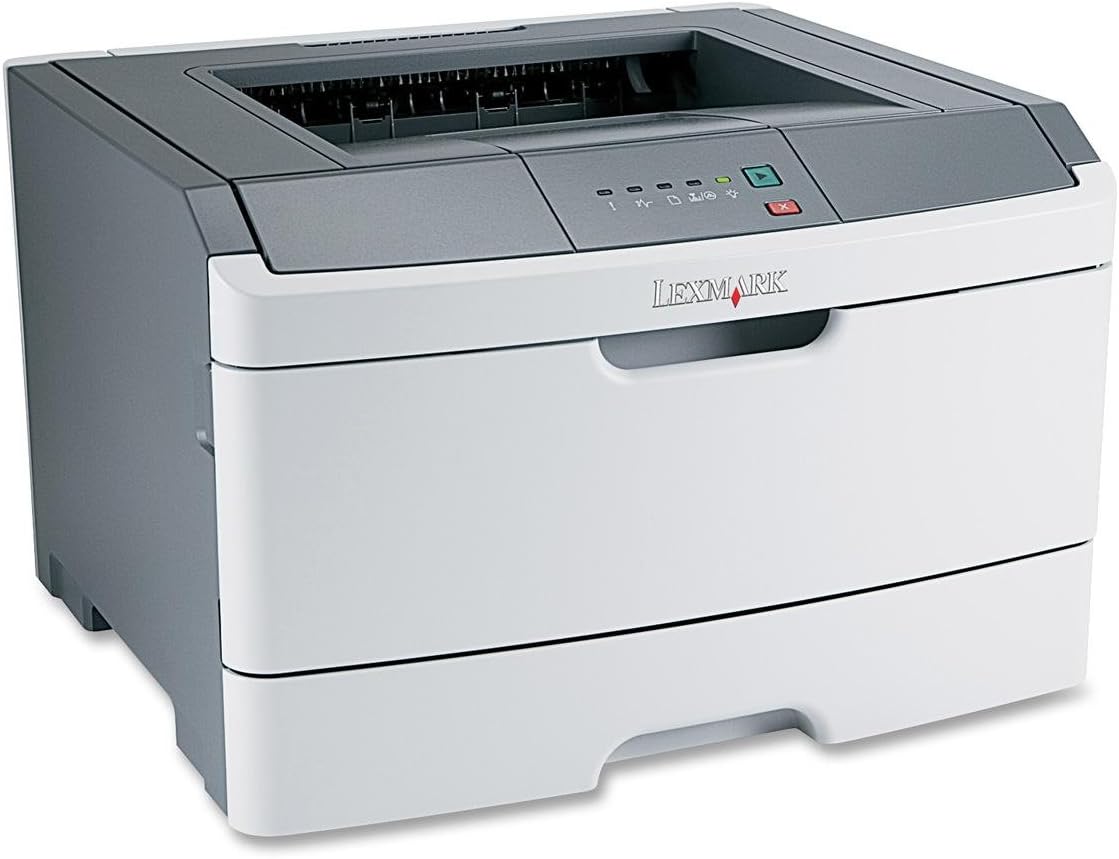
Figear 1: Lexmark E260D Monochrome Laser Printer. This image shows the printer from a front-right angle, highlighting its compact design with a white body and a dark gray top cover. The output tray is visible on top, and the Lexmark logo is displayed on the front panel above the paper input tray.
2. Fiosrachadh Sàbhailteachd
- Ceangail am clò-bhualadair ri socaid cumhachd talmhaichte an-còmhnaidh.
- Na cuir bacadh air fosglaidhean fionnarachaidh.
- Cùm am clò-bhualadair air falbh bho uisge no cus taiseachd.
- Use only specified power cords and accessories.
- Avoid touching the fuser area, as it can be hot.
3. Pasgan-susbaint
Dèan cinnteach gu bheil a h-uile nì anns a’ phacaid:
- Lexmark E260D Monochrome Laser Printer
- Corda cumhachd
- Starter Toner Cartridge (may vary by region)
- Setup Guide or Documentation
- USB Cable (may be sold separately)
4. Suidhich
4.1 A’ fosgladh a’ chlò-bhualadair
- Thoir air falbh an clò-bhualadair bhon phacaid aige.
- Remove all packing materials, tapes, and protective films from the exterior and interior of the printer.
- Cuir am clò-bhualadair air uachdar seasmhach, rèidh le fionnarachadh iomchaidh.
4.2 A ’ceangal a’ chlò-bhualadair
- Ceangail an càball cumhachd ris a’ chlò-bhualadair agus an uair sin ri socaid dealain le talamh.
- Ceangail aon cheann den chàball USB ri port USB a’ chlò-bhualadair agus an ceann eile ris a’ choimpiutair agad.
4.3 A’ stàladh a’ chairt-thonnair
- Fosgail doras ruigsinneachd aghaidh a’ chlò-bhualadair.
- Carefully remove the toner cartridge from its packaging and shake it gently to distribute the toner.
- Cuir a’ chairt-tonair a-steach don chlò-bhualadair gus an cliog e na àite.
- Close the front access door securely.
4.4 Pàipear luchdachadh
- Tarraing a-mach an treidhe pàipeir.
- Atharraich na stiùiridhean pàipeir gus am bi iad a rèir meud a’ phàipeir a tha thu a’ luchdachadh.
- Cuir pàipear a-steach don treidhe, a’ dèanamh cinnteach gu bheil e rèidh agus nach eil e a’ dol thairis air an loidhne lìonaidh as àirde.
- Brùth an treidhe pàipeir air ais dhan chlò-bhualadair gus an glas e.
4.5 stàlaich draibhear
After connecting the printer, your operating system may automatically detect and install the necessary drivers. If not, follow these steps:
- Insert the driver CD (if included) into your computer's CD/DVD drive, or download the latest drivers from the official Lexmark support weblàrach.
- Lean an stiùireadh air an sgrion gus crìoch a chuir air stàladh an draibhear.
- Ath-thòisich do choimpiutair ma thèid a bhrosnachadh.
5. A’ cleachdadh a’ chlò-bhualadair
5.1 Clò-bhualadh Bunasach
- Dèan cinnteach gu bheil am clò-bhualadair air agus ceangailte ris a’ choimpiutair agad.
- Fosgail an sgrìobhainn a tha thu airson a chlò-bhualadh air a’ choimpiutair agad.
- Tagh File > Clò-bhuail (no an àithne co-ionann san aplacaid agad).
- Choose the Lexmark E260D from the list of available printers.
- Adjust print settings as needed (e.g., number of copies, page range).
- Cliog Clò-bhuail.
5.2 Clò-bhualadh dà-thaobhach (dà-thaobhach)
The Lexmark E260D supports automatic two-sided printing.
- Nuair a chuireas tu obair chlò-bhualaidh, faigh cothrom air feartan no roghainnean a’ chlò-bhualadair.
- Look for an option related to Clò-bhualadh Duplex or Clò-bhuail air an dà thaobh.
- Tagh an roghainn dà-fhillte a tha thu ag iarraidh (m.e., ceangal oir fhada, ceangal oir ghoirid).
- Dearbhaich na roghainnean agad agus cliog Clò-bhuail.
6. Cumail suas
6.1 Glanadh a’ chlò-bhualadair
- Taobh a-muigh: Sguab na h-uachdaran a-muigh le bog, damp, clò gun lint. Na cleachd innealan-glanaidh sgrìobach no fuasglaidhean.
- Taobh a-staigh: Periodically open the front access door and gently remove any loose toner dust with a dry, lint-free cloth. Avoid touching sensitive components.
6.2 Ath-chur Cartridge Toner
When the toner level is low, the printer's control panel will indicate it. Replace the toner cartridge as follows:
- Dèan cinnteach gu bheil an clò-bhualadair air a stiùireadh.
- Fosgail an doras ruigsinneachd aghaidh.
- Carefully remove the old toner cartridge by pulling it straight out.
- Unpack the new Lexmark E260D compatible toner cartridge and shake it gently.
- Cuir a’ chairt-chlò ùr a-steach don chlò-bhualadair gus an glac e na àite.
- Dùin an doras ruigsinneachd aghaidh.
7. A ’dèanamh trioblaid
7.1 Stuthan pàipeir
If a paper jam occurs, the printer's control panel will display an error. Follow these general steps:
- Cuir dheth an clò-bhualadair agus dì-phlugaich e bhon t-socaid cumhachd.
- Open all accessible covers (front door, rear door, etc.).
- Carefully remove any jammed paper, pulling it in the direction of the paper path to avoid tearing.
- Dùin na còmhdaichean uile gu tèarainte.
- Plug a-steach agus cuir an clò-bhualadair air.
7.2 Cùisean Càileachd Clò-bhualaidh
- Faded or Light Prints: The toner cartridge may be low. Try shaking the cartridge gently or replace it.
- Streaks or Smudges: Clean the interior of the printer, especially around the toner cartridge area. Ensure the paper type setting matches the loaded paper.
- Duilleagan falamh: Ensure the toner cartridge is properly installed and has toner. Check printer drivers and print settings.
7.3 Duilgheadasan Ceangail
- Clò-bhualadair gun lorg: Ensure the USB cable is securely connected to both the printer and the computer. Try a different USB port or cable. Reinstall printer drivers if necessary.
- Print Jobs Stuck: Clear the print queue on your computer. Restart both the printer and the computer.
7.4 Envelope Printing on Mac
Users printing envelopes on macOS may encounter issues with incorrect print orientation or partial printing. To resolve this:
- In the print dialogue box, locate the menu that initially reads 'Layout'.
- Select 'Paper Feed' from this menu.
- Change the 'Auto Select' option to 'Manual Envelope'.
- Lean air adhart leis a’ chlò-bhualadh.
8. Sònrachaidhean
| Feart | Sònrachadh |
|---|---|
| Ainm Modail | E260D |
| Teicneòlas clò-bhualaidh | Laser |
| Toradh Clò-bhualadair | Monochrome |
| Astar Clò-bhualaidh as Motha (Moncromach) | 35 ppm |
| Rùn Clò-bhualaidh as àirde (Dubh is Geal) | 1200 dpi |
| Clò-bhualadh Duplex | fèin-ghluasadach |
| Teicneòlas ceangail | USB 2.0 |
| Comas duilleag cuir a-steach as àirde | 250 duilleagan |
| Meadhanan Clò-bhuailte a tha a’ faighinn taic | Envelopes, Labels, Paper (plain), Transparencies |
| Comas stòraidh cuimhne | 32 MB |
| Meudan toraidh | 16.5 x 18.1 x 14 òirleach |
| Cuideam nì | 29.8 not (13.53 kg) |
| Caitheamh Cumhachd (Modh air) | 16 watt |
9. Fiosrachadh Barantais
The Lexmark E260D Monochrome Laser Printer comes with an Exchange Warranty. For specific terms, conditions, and duration of your warranty, please refer to the warranty documentation included with your product or visit the official Lexmark support weblàrach.
10. Taic teachdaiche
For further assistance, technical support, or to order replacement parts and supplies, please contact Lexmark Customer Support. You can find contact information and additional resources on the official Lexmark weblàrach:
- Taic Lexmark Weblàrach: www.lexmark.com/support (Thoir an aire: Is e seo àite-glèidhidh URL. Refer to your product documentation for the exact support link.)