
1. Ro-ràdh
Tapadh leibh airson ceannachasing the GPX CDP6806DT Personal CD Player. This manual provides important safety instructions, operational guidelines, and maintenance procedures to ensure optimal performance and longevity of your device. Please read this manual thoroughly before using the product and retain it for future reference.
2. Fiosrachadh Sàbhailteachd
Stiùireadh sàbhailteachd cudromach
- Na nochd an aonad gu uisge no taiseachd.
- Seachain an aonad a chur faisg air stòran teas leithid rèididheatoran, clàran teas, stòbhaichean, no innealan eile (a’ gabhail a-steach ampliifiers) a bheir teas.
- Na feuch ri an aonad a thoirt às a chèile no atharrachadh. Thoir aire do luchd-obrach seirbheis teisteanasach airson a h-uile seirbheis.
- Use only the specified batteries (2 x AA batteries). Ensure correct polarity when inserting batteries.
- Thoir air falbh bataraidhean mura tèid an aonad a chleachdadh airson ùine fhada.
- Avoid listening at high volume levels for prolonged periods to prevent hearing damage.
- Glan an aonad a-mhàin le clò tioram.
3. Pasgan-susbaint
Carefully unpack your GPX CDP6806DT Personal CD Player and ensure all items are present:
- GPX CDP6806DT Personal CD Player
- Leabhar-làimhe cleachdaiche (an sgrìobhainn seo)
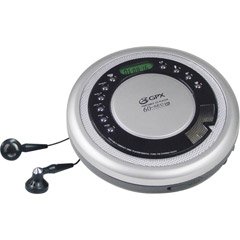
Figure 1: GPX CDP6806DT Personal CD Player. This image illustrates the compact design and general appearance of the device.
4. Smachdan agus Feartan
Familiarize yourself with the controls and features of your GPX CDP6806DT for optimal use.
- Taisbeanadh LCD: 6-digit display for track number, time, and FM frequency.
- CLUICH/STAD (►/−): Press to start or pause CD playback.
- STAD (■): Press to stop CD playback.
- SKIP/SEARCH (◀◀/▶▶): Press to skip tracks. Hold to search within a track.
- TOIRT ÀIRDE (+/-): Atharraich an ìre toraidh claisneachd.
- MODE/PROG: Selects playback mode (Repeat, Random) or programs CD tracks.
- FM TUNER (ON/OFF/BAND): Switches to FM radio mode, turns FM on/off, or changes FM band.
- RO-SHUIDHEADH (+/-): Navigates saved FM radio presets.
- Roinn CD: Area for inserting audio CDs.
- Roinn Bataraidh: Located on the bottom, holds 2 AA batteries.
- Jack headphone (3.5mm): Connects headphones for private listening.
Figure 2: GPX CDP6806DT Controls Layout. This image provides a visual reference for the location of various buttons and ports on the device.
5. Suidhich
5.1 Stàladh bataraidh
The GPX CDP6806DT requires two (2) AA batteries (not included) for portable operation.
- Lorg roinn a’ bhataraidh aig bonn an aonaid.
- Sleamhnachadh còmhdach cuibhreann a ’bhataraidh fosgailte.
- Cuir a-steach dà bataraidh AA, a’ dèanamh cinnteach gu bheil am polarachd cheart (+ agus -) mar a tha air a chomharrachadh taobh a-staigh a’ bhataraidh.
- Dùin an còmhdach roinn bataraidh gu tèarainte.
5.2 A’ ceangal fònaichean-cluaise
For private listening, connect your 3.5mm stereo headphones (not included) to the headphone jack located on the side of the unit.
6. Stiùireadh Obrachaidh
6.1 Ath-chluich CD
The unit supports CD and CD-R/RW disc formats.
- Open the CD compartment lid by gently pressing the OPEN button (if present, or lifting the lid).
- Cuir CD leis an taobh leubail suas air an spindle mheadhanach.
- Dùin còmhdach roinn an CD gu daingeann gus an cliog e.
- Brùth an CLUICH/STAD (►/−) button to begin playback. The track number and elapsed time will appear on the LCD display.
- Gus stad a chuir air cluich, brùth CLUICH/STAD (►/−). Brùth a-rithist gus ath-thòiseachadh.
- Gus casg a chuir air ath-chluich, brùth air an STAD (■) putan.
- Gus leum chun ath cheum, brùth SKIP/SEARCH (▶▶).
- To go back to the beginning of the current track, press SKIP/SEARCH (◀◀) once. Press twice to go to the previous track.
- To search rapidly forward or backward within a track, hold down SKIP/SEARCH (▶▶) or (◀◀) fa leth.
- Atharraich an tomhas-lìonaidh a ’cleachdadh an TOIRT (+/-) smachdan.
6.2 Obrachadh Rèidio FM
The unit features a digital FM tuner with station presets.
- Sleamhnachadh an TUNER FM switch to the ON position or press the BANN putan gus a dhol a-steach don mhodh FM.
- Brùth an SKIP/SEARCH (▶▶) or (◀◀) putanan gus gleusadh le làimh chun tricead a tha thu ag iarraidh.
- To auto-scan and save stations, hold down the CLUICH/STAD (►/−) button (or refer to specific instructions for auto-scan if available on the device).
- To recall saved presets, use the PRESET (+/-) putanan.
6.3 CD Programming (24-Track)
Faodaidh tu suas ri 24 trac a phrògramachadh airson cluich ann an òrdugh sònraichte.
- With the CD stopped, press the MODE/PROG putan. Bidh “PROG” a’ priobadh air an taisbeanadh.
- Cleachd an SKIP/SEARCH (▶▶) or (◀◀) buttons to select the first track you wish to program.
- Brùth MODE/PROG again to confirm the selection. The display will show the program number and the next available program slot.
- Repeat steps 2 and 3 to add up to 24 tracks to your program.
- Às dèidh dhut na slighean uile a tha thu ag iarraidh a phrògramadh, brùth CLUICH/STAD (►/−) gus ath-chluich prògramaichte a thòiseachadh.
- Gus am prògram a ghlanadh, brùth air a’ phutan STAD (■) putan dà uair.
6.4 Anti-Skip Protection (ASP)
The GPX CDP6806DT features a 60-second Anti-Skip Protection system. This system buffers audio data to minimize interruptions caused by minor shocks or vibrations during CD playback. The ASP activates automatically when a CD is playing.
7. Cumail suas
7.1 Glanadh an Aonaid
- Sguab taobh a-muigh an aonaid le clò bog, tioram.
- Na cleachd innealan-glanaidh sgrìobach, cèir, no fuasglaidhean.
- If the CD lens needs cleaning, use a specialized CD lens cleaner disc or a soft, lint-free cloth designed for optical lenses.
7.2 Cùram Bataraidh
- Remove batteries if the unit is not used for an extended period to prevent leakage.
- Na bi a’ measgachadh bataraidhean sean is ùr, no diofar sheòrsaichean bataraidhean.
- Cuir às do bataraidhean cleachdte gu ciallach a rèir riaghailtean ionadail.
8. A ’dèanamh trioblaid
If you experience issues with your GPX CDP6806DT, please consult the following table for common problems and solutions.
| Trioblaid | Adhbhar / Fuasgladh a dh’fhaodadh a bhith ann |
|---|---|
| Chan eil cumhachd aig an aonad. | Check if batteries are inserted correctly with proper polarity. Ensure batteries are fresh and not depleted. |
| Gun fhuaim bho chluas-cinn. | Ensure headphones are fully plugged into the headphone jack. Increase the volume level. Test with another pair of headphones. |
| CD skips or playback is interrupted. | Ensure the CD is clean and free of scratches or smudges. Clean the CD with a soft, lint-free cloth. Ensure the unit is on a stable surface or held steadily during use. |
| Chan eil an CD a’ cluich. | Ensure the CD is inserted correctly with the label side up. Close the CD compartment lid completely. Check if the CD is a supported format (CD, CD-R/RW). |
| Tha gabhail rèidio FM bochd. | Extend the headphone cable as it acts as the antenna. Try moving to a different location. |
9. Sònrachaidhean
- Brand: GPX
- Modail: CDP6806DT
- Cruthan diosc le taic: CD, CD-R / RW
- Dìon an-aghaidh Skip: 60 diog
- Taisbeanadh: LCD 6-digit
- Rèidio: Digital FM Tuner with Presets
- CD Programming: 24-rian
- Stòr cumhachd: 2 x Bataraidhean AA (gun a thoirt a-steach)
- Ceangal: Jack Fònaichean-cluaise 3.5mm (Taice)
10. Barantas agus Taic
For detailed warranty information, please refer to the warranty card included with your original product packaging. For technical support, service inquiries, or to purchase replacement parts, please visit the official GPX weblàrach-lìn no cuir fios chun roinn seirbheis teachdaiche aca a’ cleachdadh am fiosrachadh conaltraidh a tha air a thoirt seachad ann an sgrìobhainnean an toraidh agad.
Feuch an glèidh thu an dearbhadh ceannach agad airson tagraidhean barantais.