
1. Ro-ràdh
This manual provides comprehensive instructions for the safe and efficient use of your Logisys PS480D 480W ATX Power Supply. Please read this manual thoroughly before installation and operation to ensure proper functionality and to prevent damage to the unit or other components.

Figure 1: Logisys PS480D 480W ATX Power Supply, front view with cables bundled.
2. Fiosrachadh Sàbhailteachd
RABHADH: Power supplies contain high voltagna pàirtean. Na fosgail an solar cumhachd casing. Chan eil pàirtean sam bith a dh’ fhaodas an neach-cleachdaidh a chàradh a-staigh.
- Ensure the power supply is disconnected from the AC outlet before installation or maintenance.
- Always ground yourself to prevent electrostatic discharge (ESD) when handling internal computer components.
- Na cleachd an solar cumhachd ann an àiteachan fliucha no teth.amp cumhachan.
- Dèan cinnteach gu bheil fionnarachadh ceart timcheall an t-solair cumhachd gus casg a chuir air cus teasachadh.
- Use only the provided power cables and connectors.
3. Feartan toraidh
The Logisys PS480D is a 480W ATX power supply designed for personal computers. Key features include:
- Àrd Èifeachdas
- Low Noise & Ripple
- Thar Voltage Dìon
- Dìon cuairt ghoirid
- Built-in EMI Filter
- Insulation Resistance 100MΩ min.
- Complies with FCC part 15J class B 115VAC operation and CISPR 22 230 VAC operation.
- Meets UL 1950, CSA 22.2 LEVEL 3 Requirement.
- 100% Burn-in test / Vibration test / Hi-pot test / Leakage current test.
- MTBF above 100,000 hours at 25 °C.

Figure 2: Rear panel of the power supply with fan, AC inlet, and power switch.
4. Setup agus Stàladh
Follow these steps to install the Logisys PS480D power supply into your computer system.
- Ag ullachadh: Ensure your computer is completely powered off and unplugged from the wall outlet. Open your computer case according to its manufacturer's instructions.
- Thoir air falbh an Seann Solar Cumhachd (mas e iomchaidh): Disconnect all cables from the old power supply to the motherboard, drives, and other components. Unscrew and remove the old power supply from the case.
- Stàlaich solar cumhachd ùr: Carefully place the Logisys PS480D into the power supply bay of your computer case. Secure it with screws.
- Ceangail Prìomh Chumhachd: Connect the 20+4 pin ATX mainboard connector to your motherboard. If your motherboard uses a 20-pin connector, detach the 4-pin section. If it uses a 24-pin connector, connect both sections.
- Ceangail Cumhachd CPU: Connect the 4-pin +12V power connector to the corresponding port on your motherboard.
- Ceangail Cumhachd Iomallach:
- Use the 4-pin standard drive connectors for HDDs and CD/DVD-ROM drives.
- Use the 4-pin 3.5" FDD or ZIP connectors for floppy disk drives or similar devices.
- Use the Serial ATA (SATA) connectors for SATA hard drives and SSDs.
- Riaghladh càbaill: Sligheich na càbaill gu grinn gus dèanamh cinnteach gu bheil sruth-adhair ceart anns a’ chùis.
- Dùin Cùis: Cho luath ‘s a bhios na ceanglaichean uile tèarainte, dùin cùis a’ choimpiutair agad.
- Ceangail AC Power: Plug the AC power cord into the power supply's AC inlet and then into a wall outlet.
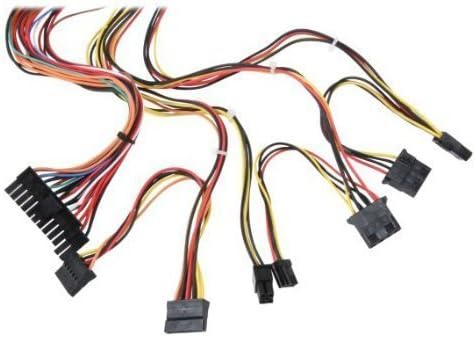
Figear 3: Os a chionnview of power supply connectors.

Figure 4: Power supply dimensions and included AC power cord.
5. Stiùireadh Obrachaidh
After successful installation, you can power on your computer.
- Ensure the power switch on the rear of the power supply (Figure 2) is in the "ON" (I) position.
- Brùth am putan cumhachd air cùis a’ choimpiutair agad.
- The power supply will provide stable power to your system components.
- To power off, shut down your operating system normally. For complete power disconnection, switch the power supply to the "OFF" (O) position and unplug the AC cord.
6. Cumail suas
Regular maintenance helps ensure the longevity and optimal performance of your power supply.
- Glanadh: Periodically clean dust from the power supply's fan and vents using compressed air. Ensure the power supply is unplugged before cleaning.
- Sruth-adhair: Ensure that the computer case has adequate airflow and that the power supply's fan is not obstructed.
- Ionracas càball: Periodically check all power cables for secure connections and signs of wear or damage.
7. A ’dèanamh trioblaid
Ma thachras tu ri duilgheadasan leis an t-solar cumhachd agad, thoir sùil air na ceumannan cumanta fuasgladh-cheistean a leanas:
- Gun chumhachd:
- Check if the AC power cord is securely plugged into both the power supply and the wall outlet.
- Ensure the power switch on the rear of the power supply is in the "ON" (I) position.
- Dearbhaich gu bheil an socaid balla ag obair le bhith a’ cur inneal eile a-steach.
- Check all internal power connections (20/24-pin ATX, 4-pin +12V, peripheral connectors) are firmly seated.
- Neo-sheasmhachd an t-siostaim/Dùnadh sìos air thuaiream:
- This could indicate an overloaded or failing power supply. Ensure your system's power requirements do not exceed the PS480D's 480W capacity.
- Check for proper ventilation and ensure the power supply fan is spinning. Overheating can cause instability.
- Fuaim neo-àbhaisteach:
- A loud fan noise might indicate dust buildup or a failing fan bearing. Clean the fan as described in the Maintenance section.
If problems persist after attempting these steps, contact Logisys customer support or a qualified technician.
8. Sònrachaidhean
| Feart | Sònrachadh |
|---|---|
| Brand | Logisys |
| Modail Àireamh | PS480d |
| Toradh Wattage | 480 watt |
| Factor foirm | ATX |
| Meudan (LxWxH) | 6" F x 5.5" L x 3.25" À (15.24 x 13.97 x 8.25 cm) |
| Cuideam nì | 2.06 not (0.93 kg) |
| Ceangal prìomh bhòrd | 1x 20+4 Pin ATX |
| Ceangal cumhachd CPU | 1x 4 Pin +12V |
| Standard Drive Connectors | 4x 4 Pin (Molex) |
| FDD/ZIP Connectors | 1x 4 Pin 3.5" |
| Ceangalaichean ATA sreathach | 1x SATA |
| Modh fuarachaidh | Air |
| Dìon | Thar Voltage Dìon, Dìon Cuairt ghoirid |
| Teisteanasan | FCC part 15J class B, CISPR 22, UL 1950, CSA 22.2 LEVEL 3 |
9. Barantas agus Taic
For warranty information, technical support, or service inquiries, please refer to the official Logisys weblàrach-lìn no cuir fios chun roinn seirbheis teachdaiche aca. Cùm do chuidhteas ceannach mar dhearbhadh ceannach.