
Coby CT-P9040 SVR
Coby CT-P9040 5.8 GHz Analog Cordless Phone User Manual
Model: CT-P9040 SVR
Ro-ràdh
This manual provides comprehensive instructions for the setup, operation, and maintenance of your Coby CT-P9040 5.8 GHz Analog Cordless Phone. Please read this manual thoroughly before using your phone to ensure proper functionality and to prevent damage.
Susbaint pacaid agus co-phàirtean
Mus tòisich thu, dèan cinnteach gu bheil na pàirtean uile anns a’ phacaid:
- Inneal-làimhe gun sreang
- Aonad Bun-stèidh
- Adaptor Cumhachd AC
- Corda loidhne fòn
- Pasgan bataraidh ath-thagraidh
- Leabhar-làimhe cleachdaiche (an sgrìobhainn seo)
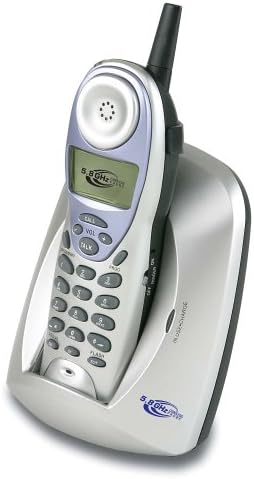
Image: The Coby CT-P9040 cordless phone, showing the handset docked in its silver base unit. The handset features a display screen, numeric keypad, and function buttons. The base unit has a charging cradle for the handset.
Stiùireadh rèiteachaidh
1. Stàladh bataraidh
- Suidhich an roinn bataraidh air cùl an inneal-làimhe.
- Fosgail an còmhdach roinn bataraidh.
- Connect the rechargeable battery pack connector to the jack inside the compartment.
- Place the battery pack into the compartment and close the cover securely.
2. Ceangal an Aonaid Bhunait
- Connect one end of the telephone line cord to the "LINE" jack on the back of the base unit.
- Ceangail ceann eile càball loidhne a’ fòn ri socaid balla fòn àbhaisteach.
- Connect the AC power adapter to the "DC IN" jack on the back of the base unit.
- Cuir an inneal-atharrachaidh cumhachd AC a-steach do socaid dealain àbhaisteach.
3. Cosgais Tùsail
Place the handset in the base unit's charging cradle. Ensure the "IN CHARGE" indicator light on the base unit illuminates, indicating proper charging. For optimal battery performance, charge the handset for at least 12-14 hours before initial use.
Stiùireadh Obrachaidh
A' deanamh Call
- Pick up the handset from the base unit or press the TALAMH putan.
- Èist ri guth dial.
- Cuir fòn chun an àireamh fòn a tha thu ag iarraidh.
- Gus crìoch a chuir air a’ ghairm, brùth air a’ phutan TALAMH button again or place the handset back in the base unit.
A' freagairt Call
Nuair a bhios am fòn a’ glaodhaich, tog am fòn-làimhe no brùth air a’ phutan TALAMH putan gus a’ ghairm a fhreagairt.
Gnìomh deargail
Gus an àireamh mu dheireadh ris an canar ath-nochdadh, brùth air an RIAGHAILT putan air an inneal-làimhe.
Atharrachadh tomhas-lìonaidh
Rè gairm, cleachd an VOL+ agus LEABHAR - putanan air an fhòn-làimhe gus fuaim a’ chluas-fhòn atharrachadh.
Gnìomh Flash
Brùth an GLAS button to use call waiting or transfer calls if supported by your telephone service provider.
Storing Phone Numbers (Speed Dial)
Your phone can store up to 10 numbers for frequently called contacts. Refer to the detailed instructions in the full manual for programming speed dial entries.
Cùram agus cumail suas
- Cùm am fòn air falbh bho stòran teas, solas dìreach na grèine, agus taiseachd.
- Glan uachdar a’ fòn le clò bog,amp aodach. Na cleachd luchd-glanaidh sgudail no solventan.
- Ensure the charging contacts on the handset and base unit are clean to maintain proper charging.
- Mura tèid am fòn a chleachdadh airson ùine mhòr, thoir am bataraidh a-mach às an inneal-làimhe.
Fuasgladh thrioblaidean
| Trioblaid | Adhbhar a dh’fhaodadh a bhith ann | Fuasgladh |
|---|---|---|
| Gun fhuaim dial | Tha càball loidhne a’ fòn air a dhì-cheangal. | Dèan cinnteach gu bheil càball na loidhne-fòn ceangailte gu tèarainte ris an aonad bonn agus ris a’ phoca balla. |
| Chan eil an inneal-làimhe a’ cur cosgais air | Handset not properly seated in cradle or dirty charging contacts. | Reseat the handset in the base unit. Clean the charging contacts on both the handset and base unit with a dry cloth. |
| Droch chàileachd fuaim / Statach | Interference from other electronic devices or out of range. | Move the base unit away from other electronic devices (e.g., microwaves, Wi-Fi routers). Move closer to the base unit. |
| Chan urrainnear gairmean a dhèanamh/fhaighinn | Power adapter disconnected or battery low. | Check if the AC power adapter is securely plugged in. Ensure the handset battery is fully charged. |
Sònrachaidhean
- Modail: CT-P9040 SVR
- Tricead: 5.8 GHz Analog
- Sianalan: 40 Channel Auto Scan
- Cuimhne: 10-number speed dial storage
- Gnìomhan: Flash, Redial, Pause, Tone/Pulse Switch
- Jack headset: Built-in 2.5mm
- Stàladh: Desk and Wall Mountable
- Meudan (L x W x H): 5 x 8 x 4 òirleach
- Cuideam: 1.8 not
- Dath: Airgiod
- ID neach-fios: Gun taic
- Gnìomh ioma-loidhne: Obrachadh aon-loidhne
Barantas agus Taic
Airson fiosrachadh barantais agus taic theicnigeach, thoir sùil air a’ chairt barantais a tha air a ghabhail a-steach leis an toradh agad no tadhail air làrach-lìn oifigeil Coby weblàrach. Cùm do chuidhteas ceannach mar dhearbhadh ceannach airson tagraidhean barantais.
For further assistance, you may contact Coby customer service. Contact details are typically available on the manufacturer's weblàrach no ann am pasgan toraidh.
Ask a question about this manual
Ask about setup, troubleshooting, compatibility, parts, safety, or missing instructions. Manuals+ will review the question and use this page’s manual context to help answer it.