
Ro-ràdh
The Altec Lansing VS4221 is a 2.1 speaker system designed to provide enhanced audio for computers, gaming systems, and other compatible devices. This system includes two satellite speakers and one subwoofer, offering a balanced audio experience with clear highs, rich mids, and deep bass. It features a wireless remote for convenient control and multiple input options for versatile connectivity.
Susbaint pacaid
Before beginning setup, please verify that all components are present in the package:
- One (1) Altec Lansing VS4221 Subwoofer
- Two (2) Altec Lansing VS4221 Satellite Speakers
- Aon (1) Smachd Iomallach gun Uèir
- One (1) Remote Control Caddy
- Audio Input Cables (color-coded)
- Càball cumhachd
Stiùiridhean rèiteachaidh
- Suidheachadh nan Luchd-labhairt: Place the subwoofer on the floor, ideally near a wall or in a corner for optimal bass response. Position the two satellite speakers on either side of your listening area, such as on a desk or shelf. The satellite speakers feature pivoting stands, allowing you to adjust their angle to direct sound towards your ears.
- Connecting Satellite Speakers to Subwoofer: Connect the cables from the satellite speakers to the corresponding output jacks on the back of the subwoofer. Ensure a secure connection.
- A’ ceangal ri Stòr Fuaim:
- For computers, MP3 players, or devices with a 3.5mm headphone jack: Use the provided 3.5mm audio cable to connect the audio output of your device to the 3.5mm input jack on the subwoofer.
- For televisions or video gaming systems with RCA outputs: Use RCA cables (not necessarily included, but the system supports them) to connect the audio output of your TV or gaming system to the RCA input jacks on the subwoofer. The cables are color-coded for easy installation (typically red for right, white for left).
- A’ ceangal ri cumhachd: Plug the power cable into the subwoofer's power input, then plug the other end into a standard electrical outlet.
- Cumhachd tùsail air adhart: Turn on the speaker system using the power button, which may be located on the subwoofer or controlled via the wireless remote.
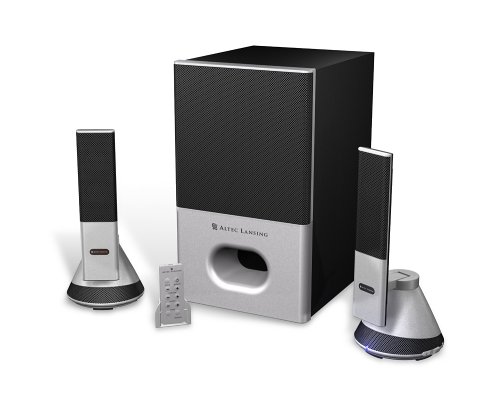
Image: The Altec Lansing VS4221 2.1 Speaker System, showing the subwoofer and two satellite speakers. The satellite speakers are designed with pivoting stands for directional sound.
Stiùireadh Obrachaidh
Using the Wireless Remote Control
The VS4221 system includes a wireless remote control for convenient adjustment of audio settings. Place the remote in its caddy when not in use to prevent misplacement.
- Cumhachd / cùl-taic: Press the power button on the remote to turn the system on or put it into standby mode.
- Prìomh leabhar: Use the volume up (+) and volume down (-) buttons to adjust the overall sound level.
- Smachd bass: Adjust the bass level to your preference using the dedicated bass control buttons.
- Smachd Treble: Adjust the treble level for crisp high frequencies using the dedicated treble control buttons.
- Loudness: Activate or deactivate the loudness feature to enhance bass and treble at lower volumes.
A ’cleachdadh an Jack Headphone
A headphone jack is integrated into the system, typically on one of the satellite speakers or the remote caddy. Plugging in headphones will mute the speakers, allowing for private listening. Unplugging headphones will restore audio through the speakers.
Cumail suas
- Glanadh: Use a soft, dry cloth to clean the surfaces of the speakers and subwoofer. Avoid using liquid cleaners or abrasive materials, as these can damage the finish or internal components.
- Suidheachadh: Ensure the speakers are placed on stable surfaces to prevent accidental falls. Avoid placing them in direct sunlight, near heat sources, or in areas with high humidity.
- Riaghladh càbaill: Cùm càbaill eagraichte agus gun cheangal gus casg a chuir air milleadh agus gus dèanamh cinnteach gu bheil ceangal ceart ann.
Fuasgladh thrioblaidean
| Trioblaid | Adhbhar a dh’fhaodadh a bhith ann | Fuasgladh |
|---|---|---|
| Gun fhuaim bho luchd-labhairt. |
|
|
| Fuaim shaobhadh no neo-shoilleir. |
|
|
| Wireless remote not responding. |
|
|
Sònrachaidhean
| Feart | Mion-fhiosrachadh |
|---|---|
| Modail Àireamh | VS4221 |
| Seòrsa neach-labhairt | 2.1 Speaker System (Two Satellite Speakers, One Subwoofer) |
| Modh Toraidh Fuaim | Stereo |
| Neach-labhairt cumhachd toraidh as àirde | 35 watt |
| Co-mheas Signal-to-Noise | 80 dB |
| Dràibhear subwoofer | 3-inch down-firing |
| Draibhearan Luchd-labhairt Saideal | Micro Drivers (for highs), 3-inch Midrange Driver (concealed) |
| Teicneòlas ceangail | Wired (3.5mm, RCA inputs) |
| Modh smachd | Wireless Remote Control, Built-in Controls |
| Innealan co-fhreagarrach | Smartphone, Tablet, Laptop, MP3 Player, Desktop, Television, Projector |
| Stòr cumhachd | AC |
| Cuideam nì | 12.3 Punnd |
| Dath | Dubh |
| UPC | 021986941538 |
Barantas agus Taic
The Altec Lansing VS4221 speaker system comes with a Barantas cuibhrichte. For specific details regarding warranty coverage, duration, and terms, please refer to the warranty card included with your product or visit the official Altec Lansing weblàrach.
For technical support, troubleshooting assistance beyond this manual, or service inquiries, please contact Altec Lansing customer support through their official channels. Keep your purchase receipt and product model number (VS4221) readily available when seeking support.