
Ro-ràdh
Tapadh leibh airson ceannachasing the Nyko AirFlo EX Controller for PlayStation 2. This controller is designed to enhance your gaming experience with its unique airflow feature, providing comfort during extended gameplay sessions. Please read this manual thoroughly before use to ensure proper setup and operation.
Susbaint pacaid
- Nyko AirFlo EX Controller for PlayStation 2
- Leabhar-làimhe cleachdaiche (an sgrìobhainn seo)
Feartan smachd
The Nyko AirFlo EX Controller integrates several features for an optimized gaming experience:
- AirFlo Cooling System: An integrated fan provides airflow to help keep hands dry and comfortable during intense gaming.
- Dealbhadh ergonomic: Shaped for comfortable grip and extended play.
- Standard PlayStation 2 Controls: Includes directional pad, action buttons (Triangle, Circle, Cross, Square), L1/R1/L2/R2 shoulder buttons, START, SELECT, and analog sticks (L3/R3 functionality).
- Fios air ais air crith: Supports in-game vibration effects for enhanced immersion.
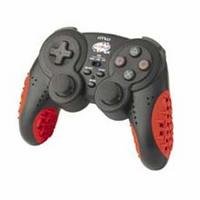
Image: Nyko AirFlo EX Controller for PlayStation 2. This image displays the front view of the controller, highlighting its button layout and ergonomic shape.
Suidhich
- Ceangail ri PlayStation 2: Locate an available controller port on your PlayStation 2 console.
- Cuir a-steach an ceangal: Firmly insert the controller's connector cable into the chosen port. Ensure it is fully seated.
- Cumhachd air a’ Chonsól: Turn on your PlayStation 2 console. The controller should be automatically recognized.
- Gnìomhachd deuchainn: Navigate the PlayStation 2 menu or start a game to confirm all buttons and analog sticks are responsive.
Stiùireadh Obrachaidh
The Nyko AirFlo EX Controller operates similarly to standard PlayStation 2 controllers, with the added AirFlo feature.
- Smachdan bunaiteach: Use the directional pad or left analog stick for movement, and the action buttons (Triangle, Circle, Cross, Square) for in-game actions.
- Analog Stick Functionality: Pressing the analog sticks down activates L3 and R3 functions, if supported by the game.
- AirFlo Fan Activation: The AirFlo fan is typically activated by a switch or button on the controller itself. Refer to the controller's physical layout for the exact location of the fan control. Toggle this control to turn the fan on or off.
- Fios air ais air crith: Vibration effects will automatically engage during gameplay when supported by the software.
Cumail suas
- Glanadh: Cleachd clò bog, tioram gus uachdar an rianadair a ghlanadh. Airson salachar stòlda, cleachd clò beagan tioram.amp cloth can be used, ensuring no moisture enters openings. Do not use harsh chemicals or abrasive cleaners.
- Stòradh: Stòraich an rianadair ann an àite fionnar, tioram air falbh bho sholas dìreach na grèine agus teòthachd anabarrach. Seachain a bhith a’ pasgadh a’ chàball gu teann timcheall an rianadair gus casg a chuir air milleadh.
- Seachain Drops: Dìon an rianadair bho bhoitean is buaidhean, a dh’ fhaodadh milleadh a dhèanamh air na pàirtean a-staigh.
Fuasgladh thrioblaidean
| Trioblaid | Fuasgladh comasach |
|---|---|
| Chan eil an rianadair a’ freagairt. |
|
| AirFlo fan not working. |
|
| Buttons or analog sticks are unresponsive or stiff. |
|
Sònrachaidhean
- Modail: AirFlo EX
- Co-chòrdalachd: PlayStation 2
- Cuideam nì: 9.6 unnsa (mu 272 gram)
- Meud pacaid: 6 x 4.8 x 2.7 òirleach (mu 15.2 x 12.2 x 6.9 cm)
- Ceangal: Uèir
- Feartan sònraichte: Integrated AirFlo cooling fan
Barantas agus Taic
For warranty information, technical support, or service inquiries regarding your Nyko AirFlo EX Controller, please contact Nyko customer support directly. Details can typically be found on the official Nyko weblàrach no pacaigeadh toraidh.
Oifigeil Nyko Weblàrach: www.nyko.com (Nota: Is e seo àite-glèidhidh URL. Please refer to your product packaging or official Nyko documentation for the most current support information.)