
VTech T2451
Fòn gun sreang analogach VTech t2451 2.4 GHz le siostam freagairt agus ID neach-fòn
Modail: T2451
Ro-ràdh
This manual provides comprehensive instructions for the setup, operation, and maintenance of your VTech t2451 2.4 GHz Analog Cordless Phone with Answering System and Caller ID. Please read this manual thoroughly before using your new phone system to ensure proper functionality and to take full advantage de na feartan aige.
Key features of your VTech t2451 include:
- 2.4 GHz analog reception for clear communication.
- Digital answering system with 3 mailboxes and 15 minutes of recording time.
- 50 name/number phonebook directory for easy contact management.
- 99 name/number Caller ID history to review fiosan air chall.
- Headset compatibility (2.5 mm jack) for hands-free operation.
- Hold function, page/handset locator, and selectable ring tones.
- Wall-mountable design for flexible placement.
Suidhich
Follow these steps to set up your VTech t2451 cordless phone system.
- A' dì-phapadh: Carefully remove all components from the packaging. Ensure you have the cordless handset, base unit, AC power adapter, telephone line cord, and battery pack.
- Stàladh bataraidh: Open the battery compartment on the back of the cordless handset. Connect the battery pack connector to the jack inside the compartment, ensuring correct polarity. Place the battery pack into the compartment and close the cover.
- A 'ceangal a' Bhun-aonad:
- Connect one end of the telephone line cord to the TEL LINE jack on the base unit and the other end to a telephone wall jack.
- Connect the small end of the AC power adapter to the DC IN 9V jack on the base unit. Plug the large end of the AC power adapter into a standard electrical outlet.
- A 'cur cosgais air an handset: Place the cordless handset in the base unit's charging cradle. The charge indicator on the handset should illuminate, indicating that the battery is charging. Allow the handset to charge for at least 12 hours before initial use.
- Stàladh balla (roghainneil): The base unit is designed to be wall-mountable. Refer to the included wall-mount bracket and instructions for secure installation.
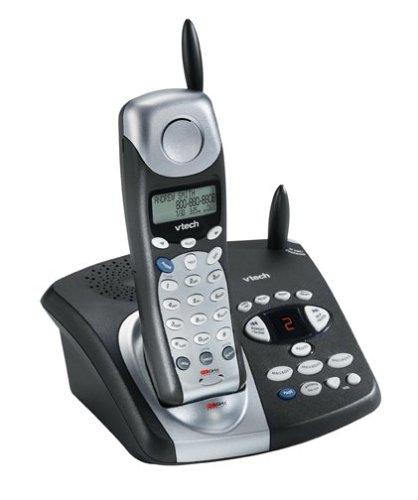
Image: The VTech t2451 cordless phone system, showing the black base unit with the silver and black handset docked in its charging cradle. The base unit features an integrated digital answering system with controls and a display.
Stiùireadh Obrachaidh
A 'dèanamh agus a' faighinn gairmean
- Gus Call a dhèanamh: Brùth an TALAMH button, wait for a dial tone, then dial the phone number.
- Airson Call fhaighinn: Nuair a bhios am fòn a’ glaodhaich, brùth air a’ phutan TALAMH button or any key on the keypad (Any Key Answer).
- Gus crìoch a chuir air gairm: Brùth an CRÌOCH brùth air a’ phutan no cuir an inneal-làimhe air ais san aonad bonn.
- Cùm gnìomh: Rè gairm, brùth air an LAOIDH button to place the call on hold. Press TALAMH a-rithist gus a’ ghairm a thòiseachadh a-rithist.
Siostam freagairt didseatach
Your phone system includes a digital answering system with 3 mailboxes and 15 minutes of recording time.
- A’ cluich teachdaireachdan: Brùth an CLÀRADH putan air an aonad bunaiteach gus èisteachd ri teachdaireachdan ùra.
- A’ clàradh teachdaireachd a-mach (OGM): Follow the voice prompts to record a personalized outgoing message.
- Mailbox Management: The system supports up to 3 distinct mailboxes. Refer to the detailed instructions in the full user guide for setting up and accessing individual mailboxes.
ID Neach-fòn agus Leabhar-fòn
- ID neach-fios: When subscribed to Caller ID service, the handset display will show the caller's name and number. Press the CID putan airson athview the 99-name/number Caller ID history.
- Leabhar Fòn: Store up to 50 names and numbers in the phonebook. Use the navigation buttons to scroll through entries and the MENU/SELECT button to add or edit entries.
Gnìomhan Eile
- Page/Handset Locator: Brùth an DUILLEAG button on the base unit to locate a misplaced handset.
- Ringer Tones: Customize your phone's ringer by selecting from various available tones. Refer to the handset settings menu.
- Cleachdadh Fònaichean-cluaise: Connect a 2.5 mm compatible headset to the headset jack on the side of the handset for hands-free communication.
Cumail suas
Proper care ensures the longevity of your VTech t2451 phone system.
- Glanadh: Glan am fòn agus an aonad bonn le clò bog, tioram.amp aodach. Na cleachd ceimigean cruaidh no innealan-glanaidh sgudail.
- Cùram Bataraidh:
- Always return the handset to the base unit when not in use to ensure it remains charged.
- Mura tèid am fòn a chleachdadh airson ùine mhòr, thoir am bataraidh a-mach às an inneal-làimhe.
- Replace the battery when its performance significantly degrades. Use only the specified replacement battery pack.
- Suidheachaidhean Àrainneachdail: Seachain am fòn a nochdadh do theodhachd anabarrach, solas dìreach na grèine no taiseachd.
Fuasgladh thrioblaidean
If you experience issues with your VTech t2451, try these common troubleshooting steps.
| Trioblaid | Fuasgladh |
|---|---|
| Gun tòna dial. |
|
| Droch ghlacadh no statach. |
|
| Chan eil an inneal-làimhe a’ cur cosgais. |
|
| Chan eil an siostam freagairt a’ clàradh teachdaireachdan. |
|
Sònrachaidhean
| Feart | Mion-fhiosrachadh |
|---|---|
| Brand | VTech |
| Modail Àireamh | T2451 |
| Seòrsa fòn | Gun sreang |
| Tricead | 2.4 GHz Analog |
| Seòrsa siostam freagairt | Didseatach |
| Comas clàraidh | 15 mionaid |
| Mailboxes | 3 |
| Clàr-innse Leabhar-fòn | 50 ainm/àireamh |
| Cuimhne Caller ID | 99 ainm/àireamh |
| Co-fhreagarrachd headset | Jack 2.5 mm |
| Stòr cumhachd | Electric Corded |
| Meudan toraidh | 7.1 x 8.5 x 5.1 òirleach |
| Cuideam nì | 2.19 not |
| Dèanadair | Vtech |
Barantas agus Taic
For warranty information, please refer to the warranty card included with your product packaging or visit the official VTech website. VTech provides customer support for product inquiries, technical assistance, and service. Contact information can typically be found on the VTech weblàrach-lìn no ann an sgrìobhainnean tùsail an toraidh.
Dèanadair: VTech
Ask a question about this manual
Ask about setup, troubleshooting, compatibility, parts, safety, or missing instructions. Manuals+ will review the question and use this page’s manual context to help answer it.